 MetaTrader 5
 Experts
 Indicatori
 librerie
 Utilità
 Widget
 Regole
Guarda i video tutorial del Market su YouTube
Come acquistare un Robot di Trading o un indicatore
Esegui il tuo EA
hosting virtuale
hosting virtuale
Prova un indicatore/robot di trading prima di acquistarlo
Vuoi guadagnare nel Market?
Come presentare un prodotto per venderlo con successo
Nuove utilità di trading per MetaTrader 4 - 33
 Di seguito sono riportati i programmi di trading che semplificano il trading in MetaTrader 4. Passa il mouse su un'utilità nella lista qui sotto per leggerne la descrizione e la sua funzione.
Super simple and powerful with full feature Trade Panel manager
This is the finest trade tool for your metatrader4, the best option for your daily trading activity with full powerfull inside.
Input parameters:
Magic Number : Define your magic number. Entry Comments : Define your entry comments.
Main Dashboard Features:
Buy & Sell button: Protected with confirmation pop-up before entry deliver to the system, incase miss press the button. Pending order (Limit & Stop) with check option: press

PRODUCT description:
Market Data Logger PRO is a utility tool specially created for the sole purpose of logging your Broker's market data to a text file. With this tool, you will be able to record and export metrics from your MT4 Broker such as the "MT4 Market Watch Time", "Bid Price", "Ask Price", "High Price", "Low Price" and various measures of "Spread". This tool may be of interest to traders, data scientists wanting to capture and analyze market data, entrepreneurs, archival purposes,

Manual Trade Panel EA MT4 è il pannello di trading più semplice e facile da usare che puoi trovare per MT4. Ha tutte le sue opzioni e funzioni in un'unica superficie, senza la necessità di aprire finestre o pannelli aggiuntivi. È un'utilità di gestione degli ordini, calcolatore del rischio, chiusura parziale e protezione dell'account, tutto in un'interfaccia estremamente comoda da usare!
Utilizzando Manual Trade Panel EA MT4 puoi fare trading molte volte più velocemente e in modo più accurato

News Scalping Executor is an utility which helps to trade high impact and huge volatility news .
This utility helps to create two opposite orders with risk management and profit protection. It moves automatically stop loss level to avoid losses as much as possible by using many different algorithms. It helps to avoid trading the news if spread suddenly becomes very huge. It can lock profit by moving stop loss or partially closing of orders.
To be profitable with this type of trading you shou

News Scalping Executor Pro is an utility which helps to trade high impact and huge volatility news .
This utility helps to create two opposite orders with risk management and profit protection. It moves automatically stop loss level to avoid losses as much as possible by using many different algorithms. It helps to avoid trading the news if spread suddenly becomes very huge. It can lock profit by moving stop loss or partially closing of orders.
To be profitable with this type of trading you

PRODUCT description:
Market Data Logger is a utility tool specially created for the sole purpose of logging your Broker's market data to a text file. With this tool, you will be able to record and export metrics from your MT4 Broker such as the "MT4 Market Watch Time", "Bid Price", "Ask Price", "High Price", "Low Price" and various measures of "Spread". This tool may be of interest to traders, data scientists wanting to capture and analyze market data, entrepreneurs, archival purposes, hobbyi
FREE

The smart EA Copy trade for VPS / PC
Designed for MT4, it easy it super fast, it full of features, for the tutorials you can see on the uploaded photo
Parameter input: Select timer setting: select between milisecond / second timer (some broker will conflict on milisecond). Select role: select the role as master or client, but leave it default you can change later on the dashboard. Master key: input the key, ensure the key are same between master and client, you can set more than master in one

This TraderMaster EA is super helpful for professional trader.
Input Parameter Section: 1) Allow trader to set different line style, such as color, width; 2) Apply our chart style, if set false, it will not change the chart style; 3) Select different panel mode 3.a) Simple Mode, for trader immediately place a market order, pending order, delete and close orders; 3.b) Draw Line Mode, for price action traders who want to trade for trend and reverse in his trading plan; 3.c) Advanced Mode, includ

功能 勾选需要显示的内容,(当前版本包括当前K线倒计时,市场信息)并显示到图表右下角。
显示格式参数 fontsize 字体大小
c 颜色 font 字体类型
自定义显示的内容 参数 Symbol candle time left SPREAD DIGITS STOPLEVEL LOTSIZE LOTSIZE TICKSIZE SWAPLONG SWAPSHORT STARTING EXPIRATION TRADEALLOWED MINLOT LOTSTEP MAXLOT SWAPTYPE PROFITCALCMODE MARGINCALCMODE MARGININIT MARGINMAINTENANCE MARGINHEDGED MARGINREQUIRED FREEZELEVEL CLOSEBY_ALLOWED
FREE

We use Price Action and Japanese Candlesticks at important price zones and standard times to open positions and use Risk/Reward: 1/2 - 0.2%/trade. Recommended symbol: EURUSD, GBPUSD, AUDUSD, USDCAD, USDJPY, GBPJPY, EURJPY. Contact me: Gmail: fifund.cuscare@gmail.com, Facebook , Twitter , Instagram . Product: Metatrader4 , Metatrader5 . Broker references: Exness , ICMarket , FBS .
FREE

The Expert Advisor is designed for quick and easy one-click trading to close market and pending orders in all pairs . there is one click button to close all market pending orders and one click button to close all pending orders . in the settings you have an options to adjust the corner and the width and front type and front color and front size . it is an easy EA that help you to delete pending orders and close market orders .

This utility is specifically designed for No Nonsense Forex traders. What it does:- Let traders add or remove symbols to trade Editable boxes in panel for updating inputs Automatically applies money management to the trades Places all orders with a single click How it calculates:- Two trades are opened per symbol By default max risk per trade is 1% By default total risk is 6% which can changed in inputs tab(recommended to keep it 6 or below) On addition of symbols the total risk will be divide

This utility is a graphical shell for other Expert Advisors that do not have their own graphical shell or whose graphical shell you do not like. Just run the utility on a free chart of any currency pair, specify in the input parameters the "Magic Number" of the advisor to which you want to connect the utility, and a graphical shell will appear on the graph, containing information about the traded currency pairs, current positions and trading results of your advisor.
If you like this utility, ta
FREE

POPITPROS V2 MUTLTI ORDER SCALPING SYSTEM FOR MT4
The legendary scalper is on the market!. Great For Scalping. PopitPros allows you to open multiple positions at the same price as well as close multiple positions at the same price. It allows you to setting multiple Trailing Stop Loss at the same price and has Breakeven feature as well. The setting is very simple. Set the value number of orders that you would like to open/trade and also the lot size. Keep in mind don't over leverage your accoun

Auto SL and TP is a simple program that add StopLoss and TakeProfit automatically, so you don't need to worry about it anymore. Trailing Stops also included. The program checks at any time if StopLoss and TakeProfit are set correctly!!! You can enter your values via the input parameter. This is for those who trades based on fundamentals specially like expecting big moves on the market and doing manual trading, this is for you.
Input-Settings Auto SL = (x)pips Auto TP = (x)pips Use Trailing

Open Risk Profit shows your current risk or possible profit of all open positions. Total open risk is your loss if all positions run into the stop loss.
Total open profit is your profit if all positions reach your take profit.
Total float is your current profit or loss of all positions. The program also breaks down the information into the individual symbols. For example, you can monitor how much is your current profit and your potential risk in EURUSD, no matter how many individual posi
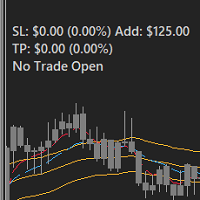
FEATURES: -Current total SL & TP -Allowed Risk per Trade -Maximum Daily Loss Alert -SL level to matc Risk per Trade
Input: MoneyOrPercent >> True=MoneyRisk, False=PercentRisk Money Risk per trade >> Fixed $$ per trade Percent of Account Balance per trade >> Fixed % of Account Balance per trade Max losing trades per day >> Max daily loss limit Font Type SL TP Label Positions SL TP Font Type and Size

Questo screener consente di identificare le risorse che sono più del solito ipercomprate (% di aumento) o ipervendute (% di caduta) entro un periodo di tempo selezionato (intervallo di tempo). Il mercato è regolato dalla legge, compra a meno, vendi di più, ma senza uno scanner automatico sarà molto difficile per te identificare valute/azioni che sono in ipercomprato o ipervenduto più del solito, diciamo, entro la settimana in corso, o l'attuale ora o mese. Possono essere decine o centinaia di s

Logica di lavoro
L'utilità Stop Out è un indicatore semplice ma molto comodo che mostra quanti punti sono rimasti al livello Stop Out /
Il suo vantaggio sta nel fatto che molti trader sopravvalutano deliberatamente il rischio nel trading in cerca di profitto, utilizzano al massimo il margine disponibile, e in questo caso è molto importante sapere dove il broker può forzare la chiusura delle proprie posizioni.
Basta posizionare l'indicatore sul grafico e, a seconda della posizione aperta in C
FREE

Utilità MetaTrader MTI (Main Trading Info) – mostra le informazioni di trading di base per un trader, vale a dire: dimensione media e attuale dello spread Scambia le dimensioni per posizioni corte e lunghe Costo di 1 pip per 1 lotto di trading Dimensione del livello di stop (distanza minima per effettuare ordini in sospeso) Tempo fino alla fine della sessione di trading corrente (rossa) e tempo fino all'inizio della sessione di trading successiva (grigia). Il tempo fino alla fine della sessione

This is a very simple yet useful tool to close positions with different conditions and methods. You can use panel buttons to close positions or set multiple rules to close all positions. Panel has two main tab, Active Order and Pending Orders:
Active Tab:
You can set profit or loss target to close all positions.
You can set equity target to close all positions,
You can set a special time to close all positions. Moreover, by panel buttons you can close only buy/sell positions or only negative/pos
FREE
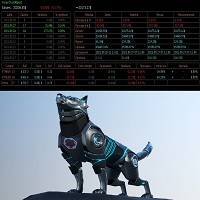
Советник основан на максимально быстром закрытие сделок от заданных параметров.Это можно так сказать разрульватель просадок.. У него встроено 3 окошка на панели.с полным мониторингом вашего терминала по всем парам. вы можите оценивать свои ситуации по разным парам. всегда можите любую ситуацию закрыть в ручную простым нажатием на экране по кнопке..
При наведении курсора мыши на ниже перечисленные столбцы, осуществляется подсветка поля: Бай профит Селл профит Прибыль Закрыть только "+" Закрыть

EasyTradePad – Pannello di trading per MetaTrader 4 EasyTradePad è uno strumento per il trading manuale e semi-automatico. Il pannello consente una rapida gestione di ordini e posizioni, nonché calcoli di gestione del rischio con un solo clic. Caratteristiche del pannello: Apri e chiudi le negoziazioni con rischio predefinito (% o valuta di deposito) Imposta SL e TP in punti, percentuali o valori monetari Calcola automaticamente il rapporto rischio/rendimento Sposta lo stop loss al pareggio C

Expert Advisor Risk Manager per MT4 è un programma molto importante e secondo me necessario per ogni trader.
Con questo Expert Advisor sarai in grado di controllare il rischio nel tuo conto di trading. Il controllo del rischio e del profitto può essere effettuato sia in termini monetari che in termini percentuali.
Affinché l'Expert Advisor funzioni, è sufficiente allegarlo al grafico della coppia di valute e impostare i valori di rischio accettabili nella valuta del deposito o in % del saldo

Questo script è progettato per valutare i pesi in varie funzioni della finestra. Un indicatore basato su queste funzioni della finestra può essere scaricato all'indirizzo https://www.mql5.com/ru/market/product/72160 Parametri di input: iPeriod – periodo indicatore. iPeriodo >= 2 iCenter è l'indice del riferimento in cui si troverà il centro della funzione finestra. Per impostazione predefinita, questo parametro è 0: il centro della finestra coincide con il centro dell'indicatore. Con 1 <= iCent
FREE

The panel has the most intuitive interface that every beginner can handle. In the SLp column – you need to specify the SL size in pips. If the value turns gray and at the same time the Bay / Sell buttons are also inactive, then you have specified a SL value that is less than that allowed before it was set by your broker. In the TP% column – you indicate TP in% of the account balance. In the settings, you can choose on the basis of what this indicator will be calculated, by equity, balance or
The EA opens and closes new orders on time. It can be used to implement trading scenarios of any complexity by creating a list of tasks. There are two options for completing the task The task is executed on the specified date and time - it is executed once and is removed from the list. The task is executed with repetition on the specified day of the week and time - the task with repetitions is not removed from the list. Panel settings Symbol - select the symbol for the trade function. Time -
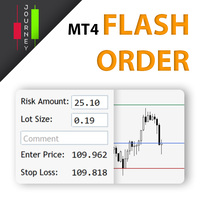
Trading has never been easier! Let's check this out! MT5 version: https://www.mql5.com/en/market/product/72120 The story: How I boost up my trading speed without any "Invalid SL or TP" error
NOW ALL YOU NEED TO DO IS Drag the lines Press Open Order button Enjoy! With this tool, you will no longer have to enter prices manually, which can cause many mistakes and you could miss the trade! From the board, we have: Risk Amount : the risk you want to apply for your trade Risk Unit : USD : If sele

A simple Utility Trading Tool for calculating your profits automatically.
once your orders are active, it calculates your profit or loss in pips value and displays it at the bottom right corner of the screen.
ADVANTAGES - shows order movement graphically - Helps you calculate profit and loss percentages per trade in each asset. - Shows progress of each trade - Easy trading - Helps you meet daily profit targets - Professional trading
FREE

The indicator shows support and resistance levels as horizontal lines. It shows the highs and lows of former days, weeks and month in every chart.
How to work with support and resistance levels show the EA Limit Scalper and the Universal Moving Average Expert Advisor (UniMA EA) .
When the tip of the coursor is on a line (mouseover) it shows the real value of the level and which high or low is shown, see explanation below.
The indicator must be installed like an expert advisor ! To se
FREE

Stop and Reverse Martingale EA is an expert advisor that integrates the following inputs within it: Start lot size Lot multiplier Take profit distance in points Take profit distance in points *this input is a stop loss, is misspelled within the code of the EA Magic number A and B Start cycle with round number The distance of round number Daily maximum orders per cycle and close all Daily loss (maximum orders per cycle when this last order hit the stop loss the EA close all orders in the same m
FREE

Strumento Multifunzionale: Calcolatore di Lotti, Ordini Grid, Rapporto R/R, Gestore Trade, Zone di Domanda e Offerta, Price Action e molto altro Versione Demo | Manuale utente L'Assistente di Trading non funziona nel tester di strategie: puoi scaricare la Versione Demo QUI per testare l' utilità . Contattami per qualsiasi domanda / idee di miglioramento / in caso di bug trovato Se hai bisogno di una versione MT5, è disponibile qui
Semplifica, accelera e automatizza il tuo processo di tradin
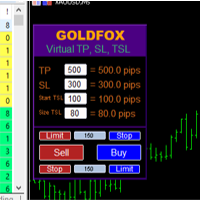
Forex Expert Advisor (utilità) "Virtual Stop Loss, Trailing Stop" consente di impostare uno stop loss virtuale (nascosto) e un trailing stop. Allo stesso tempo, senza utilizzare ordini stop loss e trailing stop standard. Pertanto, quando il consulente apre un'operazione, il tuo broker e il terminale Meta Trader non vedranno né imposteranno lo stop loss o il trailing stop, ma il consulente controllerà i parametri del TP SL TSL specificato e traccerà le linee corrispondenti sul grafico. ... Quand

Account Info Manager (AIM) is a utility designed to view information on the results of the work of advisors on a trading account. The utility can group orders by their magics or comments, thereby making it possible to analyze separately the results of the work of each Expert Advisor that traded on the account. Using this utility, you can view information on the number of orders opened by the advisor, percentage of winning orders, profit value, profit factor, average order size, maximum drawdo
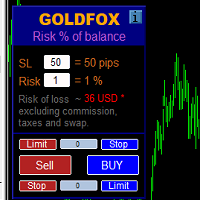
Automatic calculation of a trading lot taking into account Stop Loss (in pips) and the percentage of risk from the account balance. The Expert Advisor panel is located on the chart at the top left. On the panel of the advisor, you can select the size of the stop loss in pips and the percentage of risk from the balance. You can set the deviation from the current price in pips for pending orders. The red color indicates the amount in the deposit currency that you can lose when the stop loss is

Se ti piace questo progetto, lascia una recensione a 5 stelle. Questo indicatore disegna un orologio di conto alla rovescia compatto del tempo
di rimaning per il
candela da chiudere e: Può essere posizionato su qualsiasi angolo del grafico; Tempi multipli; È possibile aggiungerlo a una finestra di indicatore trascinandolo dal
navigatore MT5. Colore diverso quando la candela ha 10 secondi per chiudere. Colori personalizzabili per una migliore integrazione con il grafico.
FREE
Mostra le informazioni di mercato attuali con aggiornamento al secondo. Dimensione dello spread; Dimensione dello swap: per posizioni corte e lunghe; Facoltativamente, puoi attivare la visualizzazione dell'ora corrente; Utility multifunzione : 66+ funzioni, inclusa questo strumento | Contattami se hai domande | Versione MT5 Nelle impostazioni dell'indicatore, puoi configurare: Dimensione del carattere; Colore del testo; Selezionare il posizionamento: angolo sinistro/destro del grafico; A
FREE

Time saving and fast execution Whether you’re traveling or sleeping, always know that Telegram To Mt4 performs the trades for you. In other words, Our Telegram MT4 Signal Trader will analyze the trading signals you receive on your selected Telegram channels and execute them to your Telegram to MT4 account. Reduce The Risk
Telegram To Mt4 defines the whole experience of copying signals from Telegram signal copier to mt4 platforms. Users not only can follow all instructions from the signa

FXTHORA SEMI-AUTOMATED FOREX TRADING ROBOT - ADVANCED SEMI-AUTOMATED TRADING ASSISTANT FOR ALL CONDITIONS.
It's a semi-automated Forex trading assistant that helps the trader buy or sell the market, based on the trader's initial analysis, and identification of the market direction or trend. This system requires help from the trader to actually identify the direction of the market. After the direction of the market or trend has been determined by the trader, the robot trades the market in the d
FREE

Rendi visibili gli scambi. Hai mai analizzato gli scambi nel Tester di Strategie di MT4 o nella Visualizzazione dei Segnali sul grafico?
Se la risposta è "Sì", allora sai quanto siano poco visibili le linee degli scambi.
La soluzione è l’utility “Visible Deals” .
L’utility “Visible Deals” ti permette di rendere le linee degli scambi più spesse o addirittura di cambiarne il colore.
Basta trascinare “Visible Deals” sul grafico e regolare i nuovi formati delle linee.
FREE

VSAsGradient это утилита предназначена компенсировать ограниченные возможности оформления рабочей области терминала МТ4. Позволяет задать цвет окон графика (индикатора) в виде цветового градиента, установить классические обои или фотографию любимой девушки, семьи. Предварительных настроек, которые имеют значение только две: Set Gradients- выбераем насколько настройки будут индивидуальны. Default Set- только для данного типа инструмента. Individual Set- инструмент+ период графика. Hide Panel- сво

What is a tool ? Used for monitoring profit by magic number, From parameter magic number and profit target. The tool will automatically close orders to the same magic number. When your profits meet the target set. How to use Place the tool on any pair any timeframe and set input your parameter. Pair : Any Timeframe : Any Input Parameter Magic Number (0 for manual order) Meaning : Input your magic number here, Set 0 for manual order. Summary profit of this magic number ($) Meaning :
FREE

Posh Sessions is indicator which displays sessions in broker time or your local time. You can set up to 5 sessions, assign name, start time, end time and color of each session. There is session's range to help you make a chart analysis.
Settings for a session: Show: To show or not the session on chart Title: The title/name of the session Timezone: Select between broker or local time to implement the session's period Start time: The session start time End time: The session end time Colo
FREE

News Filter EA that send you a Push notification to your MT4 phone APP and TURN OFF MT4 Automatically Before News. This EA doesn't work in backtest From 1.7 version the EA have Close all trades before news functions added.
You only need to allow that url in MT4 options: To see the url and how to add it to MT4, visit this post:
https://www.mql5.com/en/blogs/post/754402
When Metatrader is turned off, it saves the status of all the charts, indicators and Expert Advisors that you have in them

DLT (Display Local Time) is an INDICATOR which displays local time using GMT timezone that can be easily switched. Support non standard timezones eg. -3:30, +4:45 Useful when you trade in your local market hours, or to evaluate candles in different time zone. This is for MT4 version. For MT5 version click here: https://www.mql5.com/en/market/product/71656 There is very useful info for candle: Range, Upperwick, Body, Lowerwick. You can get this when custom crosshair is enabled. Sessions will

This is a panel dedicated to closing positions.
In trading, we often have the need to close all current orders, or close the positions by category.
But sometimes the type of order, the quantity of the order, and the messiness of the order make it difficult for us to sort out in a short time.
And trading opportunities are fleeting, and in just a few seconds, there may be uncertain results.
So we need a small tool specifically for closing positions.
You can close long positions, short positio
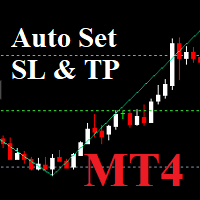
Auto SLTP Maker MT4 is an assistant for all those who forget to set Stop Loss and Take Profit in deal parameters, or trade on a very fast market and fail to place them in time. This tool automatically tracks trades without Stop Loss and Take Profit and checks what level should be set in accordance with the settings. Input Parameters: Set Take Profit: True is On. Take Profit points: Number Point. Set Stop Loss: True is On. Stop Loss points: Number Point.
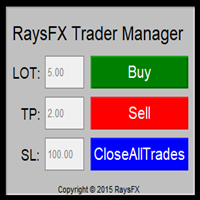
Questa utility di base non agisce in automatico, ma supporterà il trader, ti aiuterà nella gestione dei lotti tramite:
possibilità di impostare la size possibilità di impostare TP e SL (in pip) Consiglio: Questo EA ti aiuterà nella gestione dei tuoi ordini ed è ottimo abbinarlo a delgi indicatori (trovate nel nostro store molti indicatori utili, fra cui il RaysFX Strategy )

Show the account information on the chart, change the color automatically depending on the background, it adjusts to each chart and is updated every time the price moves a tick, that's why it is an expert advisor even if it is used as an indicator. Cannot change size.
You can see my other products here: https://www.mql5.com/en/users/joaquinmetayer/seller
FREE

Close All Pendings is a simple script that, when thrown on the graph, closes all pending orders that are open, ONLY pending orders, orders already open will not be closed, no matter in which pair it is thrown ... it will close all. It has no inputs, just throw it on the chart and it will run.
You can see more of my products here: https://www.mql5.com/en/users/joaquinmetayer/seller
FREE

Let us increase your profit and decrease your loss. One of the most important part of trading is choosing correct lot size. With this expert you needn’t to calculate your lot size because it’ll pick the best lot size automatically based on your trading performance, initial deposit, reward to risk ratio and your psychological risk acceptance. By using this expert, you protect your account against margin call and makes it to have minimum loss and minimum drawdown on each position which makes your

Simple buy and sell buttons to execute orders instant with automatically stop loss and take profit levels.
Stop loss and Take profit- levels can be changed in settings. Free version, only for US30- market.
Feel free to send direct message for improvements or other ideas..
---------------------- Payed version comming soon (for all markets/ timeframes).
FREE

" Trader Evolution " - A utility designed for traders who use wave and technical analysis in their work. One tab of the utility is capable of money management and opening orders, and the other can help in making Elliott wave and technical analysis.
Manual (Be sure to read before purchasing) | Version for MT5
Advantages
1. Trading in a few clicks. Immediate and pending orders are available in the panel
2. Money management. The program automatically selects the appropriate lot size
3. Simplifies

This tool will perform Trailing stop loss and Break even management for orders. Helps you limit or reduce the time spend watching orders on the screen, especially when you need to go to sleep. Just add this EA to 1 chart, you can manage all pairs. You can filter orders by comment, magic number, symbol, and order ticket number. When Breakeven it can add shift/offset pips (to cover the commission...).
You can try in strategy tester before purchase. The EA will add Buy and Sell alternately, so yo

What is a tool ? Used for monitoring profit summary in your portfolio, by setting profit target. The tool will automatically close all open orders. When the profits meet the target set. How to use Place the tool on any currency pair, any timeframe and set profit target. Easy... Currency Pair : Any Timeframe : Any Input Parameter Summary profit for auto close all orders ($) Meaning : Input your profit target here. Visit my products Target Profit Magic Target Profit All The Profit Tracker Currenc
FREE

This Expert Advisor must be placed on a second graph; placing on a second chart it will automatically modify your orders placed without StopLoss and TakeProfit. Editable parameter; updates will be available shortly to improve its efficiency. It only has two editable entries in its parameter: (Stoploss and Takeprofit). A trailing stop function will soon be added to it.

What is a tool ? Tracking your profit from the present - the past 30 days, Presented profit summary and movement is greater or less than 0 only. notice : must select show all history at account history tab. How to use Place the tool on any currency pair, any timeframe and set magic number to track your profits. Currency Pair : Any Timeframe : Any Input Parameter Track from Magic number (Manual order set 0) Meaning : Input the magic number to tracking the profit from present - the past 3
FREE

Description: - BidAskLine Indicator is very simple and easy, but each utility can be important in the probability that we will win in our trade. This utility Indicator shows lines and prices of the Bid, Ask and Spread. Input Parameters: - Visual Aspect Options : Select between 2 options with Box or Simple Style. - Parameters Bid Price : Select between show or hide line or box objects, change color, style or width line. - Parameters Ask Price : Select between show or hide line or
FREE

A Boleta Profit é a solução completa e ideal de controle de ordens visualmente pelo gráfico.
Com a Boleta Profit você pode:
- Criar estratégias - Definir ordens OCO - Definir lotes por estratégia - Definir gain / take profit em ticks por estratégia - Definir gain / take profit em moeda base da conta por estratégia - Definir gain / take profit em percentual do saldo da conta por estratégia - Definir loss / stop loss em ticks por estratégia - Definir loss / stop loss em moeda base da conta por

Possibilities: Provides the opening of an order with a specified% risk of the deposit Automatic calculation of lot and other parameters of a trade for a given% risk, StopLoss and TakeProfit levels Transaction support. You can accompany an order opened by another robot. It is possible to transfer the order to breakeven and carry out a step trailing profit Graphic information panel, can be converted into a minimalistic look. Displays information about the current spread, swap, deposit load, profit

Investment Castle Panel — Your Trades, At a Glance
The Panel puts the numbers that matter right on your chart: floating profit and loss, drawdown and more — for manual trades and for any Expert Advisor. A clean, movable dashboard so you always know exactly where you stand.
What it does for you Live P/L on the chart: floating profit/loss for the current symbol, for both buy and sell orders, in your base currency and in pips. Max drawdown at a glance: keep an eye on risk without digging through
FREE

You can always keep the market variation under control by setting the time frame you prefer.
Once applied to a chart, such as EUR/USD or SP500, we can choose different parameters for our utility. The parameters that can be set are:
back_periods_1 back_periods_2 years_back align
by default these parameters are set to 30, 120, 0, left.
THE FIRST TWO PARAMETERS(1, 2): Allow you to set the two time periods that refer to the chart, so if we have set the parameters as default, that is 30 and 120

#1 Copy Signals from Signals Copier Telegram to MT4 & Never miss a trade again Time saving and fast execution Whether you’re traveling or sleeping, always know that Telegram To Mt4 performs the trades for you. In other words, Our Telegram MT4 Signal Trader will analyze the trading signals you receive on your selected Telegram channels and execute them to your Telegram to MT4 account. Reduce The Risk Telegram To Mt4 defines the whole experience of copying signals from Telegram signal copi
FREE

This tool will allow you to export MetaTrader indicators data (Buffers) for any financial instrument present in your MetaTrader 4. You can download multiple Symbols and Timeframes in the same csv file. Also, you can schedule the frequency of download (every minute, 5 minutes, 60 minutes, etc.). No need to open a lot of charts in order to get the last data, the tool will download the data directly. The CSV File will be stored in the folder: \MQL4\Files . MetaTrader 5 version : https://www.
FREE
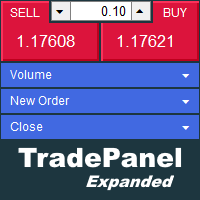
The trade panel supports discretionary traders in trading. Panel Description The windows can be opened and closed and moved. Expert Advisor Input Magic: - Unique ID, is necessary if you use several Expert Advisors (EA) One Click Trading Button The buttons work in a similar way to "One Click Trading" in Metatrader.
The values in the volume edit can be set individually for each instrument and remain saved even after changing charts or restarting Metatrader.
Caution! Check which volume is set befo

This is a utility that helps you close market orders and pending orders (optional), using keyboard shortcuts. For me, it's more convenient and faster than clicking a button on the chart. You can set: Keyboard Shortcut Hotkey: You can change and use most of the keys on the keyboard.
Key combination (Ctrl, Shift) also available in case you want to use (Note that not all combinations work). Magic Number Symbol: All Symbol, or Current Chart Symbol, or Select Symbol List Close Pending order

Evon is a great way of utility and performing well in the forex markets and giving us an unpredictable profits.Evon works on a different strategy of comparison model and it also helps us predict the market movement and takes the perfect entry and exit of the market. default settings EURUSD CHART AUTO LOT:ENABLE AUTO LOT:0.001 PAIRS TO COMPARE:EURJPY PAIRS TO COMPARE:USDJPY

Size Calculator allow you to calculate the size you need for your position giving two parametres: the number of pips risked and the money risked, for example if you want to risk 20 USD on 200 pips, then you will need to input 200 in the case reserved for pips and 20 in the case reserved for risk, the size will appear in left top carner of the chart in your metatrader 4 platform, Size Calculator support the following symbols : EURUSD GBPUSD AUDUSD NZDUSD GOLD WTI EURJPY GBPJPY USDJPY AUDJPY C

If you can not create a background image for yourself (photo size and format must be changed), let me know. I make your photo for free. Otherwise, you can read the help file . A tool for chart management You can change the background image You can change the background color Change the color of the candles Volume colors, line charts and everything else You can also enable and disable some items Read the help file for more information
Settings:
Save Changes After Remove Tool
Back Ground Photo
FREE
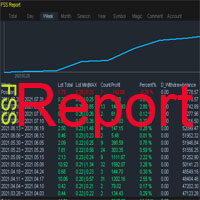
This is a professional report statistical indicator, which can be counted by day, week, month, quarter, year, magic and comment, and display the growth curve.
install: select "File" in your MT4 client,and open the folder "MQL4\indicators",then copy file "FSS_Report.ex4",reload MT4 and enjoy.
Para List: UI_XY_Setting=21 UI_X_default=0 UI_Y_default=21 custom_title=FSS Report UI_reload_time_interval=5 report_time_from=0 report_time_to=0 filter_demo=____________symool, magic and comment, all supp
Sai perché MetaTrader Market è il posto migliore per vendere strategie di trading e indicatori tecnici? Non c'è bisogno di pubblicità o di protezione del software, nessun problema di pagamento. Tutto ciò è fornito da MetaTrader Market.

Ti stai perdendo delle opportunità di trading:
- App di trading gratuite
- Oltre 8.000 segnali per il copy trading
- Notizie economiche per esplorare i mercati finanziari
Registrazione
Accedi
Accetti la politica del sito e le condizioni d’uso
Se non hai un account, registrati