Tradecap Brake
- Utilitaires
-
AL MOOSAWI ABDULLAH JAFFER BAQER
 To trade successfully we need to go through the proven path that others had gone and reached!
Here are 17 quotes from such successful investors:
1- Limit your size in any position so that fear does not become the prevailing instinct guiding your judgment.
Joe Vidich - Version: 1.0
- Activations: 5
SIX TRADES A DAY WAS THE PLAN. TRADE NUMBER SEVEN IS CLOSED WITHIN A SECOND.
Tradecap Brake is a max trades per day limiter for MetaTrader 5: a daily trade quota, an open position cap and an overtrading guard for manual trades and other Expert Advisors. Every new entry is counted from the account history; a trade over your quota, or over your limit of open positions, is closed at once. Only trades opened after you attached the brake are ever closed: positions from earlier stay exactly as they are.
Built for traders who know their best work happens in the first few trades of the day and their worst in the revenge trades after them: the seventh entry after two losses, the fourth position stacked on a news spike, the copier that suddenly opens twenty trades. One promise: the day ends at the number you chose. Counting rule: every entry deal in scope (a new position, or an addition on a netting account) is one trade; the count starts again at the reset hour you choose; trades you close yourself still count.
From the Strategy Tester log (EURUSD, 1 June 2026, defaults): the quota of 6 was reached at 12:00; the demo then opened a trade every hour, and trades 7, 8, 9, 10 and 11 were each closed in the same second they opened, with the line "trade 7 of a quota of 6" in the journal.
Works with: manual trades, other Expert Advisors and trade copiers on the same terminal (symbol scope and magic filter decide which trades are counted), hedging and netting accounts, every symbol (forex, gold, indices, crypto), and prop-firm style daily rules. It never opens a trade on your account and never changes a stop loss or take profit.
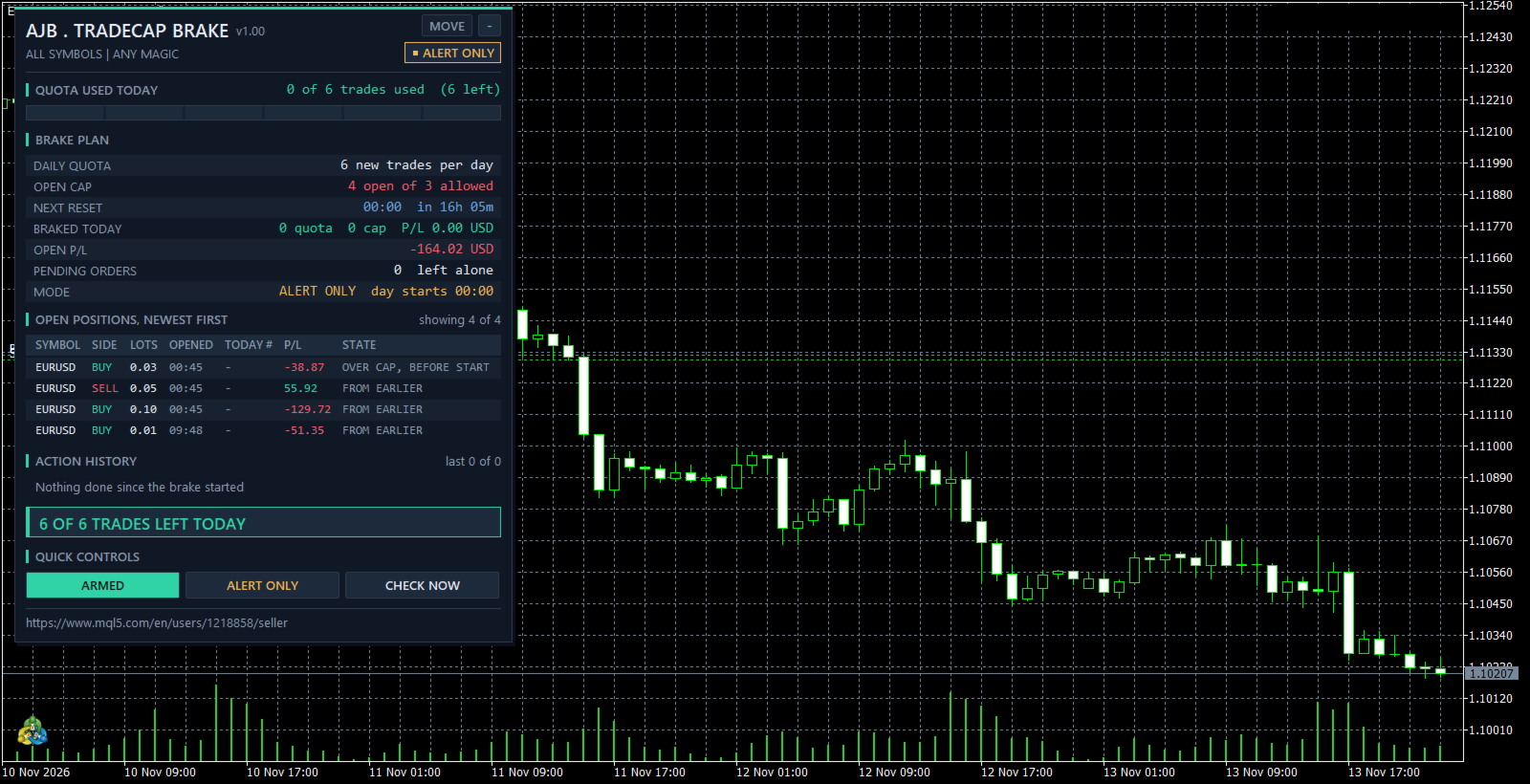
Try it free first: run Tradecap Brake in the Strategy Tester with visual mode on. There it opens one small demo trade per hour from 07 to 18, so you can watch the QUOTA USED TODAY slots fill, turn amber at the limit and the extra trades being closed.
Who this is NOT for: scalpers who take fifty trades a day by design, grid and martingale users whose EA must add positions freely (exclude it with the magic filter), and traders looking for an entry robot.
A worked example (default settings)
Daily quota 6, open cap 3, day starts 00:00 server time. Trades 1 to 3 open between 07:00 and 09:00. At 10:00 a fourth position opens while the first three are still running: four open of three allowed, so the newest one is closed (CAP CUT). By 12:00 six trades were made today: the panel shows QUOTA FULL and the banner QUOTA USED UP - NEW TRADES CLOSE UNTIL 00:00. At 13:00 a seventh trade opens and is closed at once (BRAKED). At 00:00 the count starts again at 0 of 6.
In short
- Daily trade quota: how many new trades a day are allowed (0 = no quota).
- Open position cap: how many positions may be open at the same time (0 = no cap); the newest ones above the cap are closed.
- Your own day: reset hour in server time, so the day can start with your session.
- Optional: remove pending orders while the daily quota is used up, so no order can fill behind your back.
- Only trades opened after the brake was attached are closed; on a netting account only the added volume is cut.
- Alert-only mode: one alert per trade over the limit, nothing sent.
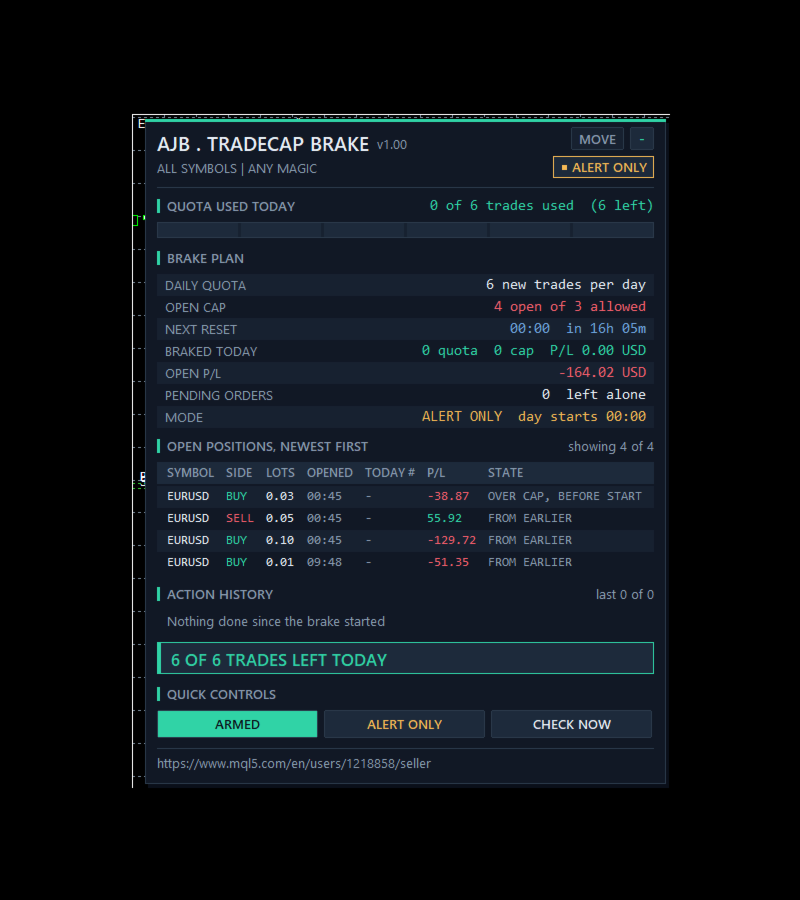
- Panel with real trading data: QUOTA USED TODAY slots, open cap, next reset countdown, what was braked today with its profit or loss, and every open position with its number of the day.
- Not a grid, no martingale, no DLLs, no web requests.
- Tester numbers (June 2026, EURUSD H1, defaults): 231 demo trades, 105 closed over the quota, 28 cut over the open cap, 0 failed sends, 0 journal errors.
START HERE
Attach it to one chart, for example EURUSD H1. One copy counts every symbol of the account unless you limit it. Set your daily quota, your open cap and the hour your trading day starts. Turn on Algo Trading and watch the position table: IN QUOTA, FROM EARLIER, BRAKING, CAP CUT. To watch first, switch to ALERT ONLY with the panel button.
How one trade is handled
Counting. On every pass the brake reads today's deal history and numbers every entry deal in scope, oldest first.
Over the quota. An open position whose entry is number 7 of a quota of 6 is closed at market with the slippage you allow.
Over the open cap. When more positions are open than allowed, the newest ones above the cap are closed.
From earlier. A position opened before the brake was attached, or before today, is shown and counted for the cap, but never closed: its state reads OVER, BEFORE START or FROM EARLIER.
Market closed. Nothing is sent while the symbol session is closed or the quote is stale; the state shows MARKET SHUT and it is tried again when trading opens.
Safety patterns inside
Before any close it checks that Algo Trading is allowed, that the symbol session is open and that the last quote is no older than 5 minutes. Right before each close the position is selected again and its symbol, magic and position id are compared with the plan, so a different position is never closed by mistake. A refused close is retried with a growing pause up to 2 minutes and a different filling type, with one alert after a set number of failures. Which trades it already handled is kept in GlobalVariables whose keys contain the chart symbol, the magic filter and the magic number, so two copies never share a key and a restart does not close the same trade twice.
Inputs, every one explained
TRADE QUOTA
InpMode = 1. 0 alert only, 1 brake (close trades over the limit).
InpMaxTradesDay = 6. New trades allowed per day; 0 = no daily quota.
InpMaxOpen = 3. Positions allowed open at the same time; 0 = no cap.
InpResetHour = 0. Hour the trading day starts, server time, 0 to 23.
InpDeletePending = false. Remove pending orders in scope while the daily quota is used up.
EXECUTION
InpSlippagePts = 30. Allowed slippage for a brake close, in points.
InpFailAlertAt = 3. One alert after this many failed attempts.
FILTER - WHICH TRADES ARE COUNTED
InpSymbolScope = all symbols or the chart symbol only. InpMagicFilter = any magic, only manual trades (magic 0), or only the magic number InpMagic.
ALERTS
InpAlertPopup = true. InpAlertPush = false (push to the MetaTrader app on your phone).
PANEL
ShowPanel = true. PanelX = 12, PanelY = 15, PanelFontSize = 9, MaxTableRows = 6, MaxHistoryRows = 4. The MOVE button drags the panel; on a short chart it drops its least important rows first.
STRATEGY TESTER DEMO
InpTesterDemo = true. Strategy Tester only: Monday to Friday 07 to 18 one demo trade per hour with a stop 1.5 ATR and a take profit 2 ATR away, at most 5 open, margin checked x 1.5, closed after 1 day, stopped after a 20 percent balance loss. This code never runs on a live or demo chart.
The panel
QUOTA USED TODAY: one slot per allowed trade, teal while trades are left, amber when the quota is full, red slots for trades over it. BRAKE PLAN: daily quota, open positions against the cap, next reset with a countdown, trades braked today with their profit or loss, open profit, pending orders, mode, last action, Algo Trading, failed sends and totals. OPEN POSITIONS, NEWEST FIRST: symbol, side, lots, opening time, number of the day (for example 7/6), profit and state, with a red edge on rows over the limit. ACTION HISTORY lists every close with server time. QUICK CONTROLS: ARMED or PAUSED, the mode button and CHECK NOW. The right side of the chart stays clear.
Common questions
Does it open trades by itself? No. On a live or demo chart it only closes trades over your limits. Demo trades exist only inside the Strategy Tester.
Does a trade I closed myself still count? Yes. Every entry of the day counts, open or closed, so closing and reopening does not reset the quota.
Will it close my trades from yesterday? Never. Only trades opened after the brake was attached can be closed.
What happens after a restart? The count is read again from the account history and handled trades are remembered in GlobalVariables, so nothing is counted twice.
What it cannot do
It cannot stop the broker from filling an order: the extra trade is opened and then closed, so you pay its spread and commission. For no fill at all, also turn on InpDeletePending and keep your own discipline on market orders. It only works while it runs: keep the terminal on, for example on a VPS.
What was and was not tested
Tested in the Strategy Tester on a hedging account, 1 to 30 June 2026, 1-minute OHLC, H1, deposit 10000, leverage 100, with no journal error and no failed send. EURUSD defaults: 231 demo trades, 105 closed over the quota of 6, 28 cut over the open cap of 3. XAUUSD alert only with a quota of 4 and no cap: 185 demo trades, 101 alerts, nothing sent. On a demo chart the panel ran in alert-only mode beside 4 EURUSD positions from earlier on a closed market and left them untouched.
Not tested at the time of writing: real closes on a live or demo broker, a netting account, retries after a broker refusal, pending order removal, chart symbol scope, magic filters, pop-up and push alerts and a terminal restart. These paths exist in the code and are described by design. Please try them on a demo account with your own broker first.
Try it in the Strategy Tester
Choose Tradecap Brake, EURUSD or XAUUSD, H1, any recent month, visual mode, and press Start. Watch the quota slots fill and the seventh trade of the day close.
If the brake stopped a day from running away, or you think it should count a case differently, an honest review on the product page helps other traders decide and tells me what to improve next.