Trade Odds Pro

Trade Odds Pro tells you, before you enter, how often the same trade reached Take Profit before Stop Loss in the history of your symbol.

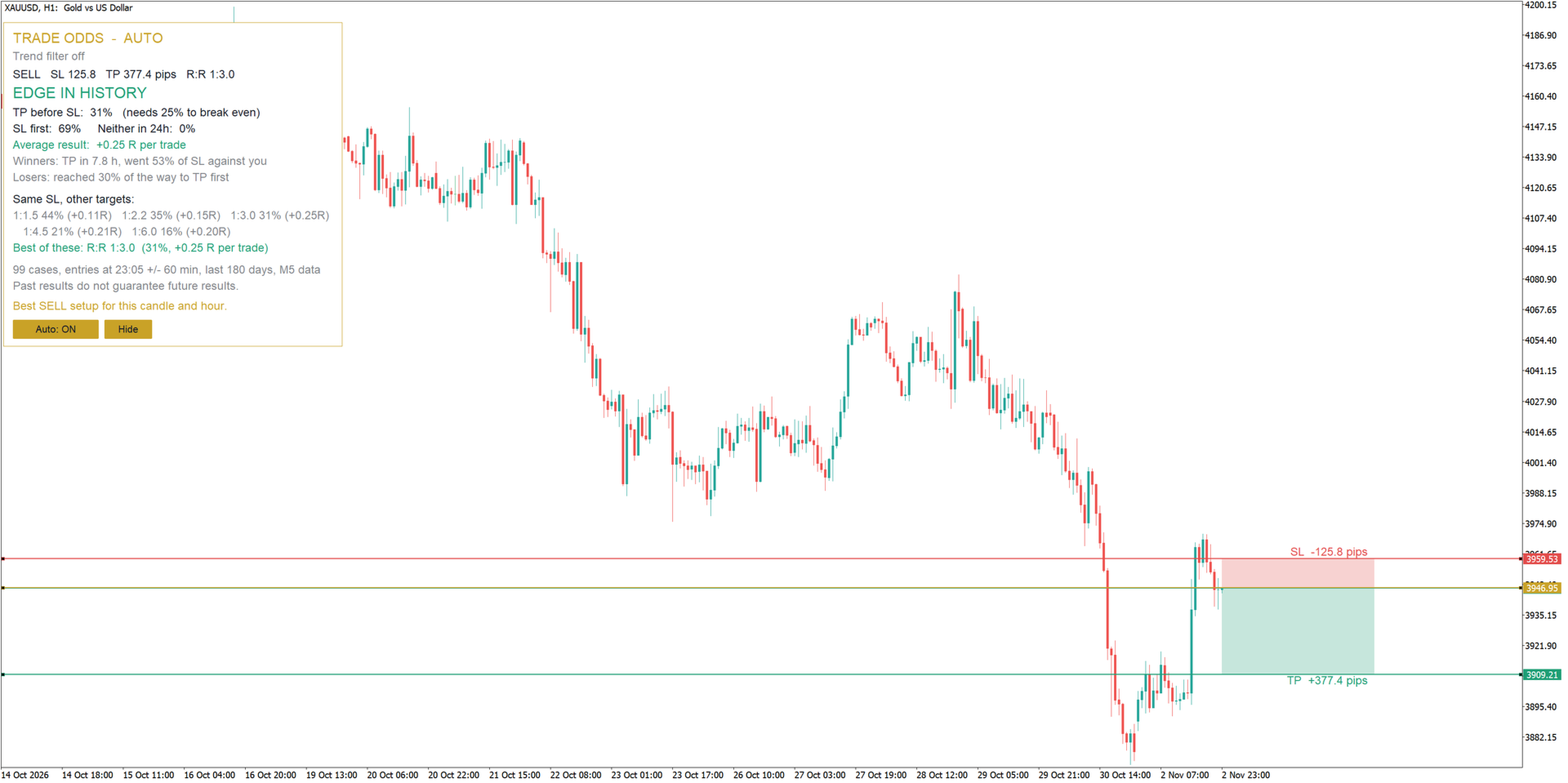
Every trader asks the same questions before a trade: is my stop too tight, is my target realistic, does this setup work at this time of day? Trade Odds Pro answers them with data instead of feeling. Place three lines on the chart - Entry, Stop Loss and Take Profit - and the indicator replays exactly this trade on hundreds or thousands of past entries at the same hour. The result appears instantly in a clear panel: win rate, break-even win rate, average result in R and a simple verdict.

In Auto mode Trade Odds Pro goes one step further. On every new candle it reads the trend, tests 36 combinations of stop size and risk to reward in the trend direction, and draws the setup with the best historical result directly on your chart.

WHAT YOU SEE IN THE PANEL

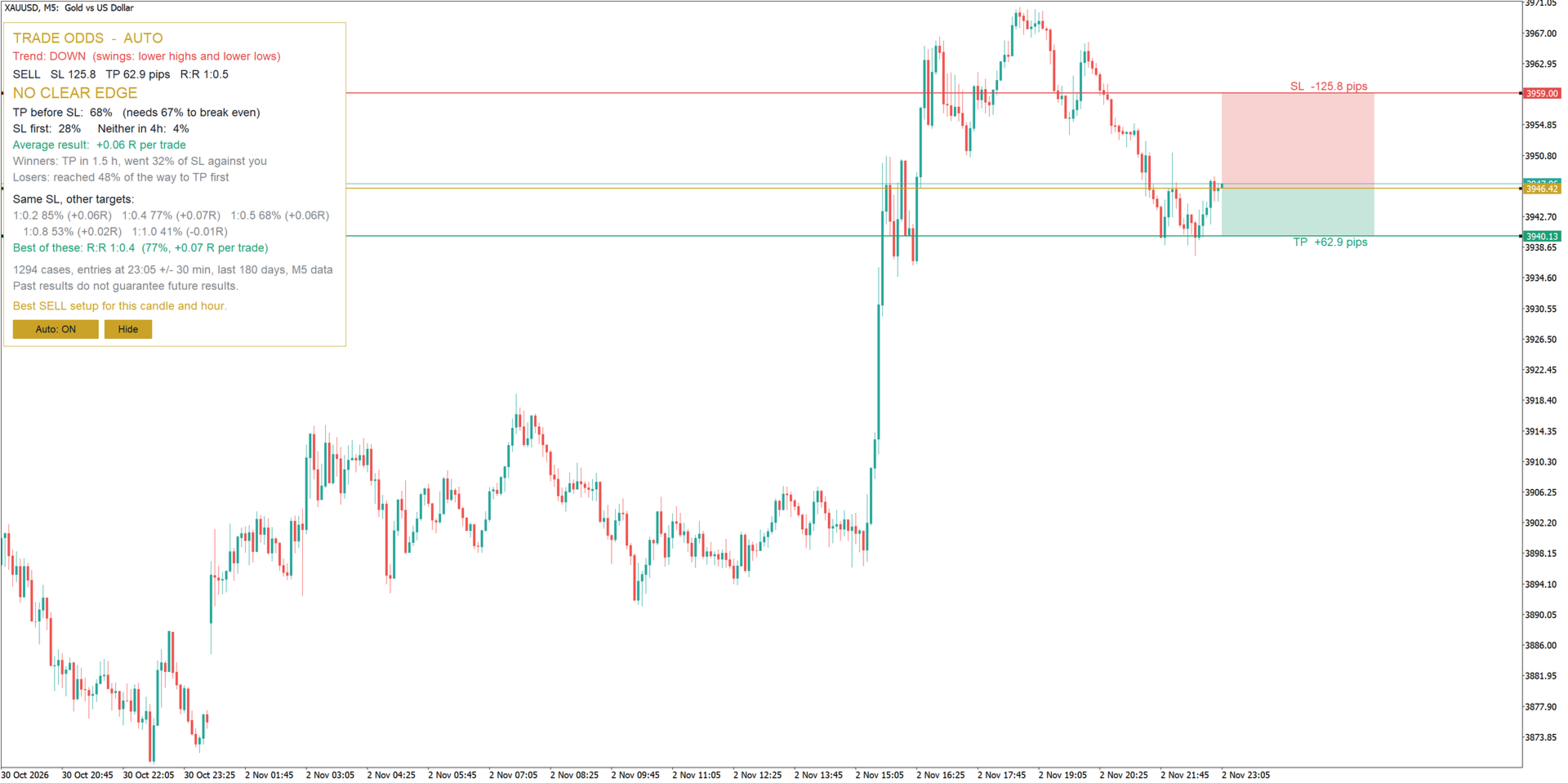
- Verdict: EDGE IN HISTORY, NO CLEAR EDGE, HISTORY IS AGAINST IT, or TOO FEW CASES when the sample is too small to trust.
- Take Profit before Stop Loss (%) compared with the win rate you need to break even at your risk to reward.
- Stop Loss first (%) and trades that reached neither level within the holding time.
- Average result in R per trade.
- Winners: average time to Take Profit and how far they moved against you first.
- Losers: how close they came to Take Profit before stopping out.
- What if: the same Stop Loss tested with five other targets, with the best one highlighted.
- Number of cases, time window, history length and data used, so you always know what the numbers are based on.

AUTO MODE AND TREND FILTER

- The best Buy or Sell setup is found and drawn automatically on every new candle. No buttons to press.
- Trades are suggested only in the direction of the trend.
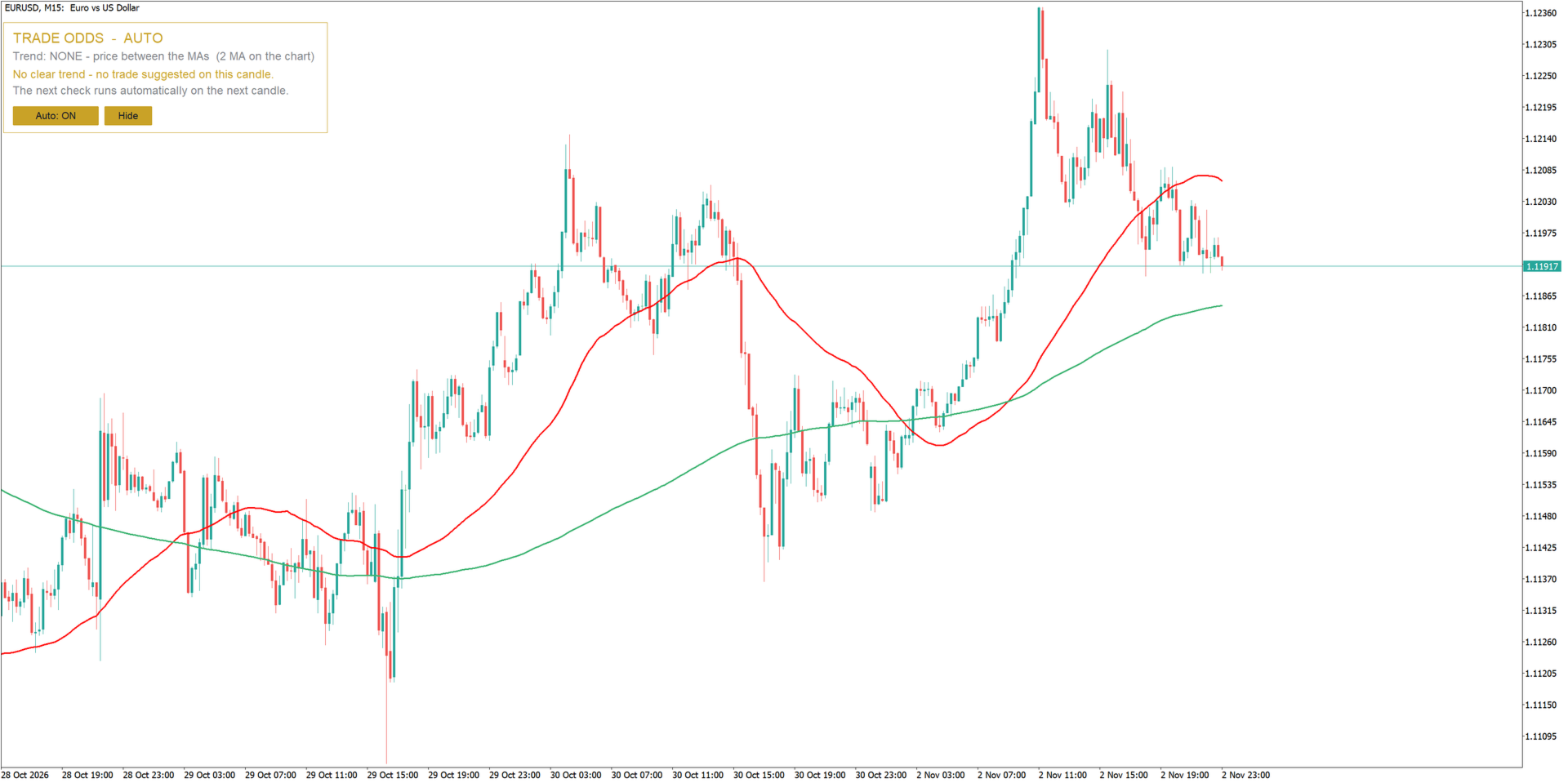
- The trend is read from the moving averages already on your chart - any period, any type. Use your own MAs and the indicator follows them.
- Without moving averages, the trend comes from market structure: higher highs and higher lows, or lower highs and lower lows.
- When the trend is unclear, no trade is suggested. The indicator simply waits for the next candle.
- The filter can be switched off to test both directions.

FULL MANUAL CONTROL

- Drag the Entry, Stop Loss or Take Profit line and the statistics update instantly.
- Drag the shaded Take Profit or Stop Loss zone to move the whole trade, or a corner to move one level.
- Stop Loss and Take Profit size in pips is shown next to the zones.
- Moving anything by hand pauses Auto mode; one click on "Auto: ON" brings it back.
- An open position with SL and TP on the symbol can be tested directly.

HOW THE TEST WORKS

For each past candle at the same time of day (+/- a time window) a virtual trade is opened with the same distances to Stop Loss and Take Profit as on your chart. The trade is followed candle by candle on M5 data (M1 on an M1 chart) until Take Profit or Stop Loss is reached, or until the maximum holding time ends. The current spread is included, weekend holds can be skipped, and when both levels are touched in the same candle the conservative assumption - Stop Loss first - is used by default.

History length, time window and holding time adapt automatically to the chart timeframe: from short scalps on M1 to trades lasting several days on H4. Every value can also be set manually.

RECOMMENDATIONS

- Symbols: forex pairs, gold (XAUUSD), indices.
- Timeframes: all; designed for intraday trading on M1 to H1.
- Works on any account type. No DLL, no external connections. The indicator never opens, modifies or closes trades.

INPUT PARAMETERS

History
- History to test in days - 0 = automatic for the timeframe (default 0).
- Which past entries to test - same time of day or any time of day (default: same time of day).
- Time window +/- in minutes - 0 = automatic (default 0).
- Maximum holding time in hours - 0 = automatic (default 0).
- Skip entries that would hold over the weekend (default true).
- When SL and TP are hit in the same bar - Stop Loss first or skip the case (default: Stop Loss first).
- Include the current spread (default true).

Lines
- Default SL distance, x ATR 14 (default 1.0).
- Default TP distance, x SL (default 2.0).
- Use SL/TP of an open position on this symbol (default true).
- Find the best SL/TP when the timeframe changes (default true).

Automatic setup
- Find the best setup automatically on every new candle (default true).
- Trend source - Auto (moving averages on the chart, otherwise swing highs and lows), Moving averages, Swing highs and lows, or No trend filter (default: Auto).
- Swing strength - bars on each side of a high or low (default 3).
- Bars to search for swing highs and lows (default 300).

Panel and colours
- Panel position from the right and from the top (default 12 / 30).
- Font size (default 9), panel background (default true), shaded zones (default true).
- Text, accent, positive and negative result colours; Entry, Stop Loss and Take Profit line colours.

Zones
- Take Profit and Stop Loss zone colours (default: from the line colours).
- Zone colour strength, 5-100 % (default 25).
- Zone length in bars to the right (default 25).
Plus de l'auteur
Trend Pulse Pro V2
Wojciech Jerzy Magda
MTF MA Dashboard Pro v1.04 - Analyseur Professionnel de Moyennes Mobiles Multi-Timeframe ​Indicateur technique avancé pour MT5 fournissant une analyse complète des moyennes mobiles sur plusieurs unités de temps, avec détection intelligente des Golden/Death Cross et un tableau de bord visuel entièrement personnalisable. ​Arrêtez de changer d'unité de temps ! Analysez jusqu'à 4 timeframes simultanément et repérez instantanément les alignements de tendance. ​ CARACTÉRISTIQUES CLÉS ​ ANALYSE
FREE
Engulfing Pattern EA v6
Wojciech Jerzy Magda
Engulfing Pattern EA v7 - Français Engulfing Pattern EA v7 est un système de trading entièrement automatisé pour MetaTrader 4 qui combine la reconnaissance classique du pattern de bougie Englobante avec une analyse technique avancée et un système de filtres multicouche. Le robot est conçu avec une flexibilité maximale — 43 paramètres configurables vous permettent de personnaliser chaque aspect de la stratégie selon votre style de trading, instrument et conditions de marché. Paire Recommandée : U
MTF MADashboard Pro
Wojciech Jerzy Magda
MTF MA Dashboard Pro v1.04 - Français MTF MA Dashboard Pro v1.04 - Analyseur Professionnel de Moyennes Mobiles Multi-Timeframe Indicateur technique avancé pour MT5 fournissant une analyse complète des moyennes mobiles multi-timeframe avec détection intelligente de Croix Dorée/Croix de la Mort et tableau de bord visuel entièrement personnalisable. Arrêtez de basculer entre les timeframes ! Analysez jusqu'à 4 timeframes simultanément et repérez les alignements de tendance instantanément. FONCT
​ ️️️CandleIntelligence MTF MA Combined Pro v3.22 ️️️ - Professional Japanese Candlestick Analysis System What Is This Indicator? CandleIntelligence MTF MA Combined Pro is an advanced educational tool combining candlestick pattern analysis with Moving Average context across multiple timeframes. The indicator recognizes 11 key Japanese candlestick formations and presents them in the context of market trend, Swing High/Low levels, and position relative to moving averages. Main Features
Engulfing V8 PRO
Wojciech Jerzy Magda
​              ️️️  Engulfing V8 PRO️️️ V8 is an advanced trading system created for traders who prioritize stability and safety over risky strategies. The algorithm is not a "black box" – it is built upon the classic, decades-proven Price Action pattern: Bullish and Bearish Engulfing. Unlike simple indicators, this EA utilizes Multi-Timeframe (MTF) logic. The entry signal is generated on a lower timeframe (e.g., M30) but is filtered by the trend from a higher timeframe (e.g., H4). Thanks
PriceActionScalper
Wojciech Jerzy Magda
Price Action Scalper Pro Professional Scalping Robot based on Price Action ENTRY METHODS The robot offers a flexible entry system that can be customized to your own strategy: Swing Detection Swing High / Swing Low - the robot automatically detects key reversal points on the chart. Configurable parameters allow you to set how many candles on the left and right side confirm a swing. Swing Confirmation mode opens a position only when the swing is fully confirmed. Price Action Patterns
Gold Asian Breakout
Wojciech Jerzy Magda
Gold Asian Breakout  — Multi Session Expert Advisor Trend-Filtered Breakout Strategy | MetaTrader 5 | XAUUSD What is Gold Asian Breakout Pro? Gold Asian Breakout Pro is a fully automated Expert Advisor designed specifically for gold (XAUUSD) trading. The EA utilizes a proven Asian session range breakout strategy — one of the most repeatable and stable formations in the gold market. The system automatically identifies the Asian session price range (High/Low) each day, then opens positions when
Candle Size Breakout
Wojciech Jerzy Magda
Candle Breakout Build your own breakout strategy — choose candle size, filters and position management What is Candle Breakout? Candle Breakout is an Expert Advisor based on the candle range breakout strategy . It gives you the tools to build your own strategy — you decide what candle size you're interested in, which trend filters to enable, how to manage your position and what risk you accept. You build the strategy, the EA executes it. Choose your candle size — set minimum and maximum range i
Volume Pressure Pro
Wojciech Jerzy Magda
Volume Pressure Pro See who really controls the market — before the move becomes obvious. Most indicators show you where price has been . Volume Pressure Pro shows you who is winning the battle right now — buyers or sellers. This is not another repainted RSI or MACD clone. It is a proprietary algorithm built from scratch, and its formula remains a trade secret — which is exactly why its signals look like nothing else on your chart. What you get Clear BUY/SELL signals — a green arrow to buy
Chart Post Maker
Wojciech Jerzy Magda
Chart Post Maker transforme le graphique MetaTrader 5 actuel en une image propre et signée pour les réseaux sociaux, en un seul clic. Les traders qui partagent leur analyse font souvent une capture d'écran, la recadrent, masquent les indicateurs et ajoutent du texte dans un autre logiciel avant de publier. Chart Post Maker fait tout cela dans le terminal. Choisissez le format, vérifiez l'aperçu et enregistrez. L'image est prête pour une publication, une story ou un canal. L'indicateur fonctionne
Session Timing Pro
Wojciech Jerzy Magda
Session Timing Pro shows when each forex session is open and rates every part of the trading day for your symbol. Most day traders know that the same setup behaves differently at 03:00 and at 14:00. Session Timing Pro puts the trading clock directly on your chart. It draws the Sydney, Tokyo, London and New York sessions in the time zone you choose, colors the background by trading quality, marks the important daily levels and keeps an information panel with the current state of the market. All s
Filtrer:
Aucun avis
Répondre à l'avis