 MetaTrader 5
 Experts
 Indicateurs
 Scripts
 Bibliothèque
 Stockage
Rejoignez notre page de fans

KCI Volatility Distance - indicateur pour MetaTrader 5

- Vues:
- 82
- Note:
- Publié:
- Mise à jour:
-
 Vous manquez des opportunités de trading :
- Applications de trading gratuites
- Plus de 8 000 signaux à copier
- Actualités économiques pour explorer les marchés financiers
Inscription Se connecterVous acceptez la politique du site Web et les conditions d'utilisation
Si vous n'avez pas de compte, veuillez vous inscrire -
 Besoin d'un robot ou d'un indicateur basé sur ce code ? Commandez-le sur Freelance
Aller sur Freelance
Besoin d'un robot ou d'un indicateur basé sur ce code ? Commandez-le sur Freelance
Aller sur Freelance
Présentation :
Le KCI Volatility Distance est un algorithme avancé et adaptatif, méticuleusement conçu pour cartographier avec une précision absolue la dynamique du marché et la direction des tendances. Grâce à un calcul propriétaire basé sur une matrice, cet outil filtre de manière dynamique le bruit du marché et offre une perspective strictement quantitative sur la force de la tendance. Construit autour d’un noyau de programmation orientée objet (POO) hautement optimisé, il est conçu à la fois pour offrir une clarté visuelle dans le trading et pour s’intégrer de manière transparente dans les Expert Advisors ou les
, garantissant ainsi une utilisation ultra-légère du processeur sur plusieurs actifs.
Fonctions et explications
- Moteur de dynamique matriciel : calcule la dynamique interne des prix au sein d’un cadre de tableaux multidimensionnels. Fonction : identifie la véritable force sous-jacente de la direction actuelle du marché avant qu’une cassure majeure ne se produise, offrant ainsi un avantage dans la détection précoce des tendances.
- Filtre de bruit dynamique : mécanisme adaptatif qui se recalibre en fonction des conditions de marché en temps réel. Fonction : supprime automatiquement les faux signaux et les pics de prix erratiques pendant les périodes de consolidation ou de faible volume, empêchant ainsi les algorithmes automatisés d’exécuter des transactions prématurées.
- Sortie de la force directionnelle : traduit des valeurs matricielles mathématiques complexes en un flux numérique clair et autonome. Fonction : sert d’indicateur de référence pour des déclencheurs d’entrée précis, la validation de figures de continuation ou le dimensionnement dynamique des lots dans les systèmes automatisés.
Configuration requise
- Indicateur technique / Noyau de trading algorithmique / Outil d’analyse quantitative.
- Exécution hautement optimisée, extrêmement légère pour une faible consommation de CPU dans les environnements VPS (< 50 Ko).
- Script open source (fichier .mq5) doté d’une architecture de classes OOP intégrée.
Image n° 1

Image 3

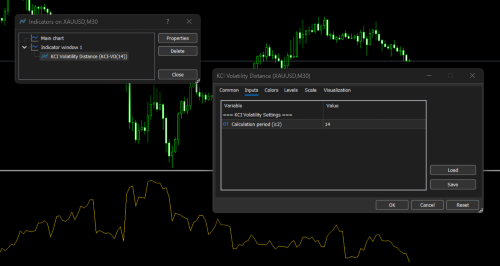
Paramétrage simple
Image n° 2
Guide d'intégration de KCI Volatility Distance dans un Expert Advisor (EA)
Il existe deux méthodes principales pour intégrer cet algorithme dans un EA. La première méthode (OOP intégré) est fortement recommandée pour une efficacité maximale du processeur et la collecte de jeux de données pour l'apprentissage automatique. La deuxième méthode (appel iCustom) est adaptée aux tests rapides de prototypes.
Méthode 1 : utilisation directe via une classe OOP intégrée (ultra-légère)
- Cette méthode intègre directement le moteur dans l’EA sans faire appel à des indicateurs externes. Le code est placé au niveau global, initialisé dans OnInit et exécuté dans OnTick.
Extrait de code
// --- 1. Placez la classe OOP en début du fichier EA ou incluez-la à l'aide de #include ---
class CKCIDirectionalMatrix
  {
   // (Insérez ici l'implémentation complète de la classe CKCIDirectionalMatrix)
   // ...
  };

// --- 2. Déclarer l'instance de l'objet global ---
CKCIDirectionalMatrix MatrixEngine;

// Paramètres d'entrée EA
input int MatrixPeriod = 14;
input double EntryThreshold = 0.0050; // Seuil de force de l'élan

// --- 3. Initialisation du moteur dans la fonction OnInit() ---
int OnInit()
  {
   if(!MatrixEngine.Init(MatrixPeriod))
      return(INIT_PARAMETERS_INCORRECT);

   return(INIT_SUCCEEDED);
  }

// --- 4. Exécuter la logique principale dans la fonction OnTick() ---
void OnTick()
  {
   // Préparer des tableaux pour stocker les dernières données sur les cours du marché
   double high[], low[], close[];

   if(CopyHigh(_Symbol, _Period, 0, MatrixPeriod + 2, high) < 0)
      return;

   if(CopyLow(_Symbol, _Period, 0, MatrixPeriod + 2, low) < 0)
      return;

   if(CopyClose(_Symbol, _Period, 0, MatrixPeriod + 2, close) < 0)
      return;

   // Les tableaux doivent être configurés comme des séries chronologiques (indice 0 = barre la plus récente)
   ArraySetAsSeries(high, true);
   ArraySetAsSeries(low, true);
   ArraySetAsSeries(close, true);

   // Calculer la matrice de sortie pour la barre la plus récente (indice 1)
   double current_matrix_strength = MatrixEngine.Calculate(1, high, low, close);

   // --- A. Module d'apprentissage automatique / d'extraction de caractéristiques ---
   // Introduisez la valeur de « current_matrix_strength » dans votre réseau neuronal
   // ou un vecteur de caractéristiques d'IA en tant que variable d'entrée.

   // --- B. Module de décision de trading (filtrage des signaux) ---
   if(current_matrix_strength > EntryThreshold)
     {
      // Validation de la quantité de mouvement réussie.
      // La tendance du marché est jugée suffisamment forte.

      // -> Exécutez ici vos ordres d'ACHAT ou de VENTE en fonction de
      //    à la stratégie directionnelle de votre EA.

      // -> Vous pouvez également utiliser cette valeur pour définir dynamiquement
      //    ajuster l'espacement du Smart Grid ou d'autres paramètres adaptatifs.
     }
  }
Méthode 2 : Appel via iCustom()
Si vous publiez séparément le fichier .mq5 de l’indicateur KCI Volatility Distance et que vous souhaitez que l’EA le lise via le tampon d’indicateur standard.
Extrait de code
// --- 1. Déclarer le descripteur de l'indicateur dans la portée globale ---
int MatrixHandle;

// Paramètres d'entrée EA
input int MatrixPeriod = 14;

// --- 2. Créer le descripteur de l'indicateur dans la fonction OnInit() ---
int OnInit()
  {
   // Vérifier que le nom du fichier d'indicateur correspond exactement
   // le fichier situé dans le dossier « Indicateurs ».
   MatrixHandle = iCustom(_Symbol, _Period, "KCI Volatility Distance", MatrixPeriod);

   if(MatrixHandle == INVALID_HANDLE)
     {
      Print("Failed to load the KCI Volatility Distance indicator.");
      return(INIT_FAILED);
     }

   return(INIT_SUCCEEDED);
  }

// --- 3. Lecture des données du tampon des indicateurs dans la fonction OnTick() ---
void OnTick()
  {
   double MatrixBuffer[];
   ArraySetAsSeries(MatrixBuffer, true);

   // Récupérer les deux dernières valeurs du tampon 0 (ligne KCI-VD)
   if(CopyBuffer(MatrixHandle, 0, 0, 2, MatrixBuffer) <= 0)
     {
      Print("Failed to copy matrix buffer data.");
      return;
     }

   // Valeur de la matrice correspondant à la dernière bougie fermée
   double current_matrix_strength = MatrixBuffer[1];

   // Valeur matricielle de la bougie en cours de formation (en temps réel)
   double previous_matrix_strength = MatrixBuffer[0];

   // --- Logique de décision de trading ---
   if(current_matrix_strength > previous_matrix_strength)
     {
      // La dynamique prend de l'ampleur.
      // -> Utilisez ceci comme confirmation supplémentaire pour
      //    augmenter la distance du Take Profit.
      //
      // -> Vous pouvez également l'utiliser pour déclencher un système adaptatif
      //    Ajustement du stop suiveur.
     }
  }
Compte tenu de l’architecture hautement adaptative et peu gourmande en ressources CPU de KCI Volatility Distance, son potentiel dépasse celui des indicateurs visuels traditionnels. La flexibilité de son code basé sur la programmation orientée objet (POO) lui permet de servir de moteur à divers scénarios algorithmiques avancés.
See how KCI Volatility Distance can be used in this indicator's Arrow Placement : KCI Arrow and on expert advisor EA KCI N-Matrix Engine
Voici quelques implémentations stratégiques de KCI Volatility Distance destinées au développement de divers EA et d’indicateurs complexes :
1. Système de défense anti-stop-hunting (SL et TP dynamiques)
Les mouvements brusques des cours constituent souvent des pièges de liquidité («liquidity grab » ou « stop-hunt ») plutôt que de véritables tendances. La distance de volatilité KCI permet de détecter ces anomalies.
- Logique : en cas de forte flambée des cours, mais si les valeurs de la matrice indiquent un faible niveau d’efficacité (direction), l’EA la détectera comme un « stop-hunting » potentiel.
- Mise en œuvre : au lieu d’exécuter un « Cut Loss » ou de placer un SL statique, l’EA élargira automatiquement la protection SL (SL dynamique) jusqu’à ce que la volatilité s’atténue, puis recherchera un point de reprise plus optimal.
Extrait de code
// Exemple : détection d'anomalies de volatilité (filtre anti-stop-hunt)
double matrix_value = MatrixEngine.Calculate(1, high, low, close);

// L'ATR sert de référence en matière de volatilité
double atr_baseline = iATR(_Symbol, _Period, 14);

// Détecter une expansion anormale du marché par rapport à la fourchette de volatilité attendue
if(matrix_value > (atr_baseline * 2.5))
  {
   Print("Warning: Volatility anomaly detected. Quantum SL Defense activated.");

   // Mesures de protection :
   // - Empêcher l'ouverture de nouvelles positions.
   // - Élargir dynamiquement le Stop Loss des positions existantes
   //   afin de réduire la probabilité d'événements de « stop-hunt ».
   ModifySLToSafeZone(matrix_value);
  }
2. Grille adaptative intelligente et algorithme de moyennage
L’une des faiblesses du système de grille standard réside dans l’espacement rigide (pas), ce qui s’avère particulièrement dangereux lorsque la tendance unidirectionnelle est forte.
- Logique : convertit l’espacement de la grille de valeurs statiques (points) en coefficients dynamiques multipliés par le résultat de la distance de volatilité KCI.
- Mise en œuvre : lorsque le marché évolue latéralement (la matrice s’étend), la distance entre les lignes de la grille s’élargit également. Cela empêche l’EA d’ouvrir un trop grand nombre de positions dans une même zone de consolidation, ce qui le rend très sûr pour résister aux baisses sur des actifs présentant des fluctuations importantes comme l’XAUUSD, le BTC ou l’US30.
Extrait de code
// Exemple : calcul adaptatif de la distance dans une grille
input double GridMultiplier = 1.5;

// Récupérer la dernière mesure de la matrice directionnelle
double current_matrix = MatrixEngine.Calculate(0, high, low, close);

// Déterminer l'espacement adaptatif de la grille à partir de la valeur de la matrice
// en tant que représentation dynamique des conditions actuelles du marché
double dynamic_grid_step = current_matrix * GridMultiplier;

// N'ouvrir une nouvelle position « grid » qu'une fois que le marché a évolué
// au-delà du seuil d'espacement calculé dynamiquement
if(MathAbs(CurrentPrice - LastOrderPrice) >= dynamic_grid_step)
  {
   // Exécuter l'ordre « Grid » / « Averaging » suivant
   ExecuteGridOrder();
  }
3. Normalisation des caractéristiques pour l’apprentissage automatique (ML)
Modules : les modèles de réseaux neuronaux nécessitent des données d’entrée normalisées pour reconnaître avec précision les modèles, sans être faussés par les différences de décimales de prix entre les courtiers ou les classes d’actifs (par exemple, la différence marquée entre les cours du pétrole WTI et ceux des paires de devises mineures).
- Logique : dans la formule de la distance de volatilité KCI, il existe un calcul du ratio d’efficacité (ER) qui produit naturellement un rapport d’échelle compris entre 0 et 1.
- Mise en œuvre : vous pouvez modifier légèrement la classe OOP pour qu’elle renvoie des valeurs ER pures. Ce tableau de valeurs matricielles est extrait sous forme de tableau, constituant ainsi un ensemble de données d’apprentissage très propre et exempt de bruit pour le « Pattern Learner ».
--------- Autres options ---------
Exemple de fichier d'en-têtemodulaire (KCIVD.mqh)
Enregistrez le code ci-dessous sous le nom KCIVD.mqh dans le dossier MQL5\Include\. Ce fichier constituera le moteur principal appelé par les indicateurs, les experts-conseils et les modules d’apprentissage automatique.
Extrait de code
//+------------------------------------------------------------------+
//|                                                        KCIVD.mqh |
//|                                   Copyright 2026, KCI Developer |
//|                         https://www.mql5.com/fr/users/ritzfalih |
//+------------------------------------------------------------------+
#property copyright "Copyright 2026, KCI Developer"
#property link      "https://www.mql5.com/fr/users/ritzfalih"
#property version   "1.0"

class CKCIVolatilityDistance
  {
private:
   int               m_kinetic_period;
   double            m_point;

public:
                     CKCIVolatilityDistance(void);
                    ~CKCIVolatilityDistance(void);

   bool              Init(const int period);
   double            Calculate(const int index,
                               const double &high[],
                               const double &low[],
                               const double &close[]);
  };

//+------------------------------------------------------------------+
//| Constructeur                                                      |
//+------------------------------------------------------------------+
CKCIVolatilityDistance::CKCIVolatilityDistance(void)
  {
   m_kinetic_period = 14;
   m_point          = _Point;
  }

//+------------------------------------------------------------------+
//| Destructeur                                                       |
//+------------------------------------------------------------------+
CKCIVolatilityDistance::~CKCIVolatilityDistance(void)
  {
  }

//+------------------------------------------------------------------+
//| Initialisation                                                   |
//+------------------------------------------------------------------+
bool CKCIVolatilityDistance::Init(const int period)
  {
   if(period < 2)
     {
      Print("[KCI VD Error] Period must be at least 2");
      return(false);
     }
   m_kinetic_period = period;
   m_point          = _Point;
   if(m_point <= 0) m_point = 0.00001; // Solution de secours
   return(true);
     }

//+------------------------------------------------------------------+
//| Moteur de calcul principal (optimisé pour le processeur et la vitesse)              |
//| Remarque : les tableaux doivent être définis en tant que séries (ArraySetAsSeries = true)      |
//+------------------------------------------------------------------+
double CKCIVolatilityDistance::Calculate(const int index,
                                         const double &high[],
                                         const double &low[],
                                         const double &close[])
  {
   double sum_TR    = 0.0;
   double sum_sq_TR = 0.0;
   double path_length = 0.0;

   // --- 1. Fenêtre de boucle optimisée sans fonctions imbriquées ---
   for(int j = 0; j < m_kinetic_period; j++)
     {
      int curr_idx = index + j;

      // Optimisation de la vitesse de comparaison de la plage réelle (pour éviter les MathMax imbriqués)
      double hl = high[curr_idx] - low[curr_idx];
      double hc = MathAbs(high[curr_idx] - close[curr_idx + 1]);
      double lc = MathAbs(low[curr_idx] - close[curr_idx + 1]);

      double tr = hl;
      if(hc > tr) tr = hc;
      if(lc > tr) tr = lc;

      sum_TR    += tr;
      sum_sq_TR += (tr * tr);

      // Longueur du mouvement de clôture (ratio d'efficacité)
      if(j < m_kinetic_period - 1)
        {
         path_length += MathAbs(close[curr_idx] - close[curr_idx + 1]);
        }
     }

   // --- 2. Calcul du rendement (ratio) ---
   double net_distance = MathAbs(close[index] - close[index + m_kinetic_period - 1]);

   if(path_length < net_distance) path_length = net_distance; // Limites logiques
   if(path_length == 0.0)         path_length = m_point;      // Empêcher la division par zéro

   double efficiency_ratio = net_distance / path_length;

   // --- 3. Calcul de l'écart-type du KCI ---
   double mean_TR  = sum_TR / m_kinetic_period;
   double variance = (sum_sq_TR / m_kinetic_period) - (mean_TR * mean_TR);
   if(variance < 0.0) variance = 0.0; // Correction de la précision en virgule flottante

   double std_TR = MathSqrt(variance);

   // --- 4. Affichage de la note finale du KCI VD ---
   return(std_TR * (2.0 - efficiency_ratio));
  }
Fichier d’indicateur visuel (KCI_Volatility_Distance.mq5) --- Autres options ---
Enregistrez ce code dans le dossier MQL5\Indicators\. Cet indicateur est désormais très épuré, car il appelle la structure OOP du fichier .mqh ci-dessus.
Extrait de code
//+------------------------------------------------------------------+
//|                                      KCI Volatility Distance.mq5 |
//|                                   Copyright 2026, KCI Developer |
//|                         https://www.mql5.com/fr/users/ritzfalih |
//+------------------------------------------------------------------+
#property copyright   "Copyright 2026, KCI Developer"
#property link        "https://www.mql5.com/fr/users/ritzfalih"
#property description "KCI Volatility Distance - Indicator Module"
#property indicator_separate_window

#property indicator_buffers 1
#property indicator_plots   1
#property indicator_label1  "KCI-VD"
#property indicator_type1   DRAW_LINE
#property indicator_color1  clrGold
#property indicator_style1  STYLE_SOLID
#property indicator_width1  1

// Inclure Mesin Utama KCIVD
#include <KCIVD.mqh>

// --- Entrée ---
input group "=== KCI Volatility Settings ==="
input int KineticPeriod = 14;   // Période de calcul (≥ 2)

// --- Tampon ---
double KVR_Buffer[];

// Instance d'objet global
CKCIVolatilityDistance kci_engine;

//+------------------------------------------------------------------+
//| Fonction d'initialisation d'un indicateur personnalisé                         |
//+------------------------------------------------------------------+
int OnInit()
  {
   if(!kci_engine.Init(KineticPeriod))
      return(INIT_PARAMETERS_INCORRECT);

   SetIndexBuffer(0, KVR_Buffer, INDICATOR_DATA);
   PlotIndexSetDouble(0, PLOT_EMPTY_VALUE, 0.0);
   ArraySetAsSeries(KVR_Buffer, true);

   IndicatorSetInteger(INDICATOR_DIGITS, _Digits);
   IndicatorSetString(INDICATOR_SHORTNAME, "KCI-VD(" + IntegerToString(KineticPeriod) + ")");

   return(INIT_SUCCEEDED);
  }

//+------------------------------------------------------------------+
//| Fonction d'itération de l'indicateur personnalisé                              |
//+------------------------------------------------------------------+
int OnCalculate(const int rates_total,
                const int prev_calculated,
                const datetime &time[],
                const double &open[],
                const double &high[],
                const double &low[],
                const double &close[],
                const long &tick_volume[],
                const long &volume[],
                const int &spread[])
  {
   if(rates_total < KineticPeriod + 2) return(0);

   // Définir le tableau par défaut comme série
   ArraySetAsSeries(high, true);
   ArraySetAsSeries(low, true);
   ArraySetAsSeries(close, true);

   if(prev_calculated == 0)
     {
      ArrayInitialize(KVR_Buffer, 0.0);
     }

   int limit = (prev_calculated == 0) ? (rates_total - KineticPeriod - 2) : (rates_total - prev_calculated + 1);

   // Lancer le moteur de calcul via un objet OOP
   for(int i = limit; i >= 0 && !IsStopped(); i--)
     {
      KVR_Buffer[i] = kci_engine.Calculate(i, high, low, close);
     }

   return(rates_total);
  }
Guide d’intégration interfonctionnelle (comment l’utiliser dans un EA/ML)
Grâce à la structure de classe CKCIVolatilityDistance, vous pouvez l'utiliser directement dans n'importe quel Expert Advisor pour des performances optimales. Voici un exemple de sa mise en œuvre logique :
Intégration dans un module d’apprentissage automatique (extraction de caractéristiques / validation de signaux)
Si vous disposez d’un réseau neuronal ou d’un module d’apprentissage de modèles nécessitant une normalisation de la volatilité comme caractéristique d’entrée, vous pouvez extraire la valeur KCI VD de manière pure :
Extrait de code
#include <KCIVD.mqh>

CKCIVolatilityDistance KCI_ML;

int OnInit()
  {
   // Initialisation du moteur « KCI Volatility Distance »
   // avec la période de calcul souhaitée.
   KCI_ML.Init(14);

   return(INIT_SUCCEEDED);
  }

void GetMLFeatures()
  {
   double high[], low[], close[];

   // Copier une quantité suffisante de données historiques sur les cours
   // (par exemple, les 50 dernières barres) dans des tableaux locaux.
   CopyHigh(_Symbol, _Period, 0, 50, high);
   CopyLow(_Symbol, _Period, 0, 50, low);
   CopyClose(_Symbol, _Period, 0, 50, close);

   ArraySetAsSeries(high, true);
   ArraySetAsSeries(low, true);
   ArraySetAsSeries(close, true);

   // Calculer la valeur de la « KCI Volatility Distance » pour
   // la barre actuelle (indice 0) ou la dernière barre clôturée (indice 1).
   double kci_current_volatility = KCI_ML.Calculate(0, high, low, close);

   // Intégrer « kci_current_volatility » dans le réseau neuronal
   // vecteur de caractéristiques pour la validation ou la prédiction d'un signal.
  }
4. Scanner multi-symboles (indicateur de tableau de bord)
Comme KCIDirectionalMatrix ne repose pas sur iCustom et libère rapidement la mémoire locale, il est idéal comme moteur de recherche de signaux sur un tableau de bord multi-symboles.
- Logique : installez un seul indicateur de tableau de bord sur un graphique, mais exécutez la boucle de calcul de la matrice simultanément sur 20 à 30 symboles différents.
- Mise en œuvre : l’indicateur analysera l’intégralité du Market Watch (devises majeures, paires croisées, métaux, indices) afin d’identifier les actifs dont les valeurs de la matrice sont en contraction (préparant une cassure) ou qui présentent une forte dynamique de tendance. Cela évitera tout ralentissement du VPS Windows Server ou toute surcharge du processeur.
Extrait de code
// Exemple : moteur d'analyse des marchés multi-actifs
string symbols[] = {"EURUSD", "GBPUSD", "XAUUSD", "BTCUSD", "US30"};

for(int s = 0; s < ArraySize(symbols); s++)
  {
   // Charger les données historiques de marché nécessaires
   // pour l'instrument de négociation actuel.
   // ...

   // Évaluer l'intensité directionnelle
   // de la bougie qui vient de se fermer.
   double strength = MatrixEngine.Calculate(1, h, l, c);

   // Générer un signal de trading uniquement lorsque le
   // l'intensité directionnelle dépasse le seuil configuré.
   if(strength > Threshold)
     {
      // Mettre à jour le tableau de bord avec les données détectées
      // Opportunité d'ACHAT/VENTE pour l'instrument actuel.
      DrawDashboardSignal(symbols[s], strength);
     }
  }
Voici le code de la « KCI Volatility Distance » ; ce code peut, à tout le moins, être utilisé à diverses fins. Vous pouvez le développer davantage à l’aide d’indicateurs MT5 standard et d’indicateurs MT5 personnalisés afin d’obtenir une précision encore plus grande et une analyse plus fine.
Traduit de l’anglais par MetaQuotes Ltd.
Code original : https://www.mql5.com/en/code/74838
Double Enevlopes (Historical Gauged)
Un outil et un système de gestion des services de garde d'enfants :D
Structure Range
Sell Arrow SL Box: Extends UPWARDS from the Sell Arrow. Buy Arrow SL Box: Extends DOWNWARDS from the Buy Arrow.
Previous Week High Low Indicator
Plots the previous trading week's High and Low as horizontal reference levels across the current week, with optional multi-week history for context. No repainting, no discretion — the levels are read directly from the completed Weekly bar.
Scalping Dashboard
This indicator is a professional Scalping Dashboard utility designed specifically for MetaTrader 5 (MT5). It displays real-time vital market status information and scalping strategy conditions (based on Exponential Moving Arrows/EMAs), automatically computing spreads, momentum, and moving averages to output instant BUY/SELL SETUP visual signals.