Todos los encargos
 Reglas
Tarea técnica
1. The idea of the trading system is as follows: market entries are performed when Bill Williams's Awesome Oscillator Technical Indicator crosses the zero line.
2. Trading Signals:
- Buy signal:
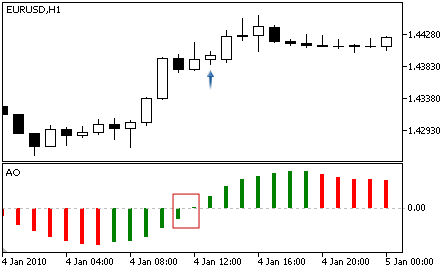
Crossing the zero line — value of the indicator is above 0 at the analyzed bar, and it is below 0 at the previous bar.
The below figure shows Buy signals.
the signal is generated, when you have a peak pointing down (the lowest minimum) which is below the zero line and is followed by another down-pointing peak which is somewhat higher (a negative figure with a lesser absolute value, which is therefore closer to the zero line), than the previous down-looking peak;
the bar chart is to be below the zero line between the twin peaks. If the bar chart crosses the zero line in the section between the peaks, the signal to buy doesn’t function. However, a different signal to buy will be generated — zero line crossing;
each new peak of the bar chart is to be higher (a negative number of a lesser absolute value that is closer to the zero line) than the previous peak;
if an additional higher peak is formed (that is closer to the zero line) and the bar chart has not crossed the zero line, an additional signal to buy will be generated.
- Sell signal:
Awesome Oscillator signals to sell are identical to the signals to buy.
Crossing the zero line — value of the indicator is below 0 at the analyzed bar, and it is above 0 at the previous bar.
The below figure shows Sell cases.
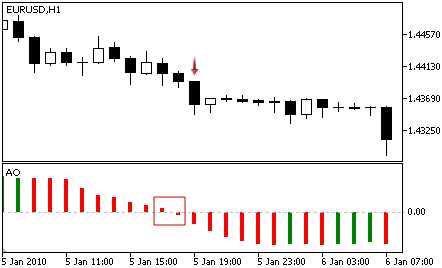
The saucer signal is reversed and is below zero. Zero line crossing is on the decrease — the first column of it is over the zero, the second one is under it. The twin peaks signal is higher than the zero line and is reversed too.
3. Positions are closed at opposite signals: Buy positions are closed at Sell signals, and Sell positions are closed at Buy signals.
4. Positions are opened at the market price, when a new bar emerges. The Expert Advisor is to be tested using Open prices, so there is no need to add functions for disabling operations inside the bar.
5. Close by Take Profit — during position opening, a Take Profit level is set at a fixed distance from the open price, specified in points. The value is set in the InpTakeProfit input parameter.
6. Position management
TrailngStop is used to protect profit. Stop Loss is set if profit in points exceeds the value specified in the InpTrailingStop parameter. If the price continues to move in the profit direction, Stop Loss should be trailed at the given distance. Stop Loss cannot be moved towards the loss direction, i.e. the Stop Loss value cannot be increased. If none of protective orders (Take Profit or Stop Loss) triggers, the position should be closed by an opposite signal.
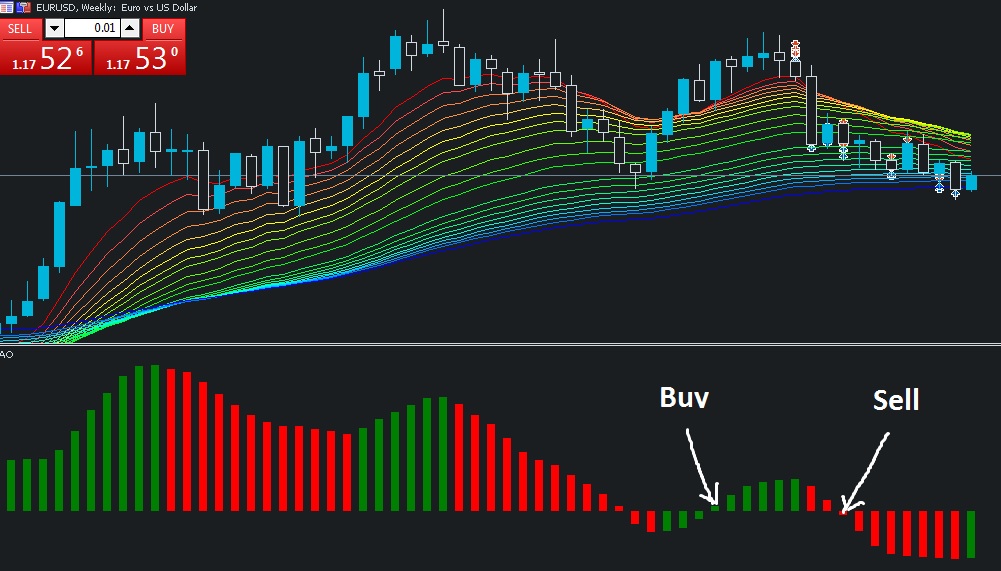
The below figure shows Buy and Sell cases: