I am studying the correlation between currency pairs, and would like you to do an EA for me, preferably in MQL5, but if you prefer can be a MQL4 .
I would like to see in practice a system using a strategy of correlation. How to work a system based on this idea? Nothing like an EA to we analyze this possibility. :)
Within my the point of view as layperson, I think it is a simple system, from what I've read, especially in MQL5, which has this peculiarity in the language engineering in relation to the use of currency pairs in different strategies.
The system would be run daily (TIMEFRAME D1 TO OPEN ORDER), starting and closing business operations within schedule determined by the trader.
In the Sunday the EA should not work in the sunday, in the opening and closing of market.
Should also have a parameter specified time to close the trade on Friday.
Parameters
StartTimeDaily: 00:00 (time of the broker)
EndTimeDaily: 00:00 (time of the broker)
EndTimeFriday: 00:00 (time of the broker)
To set the direction of trade (Buy or Sell), we use a single indicator, SEMAFORO SIGNAL!
Rules to open orders Sell or Buy of the main currency pair in time determined by the parameter StartTimeDaily: TO WORK IN TIMEFRAME D1 TO RUN ORDER IN THE MAIN CURRENCY PAIR
BUY ORDER TO MAIN CURRENCY PAIR
After painting signal DOWN of SEMAFORO, at the time determined by the parameter StartTimeDaily, all orders from the main pair are long orders.
SELL ORDER TO MAIN CURRENCY PAIR
After painting signal UP of SEMAFORO, at the time determined by the parameter StartTimeDaily, all orders from the main pair are short orders.
NOTE: EA only opens trading orders for the main pair and pair correlated if the orders that were opened by the EA were closed during the day.
Rules to open orders Sell or Buy in pair currency correlated
1. There will be a parameter to determine whether the EA will open orders to pair correlating
CorretionRun: True or False
If False, EA only opens orders in the main currency pair
2. If True, EA opens orders to main pair and pair correlated. I put the EA to work on the graph of the pair main, when the EA enter with an order to trade this currency pair main, the EA automatically enters with an order to trade in the pair correlated that can be in the same direction or opposite direction.
For this purpose would be two parameters:
Paircorrelation: (here I select the currency pair to correlate with the main currency pair
DirectionOrder: here will be accepted two values, 0 or 1
ZERO - the EA will open an order of this currency pair chosen in the same sense of order that open the main pair.
ONE - the EA will open an order of this currency pair chosen in the opposite order that open the main pair
The pairs to be used for correlacinamento will be:
AUD/USD
EUR/AUD
EUR/CHF
EUR/GBP
EUR/JPY
EUR/USD
GBP/USD
NZD/USD
USD/CAD
USD/CHF
USD/JPY
XAG/USD
XAU/USD
Rules for the closing of the orders with Profit.
1 - To close Orders will be set two parameters :
1.a - TakeProfitDayEnd : This parameter is a Percentage value about the free margin of the account balance of the broker.
1.a.1 - The trader puts a percentage value in this parameter, so is determined a time by parameter EndTimeDaily or EndTimeFriday, if there is a positive profit between the main pair and pair correlated in this percentage or higher about the free margin of the broker account, the EA closes the daily position in the determined time.
1.a.2 - If there is a smaller profit or negative between the main pair and pair correlated than the percentage this parameter about the free margin of the broker account, the EA WILL NOT CLOSE position daily.
1.b - TakeProfitFull : This parameter is a Percentage value about the free margin of the account balance of the broker. Regardless of the time set in parameter ndTimeDaily or EndTimeFriday, profit is reaching this percentage about the free margin of the broker account , the EA closes daily positions immediately. The next trading orders will only will be open the next day at the time set by parameter StartTimeDaily.
2 - The trade position of principal and correlating currency pair only be closed when there is positive profit established by TakeProfitDayEnd or TakeProfitFull parameters, and there isn't profit, the positions will remain open as long as necessary, in consequence , while doesn't close these orders, the EA doesn't will open more no order.
Rules for Stop Loss.
The Stop Loss is defined by a percentage about the free margin of the broker account.
After opening trade order, according percentage defined in Stop Loss parameter by user, with basis in volume size, the EA will calculate the price to put in the chart. This calculus will be placed also in the trade order of the correlated currency pair.
Ex:
Stop Loss: 3 (3% about free margin)
Volume Size: 0.10 (identified by EA)
Free Margim : 10000 (identified by EA)
If Main Pair is the EURUSD and correlating pair is the USDJPY.
The distance of the stop loss will be calculated in PIP.
To EURUSD
10000 * 3 = 300
whereas one PIP is around 0,10 (10 cents), this value is calculated internally by EA, then the monetary value to volume size is 0,10 (cents)/0.10 = 1,00
So 3% in pips are 300 PIP ( (10000*3%)/1,00) = 300 Ticks
If trade order was in the price 1.34560, the SL to Sell is equal 1.37560 or to Buy is equal 1.31560 .
To USDJPY
1000 * 3 = 300
whereas one PIP is around 0,10 (12 cents), this value is calculated internally by EA, then the monetary value to volume size is 0,12 (cents)/0.10 = 1,20
So 3% in pips are 300 PIP ((10000*3%)/1,2) = 250 Ticks
If trade order was in the price 92.500, the SL to Sell is equal 95.000 or to Buy is equal 90.000
Note:
1. When closes the main par or the correlated pair, both pairs will be closed.
2. THIS IS IMPORTANT: as are two orders opened, if the sum of both is equal to the Stop Loss parameter percentage, no matter if the prices of Stop Loss of EURUSD and USDJPY didn't was reached, the EA closes both orders.
3. Closing the Stop Loss orders, the EA only will open new orders the next day, unless it is on the Sunday, in this case the orders will open on the monday.
Rules for Determining the Size Volume Currency Pair Main.
We will use only two parameters:
PercentageRisk:
TicksLimiter:
Here we will have the maximum volume size that EA may apply in a trading operation in the main currency pair .
This calculation is performed about the free margin of broker account, in this example the values above, the EA will calculate the volume size about the free margin of 5% the ratio of 400 PIPs
Independent of any main currency pair, we will always consider that the monetary value of ONE PIP (tick) is 0.10 (10 cents), this is an immutable value. The free margin is identified automatically by the EA.
How will the calculation:
PercentageRisk: 5%
TicksLimiter: 400
Free Margin: 10500 (identified by the EA with the broker)
ONE PIP Value: 0.10 (immutable value)
Formula: [(PercentageRisk * Free Margin) / TicksLimiter] * Value ONE PIP
[(10500 * 5%) / 400] * 0.10 = 0.13
The volume size of this operation will be 0.13
Volume Size to Currency Pair Correlated
Will be defined by a multiplier value , we call this parameter of MultiplierVolumeSize_to_Pair Correlation
Example:
Correlation MultiplierVolumeSize_to_Pair: 1.5
EA will multiply the volume size 0.13 by 1.5, then the volume size of the correlated pair is 0.19
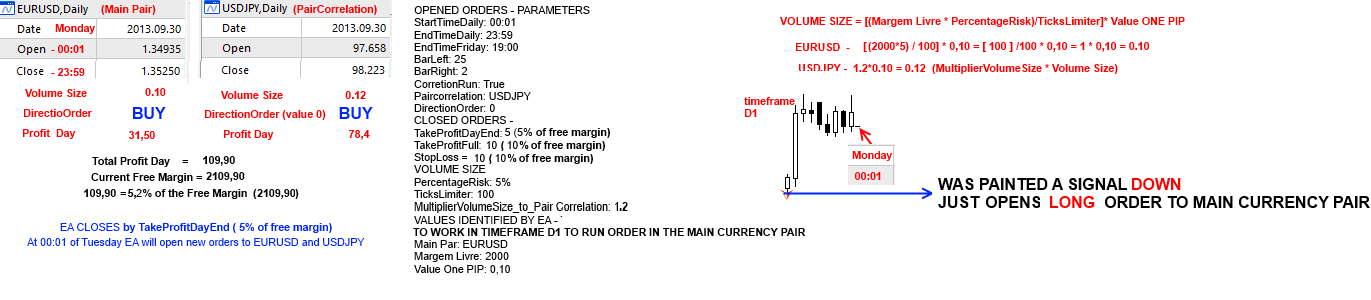
Below, an example with theoretical images with the following parameters:
Opened Order - Parameters
StartTimeDaily: 00:01 (start monday, it doesn't work in the sunday)
EndTimeDaily: 23:59
EndTimeFriday: 19:00
BarLeft: 25
BarRight: 2
CorretionRun: True
Paircorrelation: USDJPY
DirectionOrder: 0 (the EA will open an order currency pair correlated chosen in the same sense of order that open the main pair)
Closed Order - Parameters
TakeProfitDayEnd: 5 (5% free margin)
TakeProfitFull: 10 (5% free margin)
StopLoss =10 (5% free margin)
Volume Size:
PercentageRisk: 5%
TicksLimiter: 100
MultiplierVolumeSize_to_Pair Correlation: 1.2
Values identified by EA - This parameters aren't defined by user
TO WORK IN TIMEFRAME D1 TO RUN ORDER IN THE MAIN CURRENCY PAIR
Main Par: EURUSD
Margem Livre: 2000
Value One PIP: 0,10

IMAGE 1

IMAGE 2
Other example equal image 1, but with a Signal Down to open order:
 Todos los encargos
 Reglas