Yuta Hidaka
Yuta Hidaka
5 (1)
  • Information
4 years
experience
5
products
8
demo versions
0
jobs
0
signals
0
subscribers
Trading Software Developer at Quanition
QUANITION
See real screenshots and compare our MT5 tools on the Quanition website. Follow the website link above to choose where to start.

Tools that show their work.

I'm Yuta Hidaka, a software engineer and the developer behind Quanition. I build MetaTrader 5 utilities and Expert Advisors for traders who want a clearer view of their performance and more control over their workflow.

My background spans backend and cloud systems, full-stack development, and technical leadership. I bring that experience to trading software with clear interfaces, transparent logic, and a precise purpose for every feature.

My work focuses on:
• EA performance analytics — understand realized results by EA and Magic Number.
• Trading diagnostics — investigate economic calendar issues.
• Trade planning and execution support — assess position size and exposure before placing manual entries.
• Rule-based automation — build a systematic approach to trading, including XAUUSD.

Every tool should earn its place on your screen. My goal is to make the information behind your trading easier to inspect, understand, and use.

Start with the free Quanition EA Performance Dashboard Pro or Quanition Calendar Diagnostic, and explore the Quanition lineup below.

For product questions, message me here on MQL5. English and Japanese are welcome.
Yuta Hidaka
Published post EA не торгует в MT5? Как отличить заблокированную торговлю от нормального ожидания
Вы установили EA на график, оставили терминал запущенным, а позже обнаружили, что сделок нет. Стоит подождать, изменить настройки или обратиться к разработчику? Отсутствие сделок — это наблюдение, а не диагноз...
Yuta Hidaka
Published post MT5でEAが取引しない。設定の問題か、正常な待機かを見分ける方法
EAをチャートに設置して端末を動かしておいたのに、取引が一件もない。このまま待つべきか、設定を変えるべきか、それとも開発元に聞くべきでしょうか。 「取引がない」は、確認できた状態であって原因ではありません。 まず、取引が制限されている、仕様に沿って条件を待っている、判断する情報が足りない、という三つに分けます。MT5の公式資料で確認できる設定とログを使って、順に調べていきましょう。 1...
Yuta Hidaka
Published post EA Not Trading in MT5? How to Separate a Blocked Setup from Normal Waiting
You attach an EA to a chart, leave the terminal running, and come back to find no trades. Should you wait, change the settings, or contact the developer? No trades is an observation, not a diagnosis...
Yuta Hidaka
Yuta Hidaka
Running several EAs in one MT5 account? Your total P&L doesn't tell you which Magic Number contributed each result.

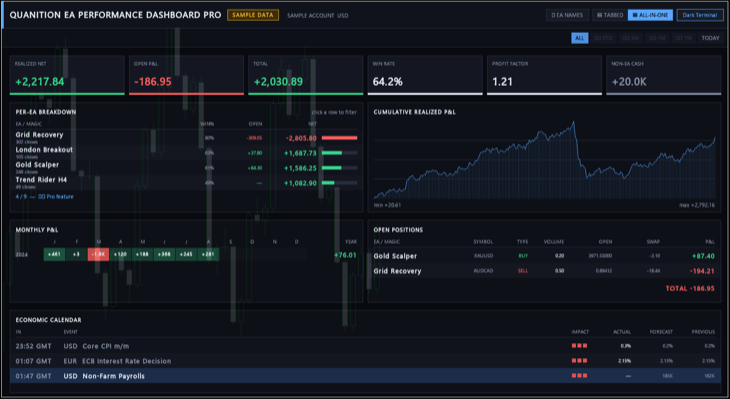
Here is a SAMPLE DATA screenshot of Quanition EA Performance Dashboard Pro, a free, read-only MT5 indicator. It groups available trade history by Magic Number and displays the five groups with the largest impact, with ALL and TODAY views.

A Magic Number is not an automatic EA name: strategies sharing a number appear together. Open P&L updates no faster than every 60 seconds; the RECENT tape has a 12-hour delay, which does not apply to Overview/EAs totals. No trades are placed or modified.

Free on MQL5 Market: https://www.mql5.com/en/market/product/187447
Setup and full-size example: https://quanition.com/products/ea-performance-dashboard-pro/
Yuta Hidaka
Published post Compare EA Results by Magic Number: Booked Money vs Open P&L
20 October 2026 · Technical guide · AI-assisted writing, checked against source and a reproducible calculation Your account is up, but one EA still has an open loss...
Yuta Hidaka Published product

Keep the entry decision in your hands, with the checks and sizing in one place. Quanition Semi Auto Cockpit helps discretionary traders inspect trading conditions, calculate order size from broker specifications and review the actions taken by the cockpit. It starts in read-only mode. Manual execution, automatic actions and calculation-only views are described separately below. Use only the modes supported by the installed version, and review which controls send orders and which only report

Yuta Hidaka Published product

An empty economic calendar does not tell you why events are missing. Quanition Calendar Diagnostic checks the calendar data available to MT5, examines whether clock uncertainty could affect the result, and suggests what to check next. HOW TO RUN IT 1. Drag the script onto any chart. 2. Open the Experts tab and read the report. 3. Follow the next checks named for that verdict. It does not place trades, change settings, repair the feed, reset the clock or clear the calendar cache. Being a script

Yuta Hidaka Published product

See how each Magic Number contributes to your MT5 account. Quanition EA Performance Dashboard Ultra brings realized results, current open profit and loss, period comparisons and monthly history into one chart. Select an EA row to explore its record instead of relying only on the account total. The dashboard is read-only. It uses the trade history and open positions available in MT5 — not the price bars of the chart it sits on. You assign EA labels yourself; strategies that share one Magic Number

Yuta Hidaka Published product

QUANITION GOLD REGIME NAVIGATOR — automate gold H1 entries and exits with a rule-based regime engine A rule-based approach to trading gold on the H1 chart. Quanition Gold Regime Navigator uses a statistical market-state model to select among trend-pullback and breakout strategies, then manages entries and exits according to its configured rules. It does not use grid entries, martingale sizing or live neural-network decisions. Review the operating limits and version-labelled test evidence before

Yuta Hidaka
Added topic Is it OK a free EA but it need pay or pay monthly for using EA's features?
Hello, I'm thinking about new EA. The EA is free, but if customer wants to use it, customer needs license key which is subscription payment. They need buy subscription plan external website and get  license key  then they can use the EA. Is
Yuta Hidaka
Added topic Dear MetaQuotes can you build a python SDK for arm archtecture?
Hello. Can we talik about MT5 python SDK? https://pypi.org/project/MetaTrader5/5.0.37/#files Recentry I bought M2 macbook and running Windows on it with parallels desktop. And I tried to install  MetaTrader5 via pip , but I'v got this. ```
123