Nguyen Thanh Trieu
Nguyen Thanh Trieu
  • Software Developer - Algorithmic Trading at Independent Trading Tools Developer
  • Viet Nam
  • 14703
4.7 (29)
  • Information
1 year
experience
20
products
11
demo versions
3
jobs
0
signals
0
subscribers
Software Developer - Algorithmic Trading at Independent Trading Tools Developer
I'm a software developer and trader. I build practical tools for MetaTrader 5 that I use in my own trading.

My work covers market structure, price action logic, risk visualization, and custom indicators and utilities.

I care about clean code, stable execution, and charts that are easy to read. Each product fixes one concrete problem. I don't sell promises.

A good tool doesn't decide for you. It helps you see clearer and decide with confidence.

I develop, test and maintain everything myself. If you have an idea or need something custom built, send me a message and we can talk it through.
Nguyen Thanh Trieu
Nguyen Thanh Trieu
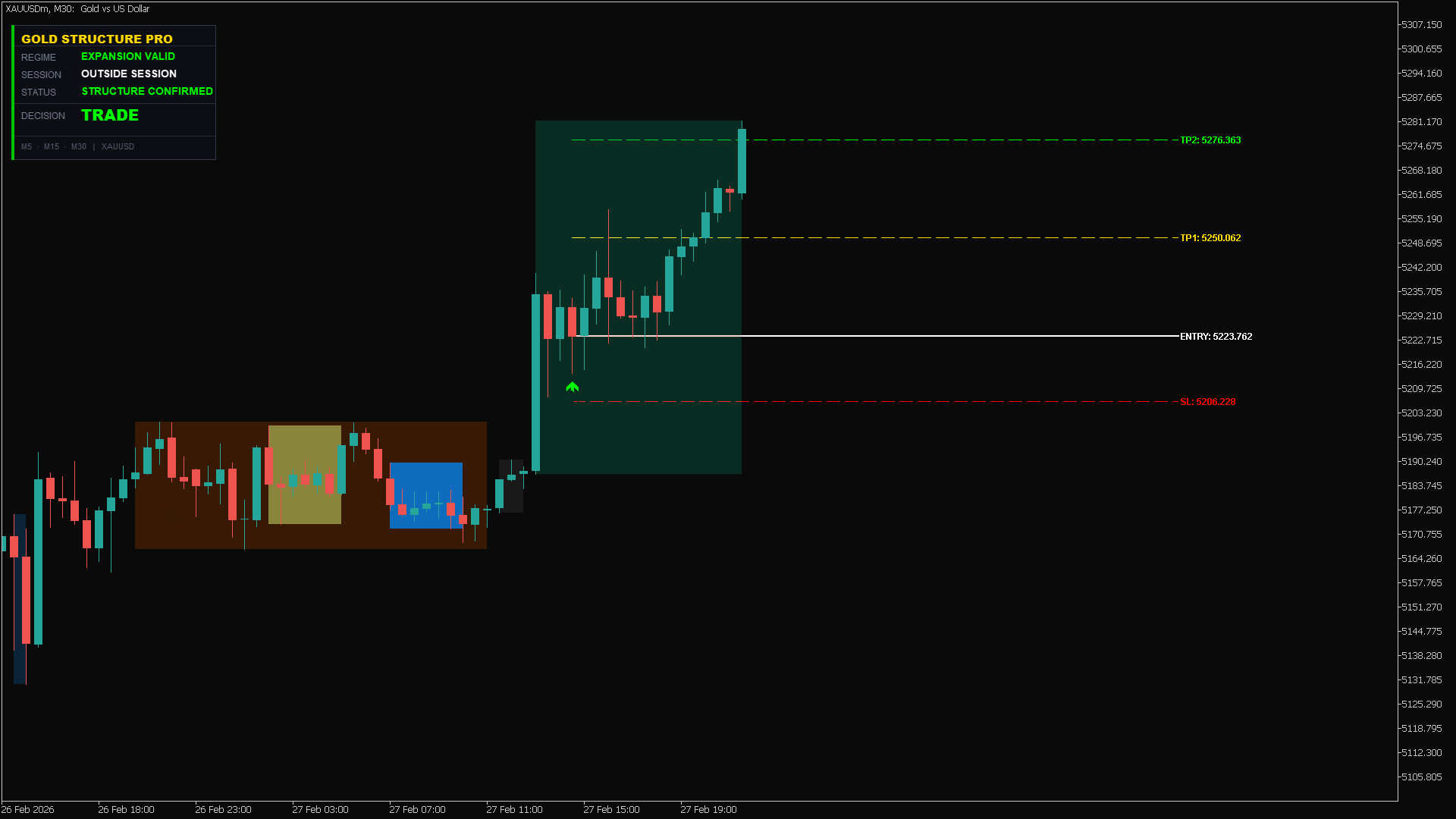
🔥 Gold Structure Pro: TP2 Smashed! +120 Pips (XAUUSD)

High-precision structure confirmation in action. As shown in the dashboard, the "Structure Confirmed" status gave us the green light to trade with confidence.
Asset: XAUUSD
Signal: Expansion Valid
Result: TP2 Hit perfectly 🎯

Stop guessing the trend. Let the algorithm do the heavy lifting.
👉 Try here: https://www.mql5.com/en/market/product/162441
Nguyen Thanh Trieu
Nguyen Thanh Trieu
Hi trader,
Trade Command Center is now live on the MQL5 Market.
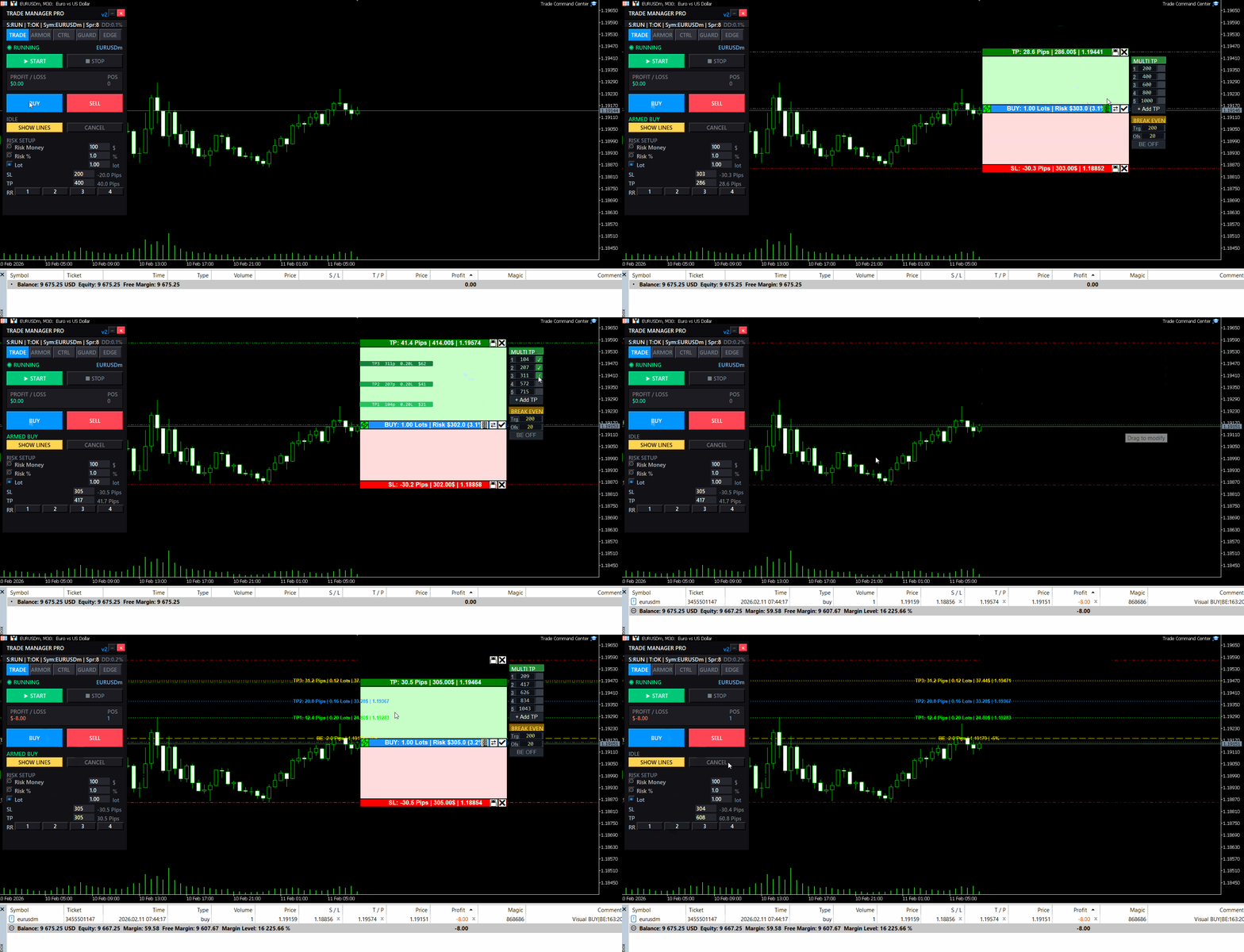
It is a visual trade execution and risk management panel built for manual traders who want precise control over every order.

What it does:
You place Entry, Stop Loss, and Take Profit directly on the chart as draggable boxes. The EA calculates your lot size automatically based on SL distance and your chosen risk mode (percent, dollar, or fixed lot). You see the exact dollar risk, pip distance, and R:R ratio before you click confirm.

Once the trade is open, automated management takes over:
- Break-even with per-trade override
- Trailing stop with step control
- Up to 5 partial take profit levels, each with its own trigger and close percentage
Risk Guard monitors your account across 6 timeframes: hourly, daily, weekly, monthly loss limits, equity drawdown percentage, and floating loss. A floating mini dashboard shows color-coded progress bars for each metric. When any limit is hit, all positions close immediately. Quick presets for FTMO and MFF rules are included.

Five tabs, one panel:
- TRADE — visual planning, risk calculator, one-click execution
- ARMOR — break-even, trailing, multi-level TP
- CTRL — position navigator, partial close, modify SL/TP, quick-close filters
- GUARD — drawdown limits, daily auto-close, advanced monitor
- EDGE — session stats, win rate, streaks, trade quality metrics

The panel uses chart objects.

It does not generate signals. It does not trade for you. It gives you the tools to execute and manage your own trades with precision.

Full feature demonstration available on the product page. Questions or feedback — use the Comments section.

Trade Command Center

👉 https://www.mql5.com/en/market/product/164935
Nguyen Thanh Trieu Published product
Reviews: 2
49.00 USD

Additional materials and instructions Installation instructions - Trial version of the application for a demo account ; Official Information Official channel Seller profile Stop Guessing Lot Sizes. Take Total Command of Every Trade. Have you ever missed a clean market entry because you wasted 15 seconds calculating lot sizes on a website? Or worse, typed a wrong lot size on Gold and watched a single mistake wipe out weeks of discipline? Trade Command Center (TCC) turns your MetaTrader 5 chart

Nguyen Thanh Trieu
Nguyen Thanh Trieu
Hello Traders,

You know that feeling when you enter a clean setup, only to watch it reverse 30 seconds later?

Not because your analysis was wrong.
Because the spread spiked. Or news dropped. Or the session died. Or volatility exploded while you weren't looking.

The chart showed movement. But movement without the right conditions is just noise.

I built something for that.

Market Bias Monitor MT5 — a real-time regime classifier that reads the market environment and tells you when conditions are actually favorable.

Four regime states: TREND, RANGE, TRANSITION, HIGH RISK.
A composite quality score from 0-100.
When conditions turn hostile, it shows you exactly why — spread, news, volatility, session, regime shift.

Multi-timeframe bias panel (M5 to W1). You see when lower timeframes conflict with higher ones before you enter.

Visual structure layer: swing zones, compression detection, ATR corridors.

Post-volatility stabilization logic — it won't let conditions flip back to "favorable" immediately after a spike. Forces you to wait.

Execution history strip — shows the last 5 bars as green (favorable) or red (unfavorable). Most traders are surprised how rarely conditions actually align.

This doesn't generate signals. It doesn't predict direction. It doesn't place trades.

It classifies the environment. You decide what to do with that information.

Demo available for testing. Works in Strategy Tester visual mode.

👉 Link: https://www.mql5.com/en/market/product/163815

Questions welcome in the comments.
Nguyen Thanh Trieu Published product

Good setup. Wrong market state. Trade invalidated before it plays out. Wide spreads, off-session hours, volatility spikes, and proximity to high-impact news all destroy edge before execution. Market Bias Monitor classifies the live environment, scores execution quality from 0 to 100, and alerts you the moment conditions shift. Designed for discretionary and semi-automated traders analyzing Gold (XAUUSD), Forex pairs, and indices across M5 to W1 timeframes. Monitors regime, session, spread, news

Nguyen Thanh Trieu
Left feedback to customer for job Super risk control
Nguyen Thanh Trieu Published product

Volume Pressure Meter MT5 The candle looked strong. Volume appeared high. You entered the breakout. Price reversed within minutes. The move had no real participation. Volume Pressure Meter reveals what institutions see: whether actual buying or selling pressure exists behind the price movement, or if you are trading against empty volume. Designed for intraday and swing traders analyzing Gold (XAUUSD), indices, and major Forex pairs across M5 to H4 timeframes. Combines eight institutional-grade

Nguyen Thanh Trieu Published product
Reviews: 1
39.00 USD

Resources and Quick Links Try Demo Version PropFirm Risk Guard is an advanced utility designed to enforce strict risk management and capital preservation protocols on your trading account. It operates as an automated compliance layer, ensuring your equity remains within predefined daily and overall drawdown limits. Ideal for accounts with strict drawdown guidelines, funded challenge evaluations, and professional capital management requirements. The utility monitors all positions in real time

Nguyen Thanh Trieu
Nguyen Thanh Trieu
Trade Manager Lite v1.4 – New dialog UI + in‑panel Settings

Hello traders, a friendly update is now available:

- Compact dialog UI docked to the right, stable on chart resizes
- Two-page Settings (Prev/Next) so the panel stays the same height
- Configure on the panel: Break-even (enable, trigger, offset), Trailing (enable, distance, step), Partial (enable, trigger, percent), default SL/TP,
- Your choices persist across timeframe/symbol changes and chart reloads
- Layout polish: cleaner spacing/alignment; lot block and Settings button slightly lower; dialog a bit wider
- Cleanup under the hood to keep things smooth and compliant

Tip: To keep only default SL/TP, leave Break-even, Trailing, and Partial all OFF.

Backwards compatible with previous behavior when features are enabled. Please test in the Strategy Tester or on a demo first. Thanks for your feedback and support!

👉 https://www.mql5.com/en/market/product/152607
Nguyen Thanh Trieu
Nguyen Thanh Trieu
Trade Manager Lite v1.3 – Small quality-of-life update

Hello traders, a small update is now available:
- New toggles: Enable_BreakEven and Enable_Trailing
- Partial Close is off by default to avoid unintended closes
- Break-even and trailing only run when enabled (no auto SL move if disabled)
- Inputs are grouped for faster, cleaner setup
Tip: To keep only default SL/TP, set Enable_BreakEven = false, Enable_Trailing = false, Enable_Partial_Close = false.

Backwards compatible with previous behavior when features are enabled. Please test settings in the Strategy Tester or on a demo first. Thanks for your feedback and support!

👉 https://www.mql5.com/en/market/product/152607
Nguyen Thanh Trieu
Nguyen Thanh Trieu
Trade Manager Auto SLTP Trailing and Breakeven MT5 – October 2025 Update

Hello traders,
I’m excited to share the latest improvements to TradeManagerLite for MetaTrader 5. This update focuses on usability and clarity, making position management even more efficient.

What’s new:
- Added four quick lot adjustment buttons (+0.01, +0.1, -0.01, -0.1) for faster trade sizing.
- The lot adjustment buttons are now neatly aligned and sized for a cleaner panel layout.
- Font size for these buttons is reduced for a more compact appearance.
- Improved panel and button placement for better visibility and workflow.
- Enhanced break-even logic to help minimize loss from slippage when moving stops.
- Fixed all known compilation and UI errors for smoother operation.

Thank you for your feedback and support!
Nguyen Thanh Trieu
Nguyen Thanh Trieu
Volume Pressure Meter v1.20 - Update

Updated version of the Volume Pressure Meter with additional features:

New Features:
- Visual Gauge Bar - Displays buy/sell pressure with a horizontal bar that changes color and size based on market pressure.
- Simplified Alerts - Alert system provides notifications when pressure crosses the 70% threshold.
- Performance Optimization - Code has been optimized for better performance when running on multiple charts.
- Smart Caching - Caching system reduces CPU usage for traders monitoring multiple timeframes.

The visual gauge displays market pressure with a green bar for buying pressure and red bar for selling pressure.

The indicator works with all symbols and timeframes. No repainting, no DLL dependencies.

Please provide feedback on the new visual gauge and any improvements you would like to see.

The update is available for download.
Nguyen Thanh Trieu Published product
Reviews: 1
FREE

Smart Session Box Shows the Sydney, Tokyo, London and New York trading sessions as boxes on your chart, with a live panel of market hours and countdowns. Market Hours and Countdown The dashboard lists each session's hours in UTC and your broker time. Active sessions show the time left before they close, and a highlighted line shows which session opens next and in how long. Reference stock exchange hours for Tokyo, London, New York and Sydney are included for context. Session Boxes Each session

Nguyen Thanh Trieu Published product

Manual position management. Missing SL. Price moves against you. No protection. Trade Manager Lite automates Stop Loss, Take Profit, Trailing Stop, and Break-Even for your open positions. Attach to one chart. Configure your default SL/TP distance. Let it manage your positions automatically. What's Included (FREE Version) Auto SL/TP: Applies missing Stop Loss and Take Profit to positions based on your configured distance in points Trailing Stop: Adjusts SL dynamically as price moves in your favor

Nguyen Thanh Trieu Published product

Volume Pressure Meter breakdown tick volume to reveal the buying and selling pressure inside every candle. Unlike standard volume which only shows total activity, this indicator splits volume to show who is actually in control of the market. It helps you identify trend strength and spot potential reversals through volume divergence. Key Features: Pressure Gauge: Visual bar showing real-time Buy vs Sell percentages. Trend Bias: Automatically identifies if the market is dominated by Buyers or

123