Gayan Indika Honnanthara Acharige / Profile
- Information
|
no
experience
|
7
products
|
2
demo versions
|
|
0
jobs
|
0
signals
|
0
subscribers
|
GTM EA Bot Studio Drag-and-drop Expert Advisor builder for MetaTrader 5 · v1.42 GTM EA Bot Studio is a robot builder that lives inside MetaTrader 5. You build your own Expert Advisor by dragging coloured blocks onto a workspace on the chart then test it on that chart and run it live. No code, no MetaEditor, no compiling. User guide: the full step-by-step guide (English and Sinhala PDF) is in my blog post: GTM EA Bot Studio - User Guide How it works - three steps Build. Drag a WHEN block (for
GTM Bot Maker builds an Expert Advisor from ready blocks, right on the chart. Choose an entry, switch on filters, set the exits and the risk, preview the result on past candles - then switch the EA on. No MQL5, no code editor, no compiling. Everything is changed live from the panel, by /commands, or by describing the idea to an AI with your own key. ━━━━━━━━━━━━━━━━━━━━━━━━━━━━━━ ■ HOW IT WORKS - THREE STEPS 1. Build - open BUILDER. Pick one of 4 entry types, switch on any of 15 filters
GTM Journal turns the trade history already sitting in your terminal into a journal you will actually read. Every closed position is rebuilt from your deal history — entry, exit, the stop that was set when you opened it, where that stop finished, the best and worst price the trade ever saw — and laid out across ten pages inside one draggable panel. Nothing is typed in twice. Nothing leaves your computer. It does not trade. It opens no positions, modifies nothing and sends no orders. It reads
Eight moving averages on one chart, a BUY or SELL arrow every time the two you nominate cross, and a control panel that changes all of it without opening the inputs dialog. Most moving-average tools give you two lines and a fixed rule. This one gives you eight lines, lets you decide which two make the signal, and lets you change your mind from the chart — period, method, colour, thickness, dash pattern, arrow shape, arrow size, and how long a cross has to hold before it counts. Everything is

GTM PANEL PRO is a manual trade-management control panel for MetaTrader 5. It does not open trades on its own and it does not predict anything. It gives you a cockpit: you decide, and the panel executes, protects and reports — in one click instead of ten. It was built for the trader who is already good at reading a chart but keeps losing money to the mechanics of trading: the stop that was never set, the basket that had to be closed one trade at a time, the pending order typed at the wrong
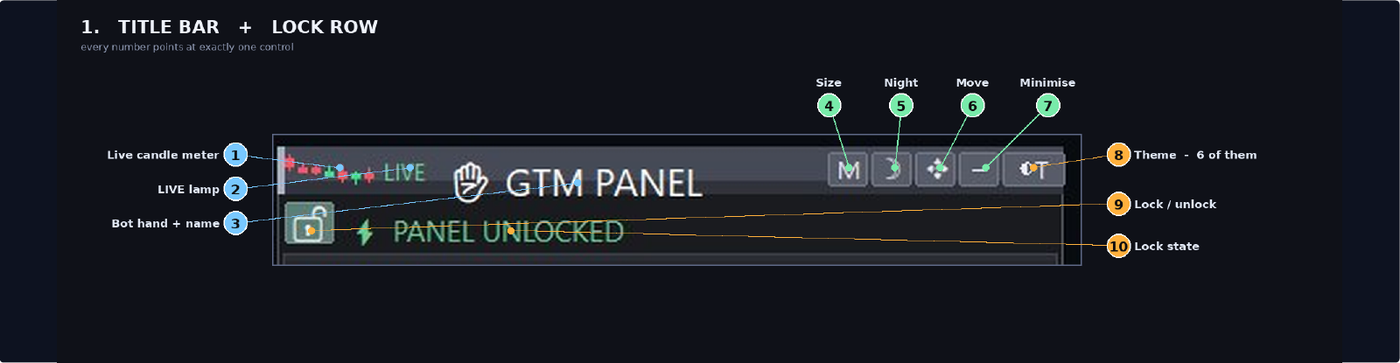
GTM Panel is a manual trade panel for MetaTrader 5. It does not generate signals and it does not open a single trade on its own. You decide what to trade and when — the panel places it, protects it, follows it, and closes it in one press instead of ten. It is built around one thing most panels treat as an afterthought: pending orders . Four independent limit slots sit beside the market scope, each with its own colour, its own price, its own lots, its own SL and TP, and its own line on the chart
GTM PANEL PRO is a manual trade-management control panel for MetaTrader 5. It does not open trades on its own and it does not predict anything. It gives you a cockpit: you decide, and the panel executes, protects and reports — in one click instead of ten. It was built for the trader who is already good at reading a chart but keeps losing money to the mechanics of trading: the stop that was never set, the basket that had to be closed one trade at a time, the pending order typed at the wrong