Dairy Desk
- Utilities
-
Adrian Winata
 Adrian Winata - developer of XAUUSD (Gold) Expert Advisors for MetaTrader 5.
LIVE SIGNALS
Both EAs run on real accounts. Every result is public and verified.
Cash Cow Cent - live cent account, verified on Myfxbook: - Version: 5.10
Launch offer: free for the first 24 hours, limited to the first 20 copies.
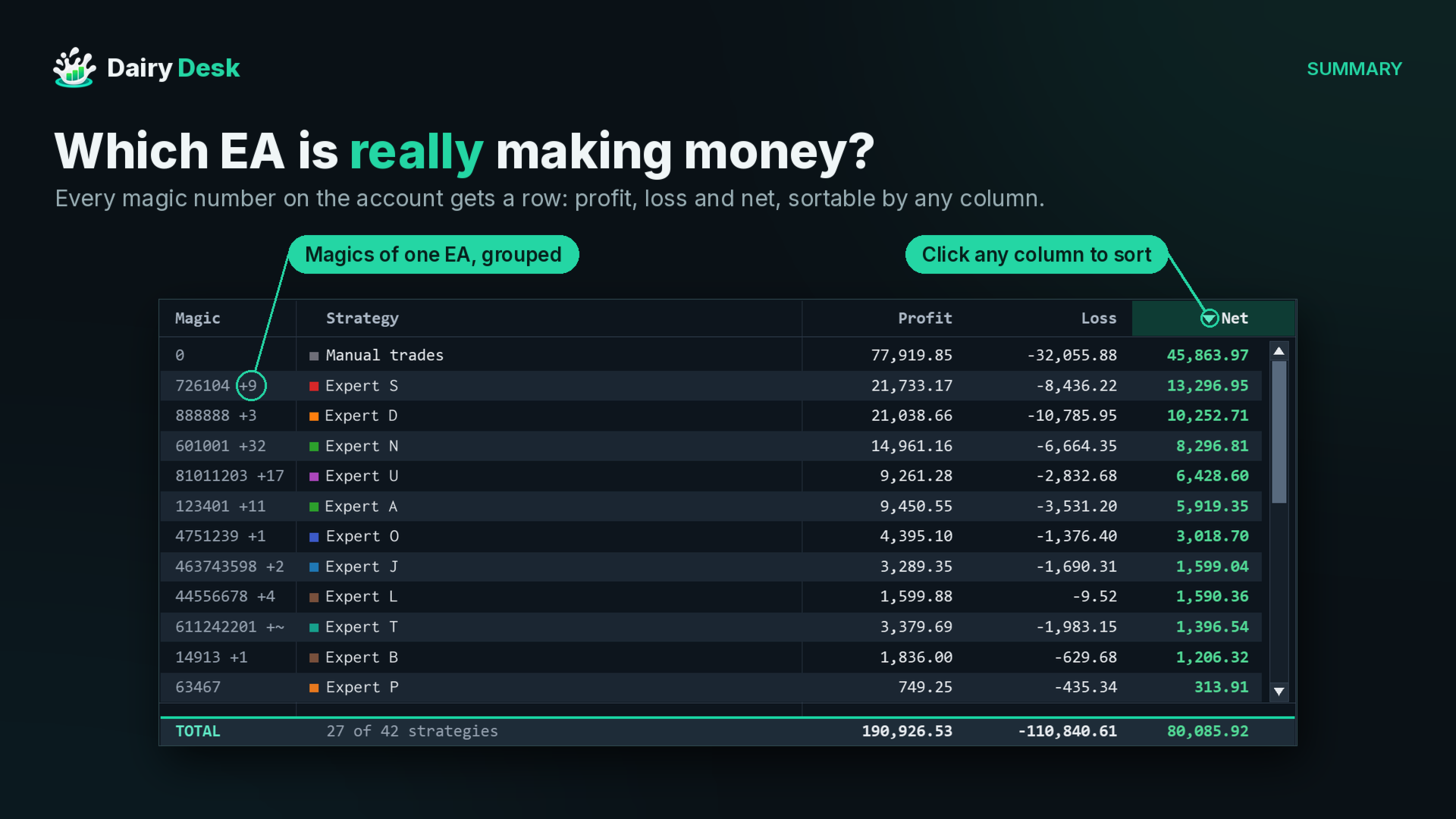
Dairy Desk is a lightweight dashboard that shows how every Expert Advisor on the account is really doing. It reads the trade history, groups trades by magic number and puts profit, statistics, a profit calendar and account details into one panel on the chart, without slowing the terminal down.
One account, many EAs, one clear view.
Quick Facts
- Type: utility (Expert Advisor that never opens, modifies or closes trades)
- Lightweight: the whole panel is one chart object and nothing runs on incoming ticks
- Platform: MetaTrader 5, hedging and netting accounts
- Works on any symbol and timeframe, one chart is enough
- Reads the full account history, including manual trades (magic 0)
- Four views: Summary, Details, Calendar, Account
- No DLLs, no extra files to install, no internet connection needed
How It Works
Dairy Desk reads the closed deals of the account and groups them by magic number. Each magic becomes a strategy, named after the comment of its most recent trade, or after a name set in the inputs. With Group switched on, magics that clearly belong to the same EA (same name, or numbers close together) are joined into one row, and each row can still be opened to see every single magic inside it.
All figures are net: commission, fees and swaps are included. The panel refreshes on its own every few seconds and whenever the balance changes, so results stay current while the EAs keep trading.
Dairy Desk is built to stay light, even next to several EAs on a busy terminal. The entire panel is drawn as a single image instead of hundreds of separate labels and buttons, so the chart stays responsive and the object list stays clean. Nothing is calculated on incoming ticks: the history is read again only when a deal closes, the balance changes or the short refresh interval passes.
Features
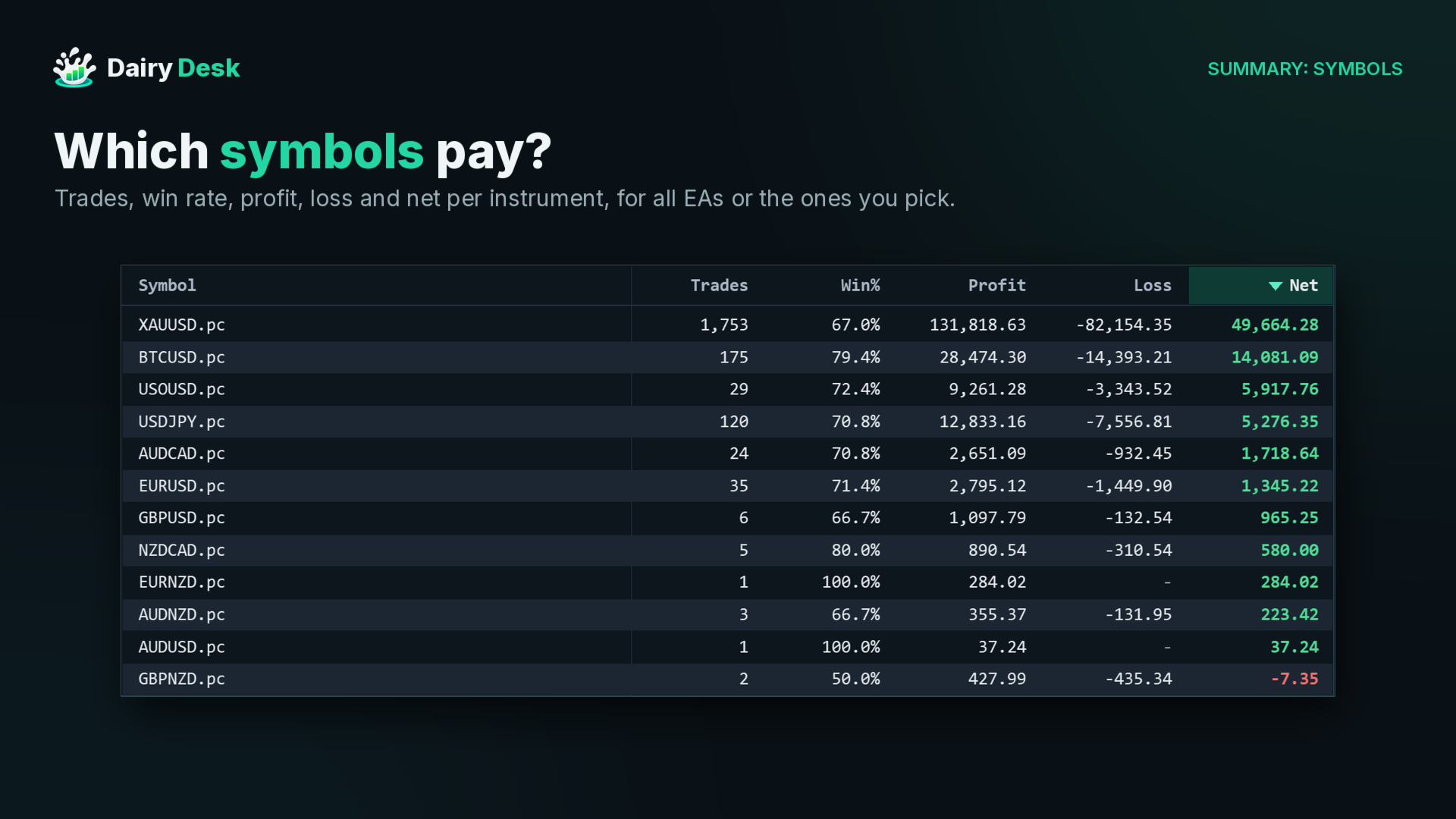
Summary lists every strategy with its profit, loss and net for the selected period (Today, Yesterday, This week, Last week, This month, Last month, All time or a custom range). The Money, Stats and Symbols views switch between money columns, statistics (trades, win rate, profit factor, max drawdown) and a breakdown by symbol. Every column can be sorted.
Details focuses on one strategy, one single magic, or several strategies combined:
- Basic: net, gross profit and loss, profit factor, expectancy, max drawdown, best and worst trade, average hold time
- Extended: average win and loss, recovery factor, consecutive wins and losses, long and short win rates, trades per week, swaps, commission and an estimate of slippage on stop and limit entries and on SL and TP exits
- Graph: cumulative net with a shaded maximum drawdown, a drawdown chart below it, and a crosshair that shows each trade on hover
Calendar shows a month of daily results with trade counts and the return of each day on the starting balance, plus weekly totals. The Year view lays out every year month by month, and a click opens any month.
Account collects account health (equity, margin level with margin call and stop out marks, open positions), broker and server details, deposits and withdrawals, trading costs for the period and the conditions of the chart symbol.
The strategy filter can pick EAs by name (A-Z) or single magics (Magic), with typing to search. The eye button hides strategies without trades in the period. When minimised, the panel turns into a compact bar with today's result, week, month, floating profit and equity.
The panel can be moved by its top bar and zoomed by dragging the bottom-right corner. The account number stays masked until the eye next to it is clicked, which keeps screenshots private. A dark or light theme and a CSV export are also included.
Requirements and Recommended Setup
- MetaTrader 5 with the account history available (Dairy Desk loads it by itself)
- Attach to one chart of the account to monitor; any symbol and timeframe will do
- No trading permission is needed, because Dairy Desk never trades
- For readable names, either let the EAs write trade comments or fill in "Names: magic=Name;magic=Name (empty = use trade comment)"
Quick Start
- Drag Dairy Desk onto any chart and press OK.
- The panel opens in the middle of the chart. Drag the top bar to move it and the bottom-right corner to resize it.
- Pick a period in the header and click a strategy to open its Details.
- Use Calendar for day-by-day results and Account for balance, margin and funding.
Dairy Desk only reads and displays the account history. It never opens, modifies or closes positions. Questions and suggestions are welcome in the comments or by private message on MQL5.