DinexSpace Economic Calendar Marker
- Indicators
-
Huu Tho Tran
 DinexSpace - trading automation studio for MetaTrader 5.
We validate your trading idea with real costs in two stages before we code it. If the idea fails validation, we stop - you don't pay for the bot.
Live track record - Version: 1.0
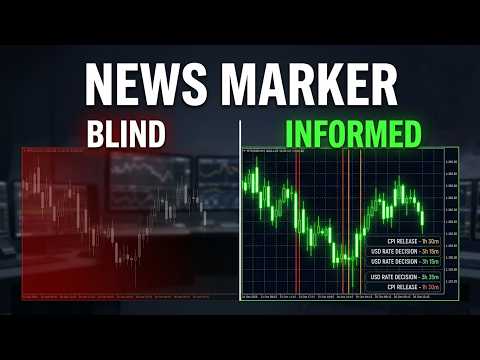
Economic Calendar Marker shows when economic news is released, directly on your chart. Each event time gets a vertical line coloured by importance, so you can see at a glance which candles were moved by news and what is coming next.
How it works
- Events come from the economic calendar built into MetaTrader 5 (the Calendar tab of the terminal). The indicator uses the standard Calendar functions.
- By default it shows the currencies of the chart symbol (for example EUR and USD on EURUSD, or USD for gold). You can type your own list instead, such as "USD,EUR,GBP".
- High, medium and low importance can each be switched on or off. Lines are red for high, amber for medium and grey for low.
- When several events share the same time, one line is drawn, coloured by the most important one. Hovering over it shows all their names.
- A panel lists the next events with date, currency, time remaining and name.
- Events from the last 5 days and the next 7 days are loaded (adjustable), and the list refreshes every 5 minutes.
Inputs
- Events: currencies, importance levels, days back, days ahead.
- Display: colours per importance, event names on lines (shown as the line description: turn on "Show object descriptions" in the chart properties, F8), number of events in the panel, panel corner, refresh interval.
Limits
- Event times are shown in the trade server's time, as provided by the terminal's calendar.
- The calendar is not available in the Strategy Tester, so nothing is drawn there.
- Event schedules can change. Always check the terminal's Calendar tab for the latest details.
The indicator marks times only. It does not trade or give signals.