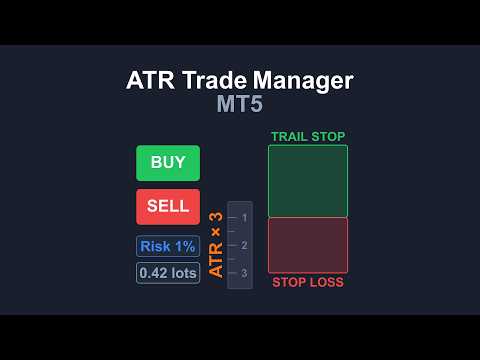
ATR Trade Manager MT5
- Experts
-
Daniel-gheorghe Muresan
 I have 8 years of experience in trading. I am a trend follower and I trade mostly using the Turtles method.
Because the markets have changed since the 80s, I use longer periods for breakouts and trailing stops, no pyramiding, and a bigger ATR multiple as stop loss. - Version: 1.7
- Updated: 20 August 2026
- Activations: 10
No Martingale. No Grid. Built by a trader with 8 years of experience, not just a programmer. Guide to every button and every rule HERE
Product Description
Tired of manually calculating risk for every order, or dealing with interfaces that get in the way of price action? ATR Trade Manager MT5 is a MetaTrader 5 order management tool built for traders who want risk controlled market and pending orders, ATR based stop losses, and full post-entry trade management, all from one panel.
The EA handles position sizing, stop loss placement, break-even, trailing stops, partial closes, and staged take profit execution, so you can spend your time on analysis and entries rather than arithmetic and manual order modification.
Discounted price. The price is temporarily set to $30 to build initial trust. Once we reach 20 sales, the price will increase to $60. Get it now while it's cheap!
Key Features
Visual Trade planning: before you place an order, drag entry, stop loss, and take profit directly on the chart. Direction, order type, and risk/reward update live as you adjust the lines, so you can see the trade before you commit to it.
ATR driven dynamic stop loss: stop distance is calculated from the non-repainting Average True Range, so it adapts to current volatility instead of using a fixed number of points.
Risk based position sizing: lot size is calculated from your account balance and chosen risk percentage using MetaTrader 5's native OrderCalcProfit() and OrderCalcMargin() functions, for broker agnostic accuracy. Margin safety is checked against the broker's own margin requirements before an order is sent.
Live Position Monitor: once a trade is open, entry, stop loss, and take profit lines remain draggable on the chart. Moving a line sends a real modification request to your broker; if the broker rejects it, the line snaps back to the last valid value.
Break-even and trade management: move stop loss to break-even, delete a pending order, partially close a position, or close it fully, all from the panel, without opening the standard order dialog.
ATR trailing stop: trails using the same ATR distance as your original stop loss, so trailing logic stays consistent with how the trade was sized. Can be toggled on or off per trade.
Take Profit in Parts: split an exit into up to three levels (TP1/TP2/TP3) with draggable handles on the chart. Each level closes a portion of the original position size automatically as price reaches it.
Two tabs interface: a Position Sizing tab for entry planning and an SL/TP management tab for open trades, keeping the panel compact and organized. The panel is draggable, minimizable, and gives real time feedback as you adjust inputs.
Broker compatibility: dynamic order filling type detection, plus checks for symbol trading permissions, stop levels, and margin, so the EA adapts to different brokers rather than assuming one configuration.
How It Works
Attach the EA to a chart. Use the Visual Trade panel to set direction, order type, and risk parameters, dragging entry, stop loss, and take profit lines until the trade matches your plan. The panel shows the calculated stop loss and position size as you adjust.
Click Place Order. The EA validates the parameters against your broker's requirements and sends the order.
Once the position is open or a pending order is placed, use the Live Position Monitor to adjust stops, take partial profit, move to break-even, or let the ATR trailing stop and Take Profit in Parts manage the exit for you.