 All orders
 Rules
Rules
Watch how to order a trading robot
Read the Rules before you post an order or execute it
How to Order a Trading Robot in MQL5 and MQL4
See a sample Requirements Specification to order a robot
New orders in the category:
30+ USD
280 - 2000 USD
30+ USD
30 - 199 USD
Job finished
Execution time 1 day

Feedback from employee
Great customer, prompt communication, clear specs, recommended+
Feedback from customer
Very easy to work with even with my many requests and changes, quick turnarounds and a great understanding of what I was trying to achieve. 100% would work with again. Thanks.
Specification
I use this indicator below on a strategy, I do not know the code, how it works and had nothing to do with its inception so you will have to study the indicator your self. Appolgies.
Currently:
- The inicator displays a slow bias
- Does NOT alert or notify
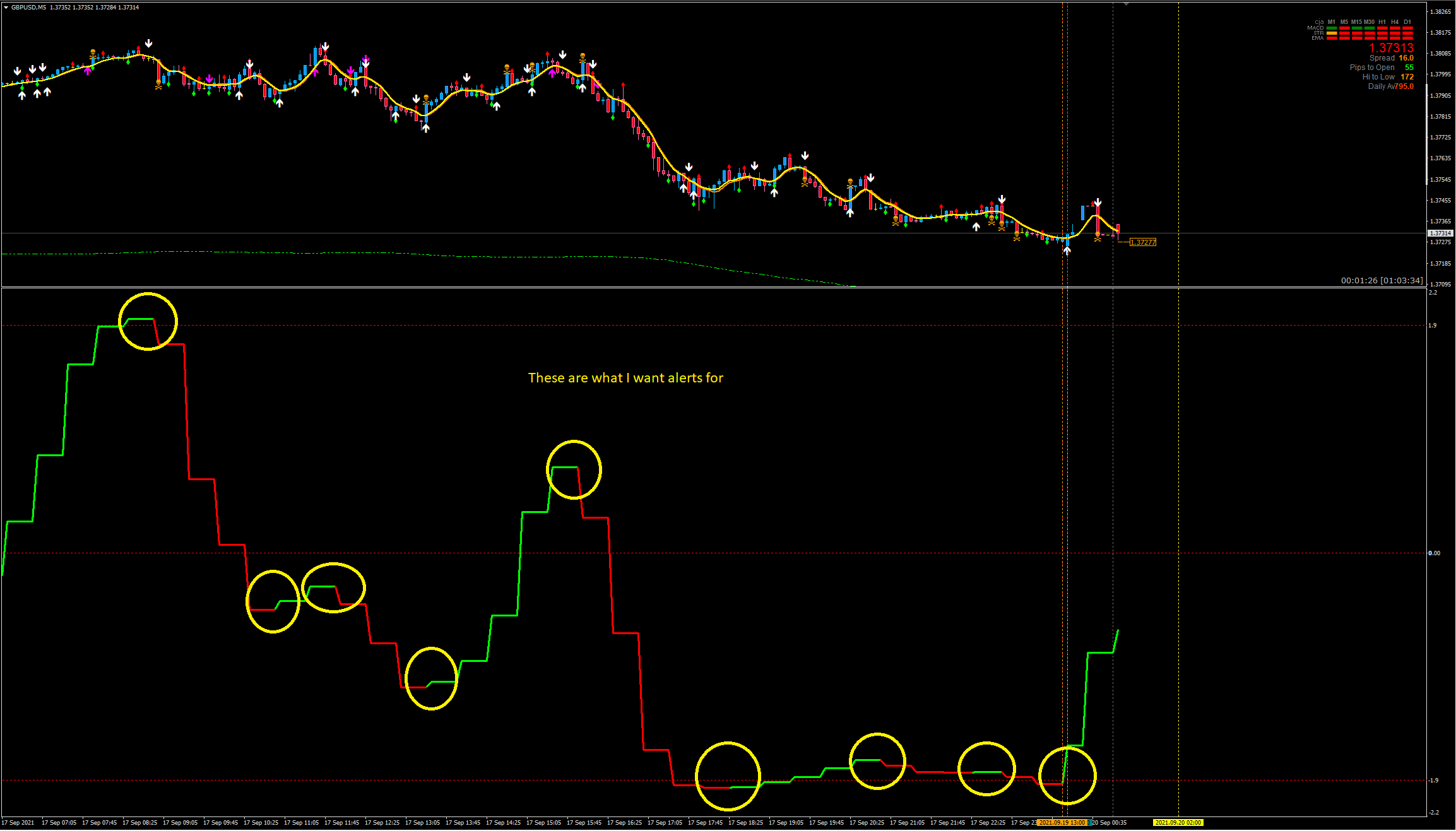
- On candle close the change of trend (colour) occurs, it is not confirmed for 4-6 candles in a 5m chart i think but I am not 100% sure. Essentially after the first colour change it can sometimes change back quickly on the next candle close.
- I edited the EA code a while ago to remove all the data displayed on the top left of the indicator box, I would like to keep all data off this screen but I am unable to double click the indicator to open settings. Only by going to indicators, options, etc i can change things.
I would like:
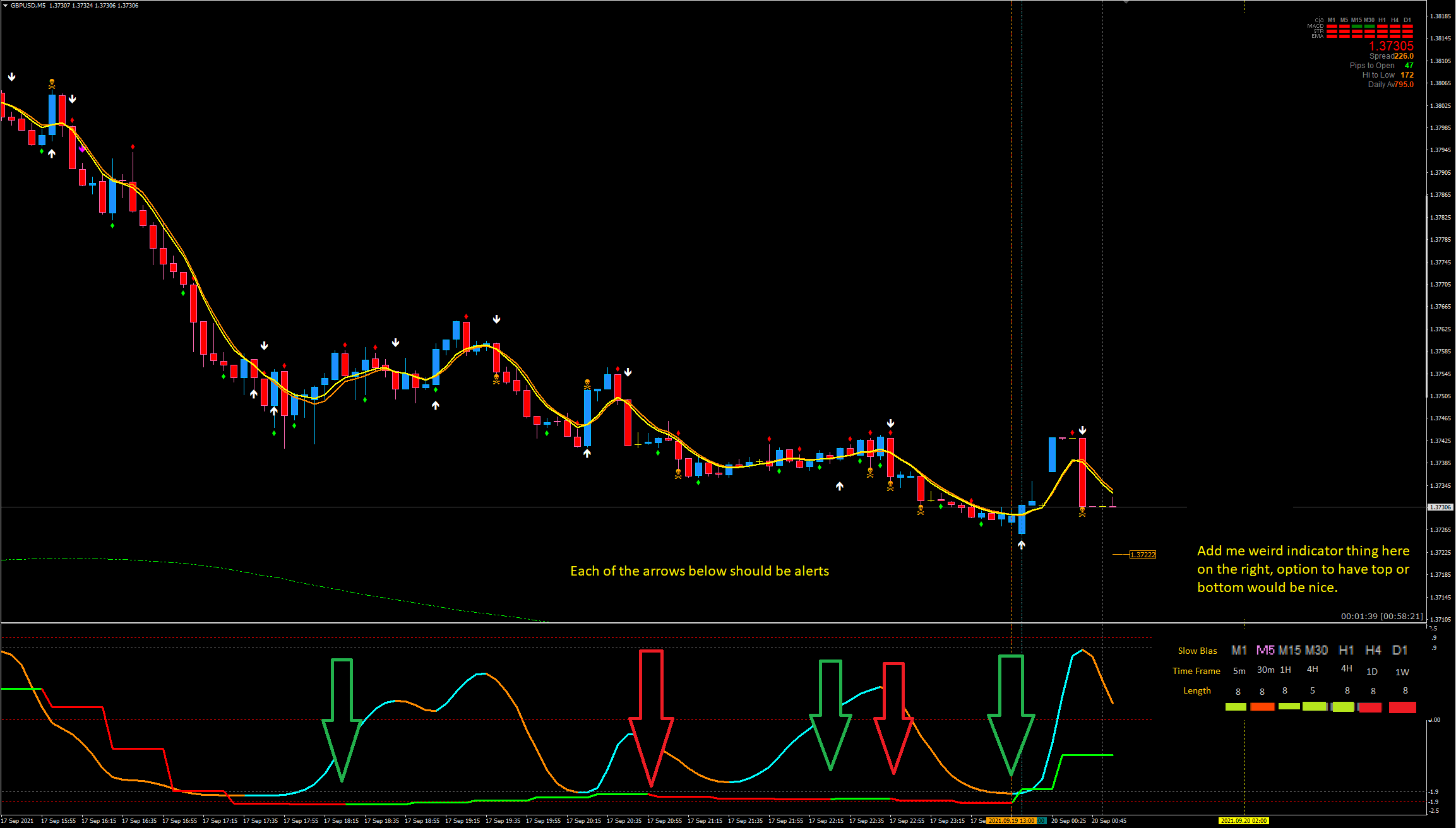
- An alert system, sound notification, popup notification, phone and email all with true false options.
- So on candle close referenace previous colour, if it has changed alert.
- ONLY on candle close the alert should occur.
- e.g. Candle 1 the indicator is red, candle 2 it is now green. Alert.
- Sometimes the previous 4/6 candles also change colour its not always just the newest one.
- This can be a seperate indicator or modify this one
- Fix my janky code that I edited to remove the indication info on the top left.
- I do not want any text in the top left BUT
- I cannot double click the indicator to bring up the settings (not a huge issue but would like it fixed if possible)
- Add a info panel to the right hand side of the indicator box similar to this image below but showing if the slow bias is currently green or red on that time frame.
- You can have a bit of artistic freedom here on the box look, maybe something like below.
- 1m = TF 5m in the indicator settings
- 5m = TF 30m in settings
- 15m = TF 1H in settings
- 30m = TF 4H in settings (but with "Length" 5 instead of 8)
- H1 = TF 4H in settings
- H4 = TF 1D in settings
- D1 = TF 1W in settings
- Might be best to add TF and Length options to each indicator colour at the bottom so its kind of customizable rather than set in stone.
- Make Time frame and Length text gray. Slow bias bronze / orange.

If anything doesnt make sense, please let me know and i will draw up something or try to explain this better.
Regards
Responded
1
Rating
Projects
284
55%
Arbitration
0
Overdue
5
2%
Free
2
Rating
Projects
1410
67%
Arbitration
123
32%
/
41%
Overdue
217
15%
Free
Published: 1 code
3
Rating
Projects
178
39%
Arbitration
4
25%
/
50%
Overdue
14
8%
Free
4
Rating
Projects
1127
43%
Arbitration
47
49%
/
23%
Overdue
84
7%
Free
5
Rating
Projects
91
25%
Arbitration
26
19%
/
54%
Overdue
25
27%
Free
6
Rating
Projects
91
13%
Arbitration
34
26%
/
59%
Overdue
37
41%
Free
Similar orders
Hi, I want to develop a highly accurate, custom technical indicator for MetaTrader 5 (MT5) specifically tailored for 1-minute Binary Options trading (Quotex). I do NOT need an automated trading bot. I only need visual buy/sell arrows on the chart, an advanced alert system, and an on-chart performance statistics dashboard. The indicator must be 100% non-repainting. --- 1. STRATEGY CONFLUENCE LOGIC The indicator should
Ndugelo Ravhengani Bot
30+ USD
Create a bot that can trade and read indicators easy to read for first time users. Bot that can be used on a phone and connect to MT5. It should be easy to install or use on any device especially phone and laptop, preferably the bot that can run over night and controllable when needed
These are orderflow footprint indicator I would like to know if you can algorithmisie and build a stacked imbalance bot from them .. Kindlt let me know if you can do it and check the file before replying me
I have 2 trading view indicators by GainzAlgo that I want code to mt5 , could u advise? I need you to give me response if you can convert This
I DO NOT need any programming or strategy development. I already have a working NinjaTrader 8 automated strategy based on a 3/5 EMA crossover. I need you to run my existing strategy through NinjaTrader Strategy Analyzer/Optimizer, test the existing adjustable parameters, and find robust settings with the best profit factor and lowest reasonable drawdown. I will provide the existing NinjaScript ZIP. I do not want the
Scalping Reaction Zones + Valid Order Blocks
30 - 150 USD
Platform: TradingView Programming Language: Pine Script v6 Type: Custom Indicator Project Name: Scalping Reaction Zones + Valid Order Blocks MAIN GOAL I need a custom TradingView indicator for scalping. The indicator must detect: 1. Reaction / Explosion Zones 2. Valid Order Blocks 3. Combined Reaction Zone + Order Block zones The indicator should NOT generate: Buy signals Sell signals TP SL Entry signals Trading
Project Description I am looking for an experienced MQL5/MT5 Expert Advisor developer to develop an automated trading EA for XAUUSD on the M3 timeframe , running on an Exness account . The EA will automate a manual strategy based on SNR/GAP zones , using two setup types: Price Rejection Price Correction The EA should identify valid BUY/SELL setups around predefined SNR/GAP areas, apply configurable RSI, SMA, EMA and
Maximas e Minimas + Super Trend
35+ USD
Indicador Maximas e Minimas + Super Trend O Indicador MAX/MIN é um indicador de análise técnica para o MetaTrader 5 , desenvolvido para ajudar você a identificar regiões importantes de preço e possíveis oportunidades de compra e venda. O que ele faz MAX/MIN: identifica máximas e mínimas relevantes do mercado e mostra os preços no gráfico. HH / HL / LH / LL: ajuda a visualizar a estrutura do mercado, mostrando quando
Hello Traders, Have a trading strategy or idea you want to automate? I specialize exclusively in MQL5 development, helping traders turn their concepts into professional trading solutions. Custom Expert Advisors — automate your strategy and reduce manual execution Custom Indicators — transform your market ideas into powerful trading tools Fix & Debug — identify errors and get your existing code working properly
I DO NOT need any programming or strategy development. I already have a working NinjaTrader 8 automated strategy based on a 3/5 EMA crossover. I need you to run my existing strategy through NinjaTrader Strategy Analyzer/Optimizer, test the existing adjustable parameters, and find robust settings with the best profit factor and lowest reasonable drawdown. I will provide the existing NinjaScript ZIP. I do not want the
Project information
Budget
30 - 200 USD
Deadline
from 1 to 10 day(s)