 Toutes les commandes
 Règles
Voir comment commander un robot de trading
Lisez les Règles avant de passer une commande ou de l'exécuter
Comment commander un robot de trading dans MQL5 et MQL4
Voir un exemple de spécification des exigences pour commander un robot
Nouvelles commandes dans la catégorie:
700 - 1500 USD
30+ USD
Tâche terminée
Temps d'exécution 1 jour

Commentaires de l'employé
Great customer, prompt communication, clear specs, recommended+
Commentaires du client
Very easy to work with even with my many requests and changes, quick turnarounds and a great understanding of what I was trying to achieve. 100% would work with again. Thanks.
Spécifications
I use this indicator below on a strategy, I do not know the code, how it works and had nothing to do with its inception so you will have to study the indicator your self. Appolgies.
Currently:
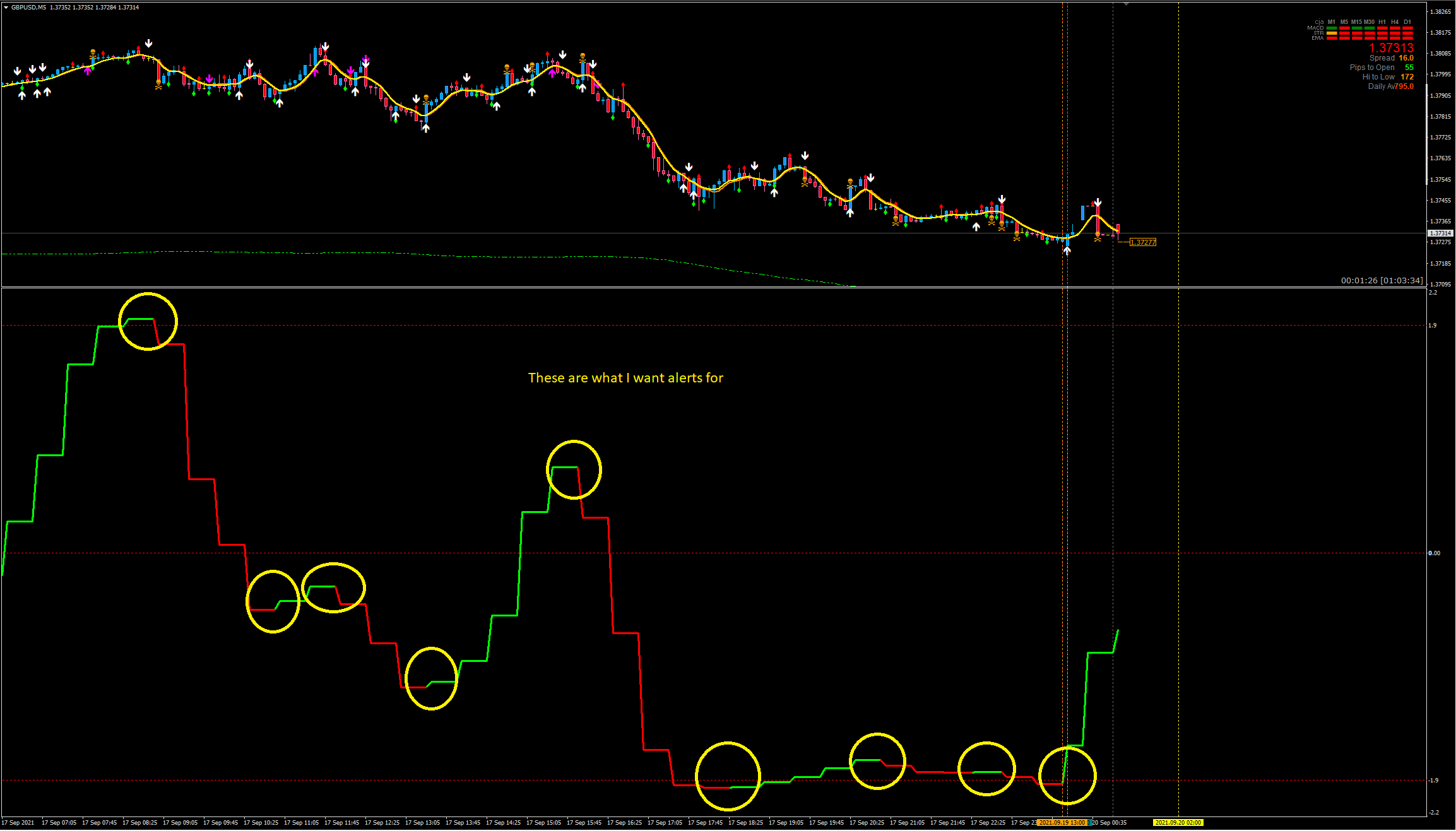
- The inicator displays a slow bias
- Does NOT alert or notify
- On candle close the change of trend (colour) occurs, it is not confirmed for 4-6 candles in a 5m chart i think but I am not 100% sure. Essentially after the first colour change it can sometimes change back quickly on the next candle close.
- I edited the EA code a while ago to remove all the data displayed on the top left of the indicator box, I would like to keep all data off this screen but I am unable to double click the indicator to open settings. Only by going to indicators, options, etc i can change things.
I would like:
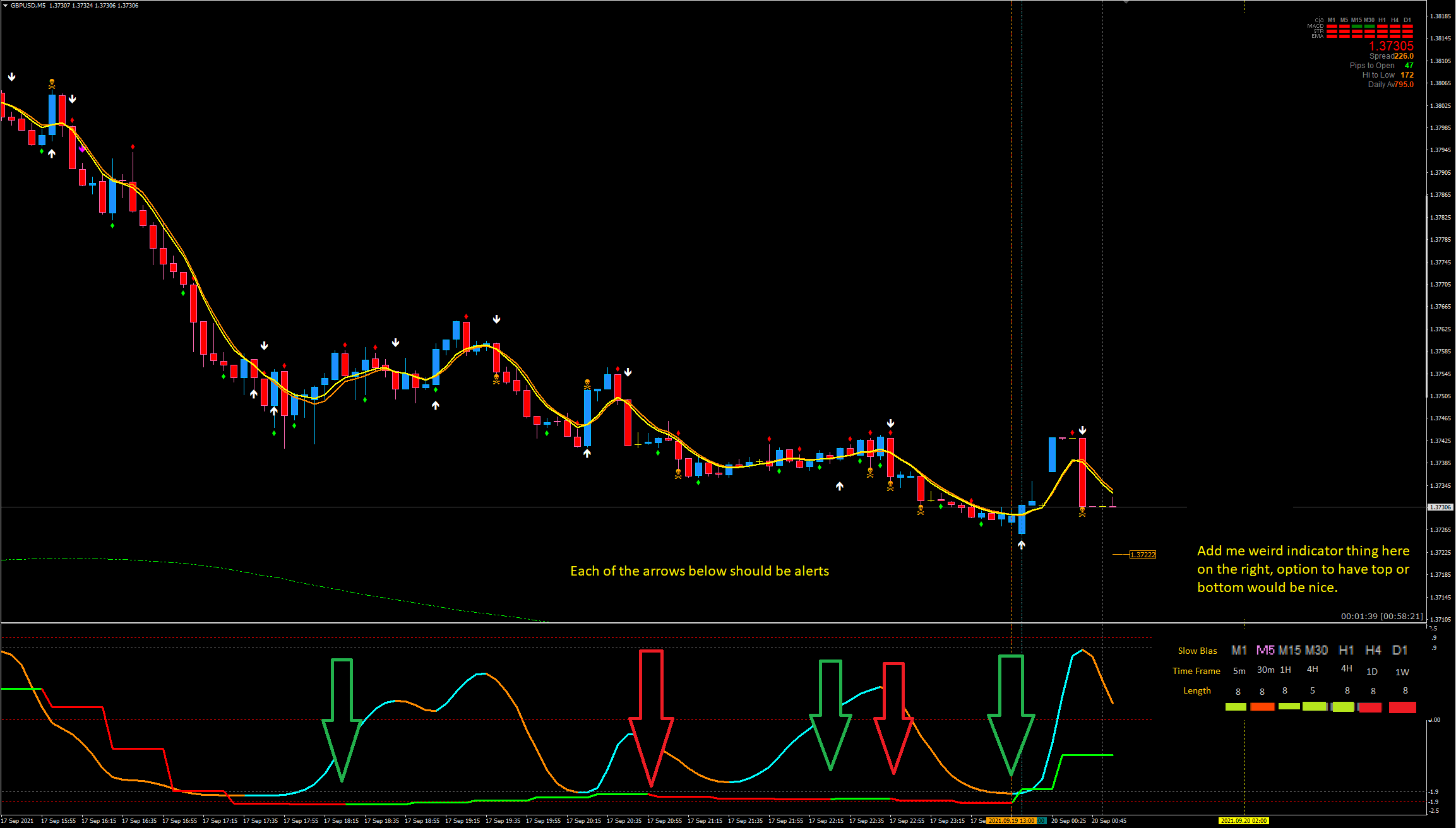
- An alert system, sound notification, popup notification, phone and email all with true false options.
- So on candle close referenace previous colour, if it has changed alert.
- ONLY on candle close the alert should occur.
- e.g. Candle 1 the indicator is red, candle 2 it is now green. Alert.
- Sometimes the previous 4/6 candles also change colour its not always just the newest one.
- This can be a seperate indicator or modify this one
- Fix my janky code that I edited to remove the indication info on the top left.
- I do not want any text in the top left BUT
- I cannot double click the indicator to bring up the settings (not a huge issue but would like it fixed if possible)
- Add a info panel to the right hand side of the indicator box similar to this image below but showing if the slow bias is currently green or red on that time frame.
- You can have a bit of artistic freedom here on the box look, maybe something like below.
- 1m = TF 5m in the indicator settings
- 5m = TF 30m in settings
- 15m = TF 1H in settings
- 30m = TF 4H in settings (but with "Length" 5 instead of 8)
- H1 = TF 4H in settings
- H4 = TF 1D in settings
- D1 = TF 1W in settings
- Might be best to add TF and Length options to each indicator colour at the bottom so its kind of customizable rather than set in stone.
- Make Time frame and Length text gray. Slow bias bronze / orange.

If anything doesnt make sense, please let me know and i will draw up something or try to explain this better.
Regards
Répondu
1
Évaluation
Projets
284
55%
Arbitrage
0
En retard
5
2%
Gratuit
2
Évaluation
Projets
1410
67%
Arbitrage
123
32%
/
41%
En retard
217
15%
Gratuit
Publié : 1 code
3
Évaluation
Projets
178
39%
Arbitrage
4
25%
/
50%
En retard
14
8%
Gratuit
4
Évaluation
Projets
1127
43%
Arbitrage
47
49%
/
23%
En retard
84
7%
Gratuit
5
Évaluation
Projets
91
25%
Arbitrage
26
19%
/
54%
En retard
25
27%
Gratuit
6
Évaluation
Projets
91
13%
Arbitrage
34
26%
/
59%
En retard
37
41%
Gratuit
Informations sur le projet
Budget
30 - 200 USD
Délais
de 1 à 10 jour(s)