Indicators: ColorZerolagJJRSX
Monthly earnings of more than 1,000 points of VIP shouting service free experience, plus QQ group 375124107, plus group please note: 77, thank you for your cooperation.
alas. the indicator window remains empty when placed on a chart. i.e. nothing is displayed. at all.
ikatrina:
alas. when I put it on a chart, the indicator window remains empty. i.e. nothing is displayed. at all.
alas. when I put it on a chart, the indicator window remains empty. i.e. nothing is displayed. at all.
The indicator works as it did! Nothing new.
For the indicator to work correctly, the compiled JJRSX.ex5 indicator file must be present in the <terminal_data_directory>\MQL5\Indicators folder. Find out where you have this file?

You are missing trading opportunities:
- Free trading apps
- Over 8,000 signals for copying
- Economic news for exploring financial markets
Registration
Log in
You agree to website policy and terms of use
If you do not have an account, please register
ColorZerolagJJRSX:
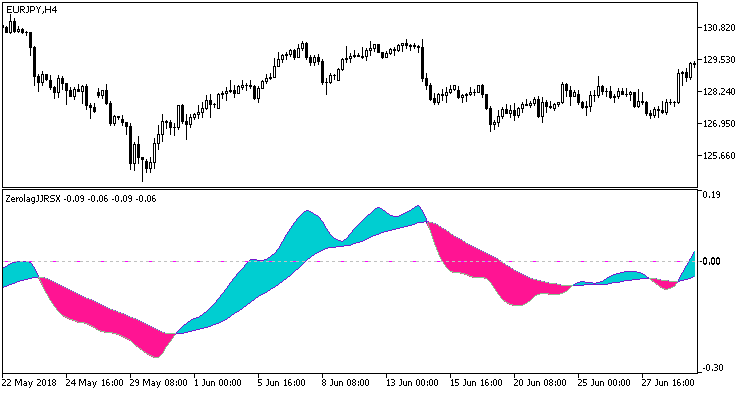
This variant of JJRSX oscillator is calculated based on five JJRSX indicators.
All editable variables are implemented as indicator input parameters. However, keep in mind that these variables are interdependent to some extent, so you should adjust them more carefully!
FactorN input variables represent the unit weight of JJRSX with number N in total indicator value.
This indicator requires the compiled indicator file JJRSX.ex5. Place it in <terminal_data_folder>\MQL5\Indicators.
Fig.1. The ColorZerolagJJRSX indicator
Author: Nikolay Kositsin