The latest MT5 update is causing extremely high CPU usage - page 2

You are missing trading opportunities:
- Free trading apps
- Over 8,000 signals for copying
- Economic news for exploring financial markets
Registration
Log in
You agree to website policy and terms of use
If you do not have an account, please register
Based on a Moderator's latest Release Build archive, you're using a Beta (experimental) Build:
Not sure how you come to that conclusion.
I didn't necessarily post all releases on this archive.
I am still unsure if build 6061/6063 are beta or intended as release with bug fix. I am trying to get more information from MetaQuotes.
I am still unsure if build 6061/6063 are beta or intended as release with bug fix. I am trying to get more information from MetaQuotes.
Thank you. Another user Messaged me regarding the latest Release Build. I will relay your reply from Metaquotes after you post it.
Edit: In Metaquotes' Demo terminal, Build 6062 showed as the latest Release Build, and Build 6063 showed as the latest Beta Build. Is that dispositive?
Thanks.
So it took 44 minutes to restart without any intervention on your side ? Or did you restart it manually ?
This item belongs to my friend. I will check with them again once I can contact them, as they are currently unreachable.
Regarding mine, I had to restart the VPS because the CPU reached 100% utilization, causing the entire VPS to freeze (making it impossible to identify which MT5 terminal was updating). After the reboot, all instances were updated to Build 6063, and CPU usage normalized
Today I saw 5 cases with the same problem in my trader group, so I'm not sure if they closed it themselves or let it finish updating.
As for the case I sent you the log for, I told them to wait until it's done updating
Not sure how you come to that conclusion.
I didn't necessarily post all releases on this archive.
I am still unsure if build 6061/6063 are beta or intended as release with bug fix. I am trying to get more information from MetaQuotes.
Confirmed 6063 will be the last release (6060/6061 with some bug fixes).
Confirmed 6063 will be the last release (6060/6061 with some bug fixes).
Thanks.
So it took 44 minutes to restart without any intervention on your side ? Or did you restart it manually ?
He killed the process and restarted it because it was taking too long
Thank you
It's ocorring the same thing at my Metatrader 5. Its just workink at 2 cpu cores to visualization
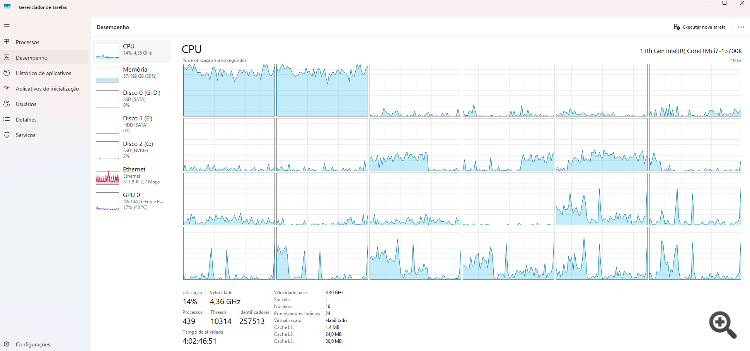
Here at another computer (Computer_2.log):
It's ocorring the same thing at my Metatrader 5. Its just workink at 2 cpu cores to visualization
Here at another computer (Computer_2.log):
Computer_2.log is showing build 5833.
20260727.log is showing B6061, so it's already updated.
It is unclear what you are showing. Please describe what you did exactly ?
Computer_2.log is showing build 5833.
20260727.log is showing B6061, so it's already updated.
It is unclear what you are showing. Please describe what you did exactly ?
Sorry, I had rolled back the .exe files to build 5833 on Computer 2 (just overwriting the executables "MetaEditor64.exe", "metatester64.exe" and "terminal64.exe") to see if the CPU usage would go back to what it was before.
Other times when an update broke my MetaTrader, I'd replace the .exe files with ones from an older version and it would work normally again — this time it didn't. So apparently just rolling back the .exe files doesn't fix the CPU usage problem.
Here's the log from Computer 2, this time running on build 6061.
Sorry, I had rolled back the .exe files to build 5833 on Computer 2 (just overwriting the executables "MetaEditor64.exe", "metatester64.exe" and "terminal64.exe") to see if the CPU usage would go back to what it was before.
Other times when an update broke my MetaTrader, I'd replace the .exe files with ones from an older version and it would work normally again — this time it didn't. So apparently just rolling back the .exe files doesn't fix the CPU usage problem.
Here's the log from Computer 2, this time running on build 6061.
Ok thanks, nothing noticeable in the log.
What is the problem exactly ? Just this high CPU usage or other symptoms ?
Did you try to remove your EAs from the charts ?