EA not executing when migrated to VPS
what is the code of your debug ea? but if I was in same situation you have described, then i would have asked service desk to move my vps to different server or location.
But regarding payment i suggest that you do a manual loading of your mql5 wallet each month instead of doing automatic cc payment. the automatic system has always been unreliably, unreliable. This may have been the root cause of your issues. ie the automatic system might not have caught up yet and not noticed that the payment was successful which i assume that it was unsuccessful a few times before it was finally successful -- in the mean time your vps might have become expired.
what is the code of your debug ea? but if I was in same situation you have described, then i would have asked service desk to move my vps to different server or location.
But regarding payment i suggest that you do a manual loading of your mql5 wallet each month instead of doing automatic cc payment. the automatic system has always been unreliably, unreliable. This may have been the root cause of your issues. ie the automatic system might not have caught up yet and not noticed that the payment was successful which i assume that it was unsuccessful a few times before it was finally successful -- in the mean time your vps might have become expired.
thank you for the swift reply. Service Desk stopped responding to my ticket.
First statement: subs expired;
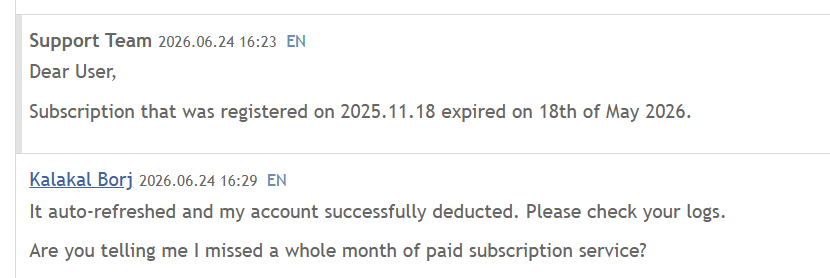
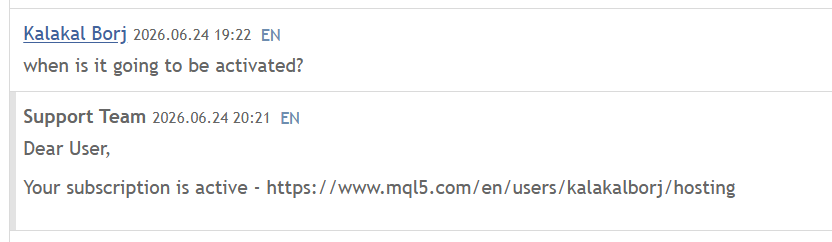
which they retracted 4hrs later. this is also the last message I got from them.
what is the code of your debug ea? but if I was in same situation you have described, then i would have asked service desk to move my vps to different server or location.
But regarding payment i suggest that you do a manual loading of your mql5 wallet each month instead of doing automatic cc payment. the automatic system has always been unreliably, unreliable. This may have been the root cause of your issues. ie the automatic system might not have caught up yet and not noticed that the payment was successful which i assume that it was unsuccessful a few times before it was finally successful -- in the mean time your vps might have become expired.
thank you for the swift reply. Service Desk stopped responding to my ticket.
First statement: subs expired;
which they retracted 4hrs later. this is also the last message I got from them.
https://www.mql5.com/en/vps/subscriptions
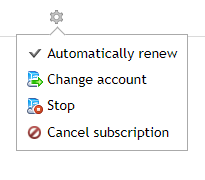
Yes Sergey, I confirmed Subs is active. Thanks for this screenshot, I have turned off the Auto renew, as that seems to be the root cause.
I have also asked the Service Desk to move my VPS to a new location as suggested by @Michael Charles Schefe
Let's see what they will reply.
they moved to another server.
Still not working.
The debug OnTick messages are firing hours later after migrating to VPS
they moved to another server.
Still not working.
The debug OnTick messages are firing hours later after migrating to VPS
well if you assume that the debugging ea is working, then, it must be your broker, right?
i suggest that you try to prove that your ea is not causing issues -- by removing your trading ea from the vps, and just have the debugging ea on the vps. if you continue to have the same issue, then you have proven that it is not your trading ea.
well if you assume that the debugging ea is working, then, it must be your broker, right?
Wait. this is new to me.I didn't know that's a possibility. how do I troubleshoot this?
Also, does it help add more context if I say that the EA when loaded into the local MT4, the expert tab is showinf the debugging messages -- per tick.
it's when uploaded/migrated/sync to VPS, that it becomes silent.
Wait. this is new to me.I didn't know that's a possibility. how do I troubleshoot this?
Also, does it help add more context if I say that the EA when loaded into the local MT4, the expert tab is showinf the debugging messages -- per tick.
it's when uploaded/migrated/sync to VPS, that it becomes silent.
sounds like your trading ea is incompable for some reason. if your ea requires a dll then it can not work on the vps. otherwise without seeing the code of your ea we can not give any more suggestions.
No worries:
Here's the EA code.
//+------------------------------------------------------------------+
#property copyright "Copyright 2025, TheBreadwinnerBoss"
#property link "https://www.mql5.com"
#property version "1.00"
#property strict
//+------------------------------------------------------------------+
//| Expert initialization function |
//+------------------------------------------------------------------+
int OnInit()
{
//---
Print("STEP 1");
//---
return(INIT_SUCCEEDED);
}
//+------------------------------------------------------------------+
//| Expert deinitialization function |
//+------------------------------------------------------------------+
void OnDeinit(const int reason)
{
//---
Print("Deinit completed");
}
//+------------------------------------------------------------------+
//| Expert tick function |
//+------------------------------------------------------------------+
void OnTick()
{
datetime gTime_LastProcessedBar = 0;
//---
Print("Tick Received: ", TimeCurrent());
//-----------------------------------
// Bar-level processing
//-----------------------------------
datetime thisM15BarOpenTime =
iTime(Symbol(),PERIOD_M15,0);
if(gTime_LastProcessedBar == 0)
{
gTime_LastProcessedBar = thisM15BarOpenTime;
return;
}
// Detect new bar
if(thisM15BarOpenTime != gTime_LastProcessedBar)
{
Print("NEW BAR DETECTED");
gTime_LastProcessedBar = thisM15BarOpenTime;
}
}
//+------------------------------------------------------------------+

- 2026.06.25
- www.mql5.com

- Free trading apps
- Over 8,000 signals for copying
- Economic news for exploring financial markets
You agree to website policy and terms of use
I really need help as Service Desk support stopped responding.
I've been creating and testing EAs since May 2025. Still new and learning, but making progress. I have seen my EAs generate profit and incur losses.
since my EA was built for GOLD Long only, and I get more losses than profit, I turned it off since May15. Got busy with day job, and I only got back into coding 5 days ago.
My VPS 6-mos subs ended in 5/18, but since it's on an auto-prolong, it should remain active as it has successfully debited my CC.
I said should, coz I realized only 2 days ago, when I migrated a new EA I am experimenting on, that it is not.
My EA runs well in Strategy Tester, but when migrate to VPS, I noticed it didnt even fire the custom initialization log.
I notice that my VPS details says: for account unknown user. It used to have my name in there.
I raised to Service Desk. First they said, my account expired. then I showed proof from the payment tab. Their next reply is : your subscription is active.
Nothing else despite all my messages to them, showing VPS Terminal and Expert logs.
Below is sample VPS expert log:
initialized 10:42, then the first "new bar detected" debug message was less than 30 mins.
I also even tried to upload a basic EA with nothing but debug messages for init ("STEP 1") the new line detection for M15 didnt show either.
And I only get to see these debug lines once, 2 hrs after loaded successfully, and nothing follows.
What other troubleshooting steps should I try?