Trading Accounts not showing my Purchased Ea's
If you really bought those EAs ubder your username (and if the fund already came to the Market as int'l payment) so you can see them/EAs in your profile here:
www.mql5.com/en/users/heathfx56789/market
If yes so you can refresh the Purchased tab on the following way:
Forum on trading, automated trading systems and testing trading strategies
The purchased tab is only showing the last two purchases
Alexey Petrov, 2021.01.19 11:17
Even if a Market product is removed from the showcase, those who already purchased it, can install it anytime from their MetaTrader terminal (Market \ Purchased section).
In case you don't see the product on the list of your purchases in the terminal, try the following:
- Close all your MetaTrader terminals
- Go to C:\Users\{user name}\AppData\Roaming\MetaQuotes\Terminal\Community
- Delete all files starting from mql4.market.* and mql5.market.*
- Open MetaTrader terminal
- Try to install product again

- www.mql5.com
Hello,
I don't know where else to write this, worry if its in the wrong place.
I have tried to write to the stupid chat bot, but cant get anywhere.
I have accounts with multiple brokers, But I am not able to see my purchased EA's for over a 10 days now so I'm getting annoyed and frustrated.
I wasn't able to see my purchased EA's for a week, then it seemed to update but, still it showed only 3 of them, I have purchased over 20. I cant update some of the EA's because they don't show in the Purchased tab and they are no longer working. I have tried installing a new MT4 version, its the same, only 3 of them showing. There is something wrong my MQL5 side of things since its the exactly the same on all brokers.....or something wrong with my specific account.
Does anyone else have the same issue?? Any ideas how to fix?
Thank in advance.
Heath
If you really bought those EAs ubder your username (and if the fund already came to the Market as int'l payment) so you can see them/EAs in your profile here:
www.mql5.com/en/users/heathfx56789/market
If yes so you can refresh the Purchased tab on the following way:
Its not showing just the last 2, its showing 3 random ordered some. Im trying to the do the process that you said but im not that technical so i might have to ask again.
Once ive gone into c drive, i see this, i cant seem to find the pathway you suggested. where should i go from here?
Sorry if im an idiot, thanks for your help

Forum on trading, automated trading systems and testing trading strategies
The purchased tab is only showing the last two purchases
Alexey Petrov, 2021.01.19 11:17
Even if a Market product is removed from the showcase, those who already purchased it, can install it anytime from their MetaTrader terminal (Market \ Purchased section).
In case you don't see the product on the list of your purchases in the terminal, try the following:
- Close all your MetaTrader terminals
- Go to C:\Users\{user name}\AppData\Roaming\MetaQuotes\Terminal\Community
- Delete all files starting from mql4.market.* and mql5.market.*
- Open MetaTrader terminal
- Try to install product again
----------------------
MT4 or MT5?
I am asking because MT4 EAs works with MT4 only, and MT5 EAs works for MT5 only.
----------------------
In Metatrader:
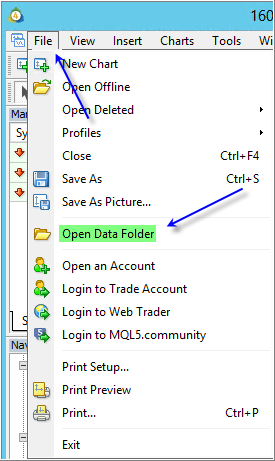
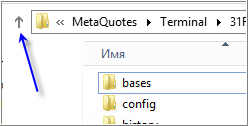
1. File - Open Data Folder - press here -
---------------
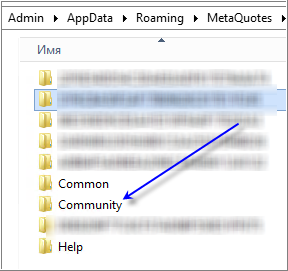
2. find Community folder -
---------------
3. close all Metatrader instances (all MT4 and all MT5);
---------------
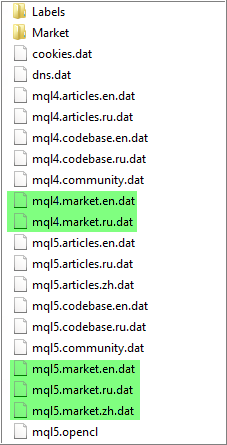
4. delete mql4.market.* and mql5.market.* from Community folder -
---------------
5. open Metatrader(s), check Community tab (to be sure that you already in login with that), and check Purchased folder.
----------------------
MT4 or MT5?
I am asking because MT4 EAs works with MT4 only, and MT5 EAs works for MT5 only.
----------------------
In Metatrader:
1. File - Open Data Folder - press here -
---------------
2. find Community folder -
---------------
3. close all Metatrader instances (all MT4 and all MT5);
---------------
4. delete mql4.market.* and mql5.market.* from Community folder -
---------------
5. open Metatrader(s), check Community tab (to be sure that you already in login with that), and check Purchased folder.
WOW!!! its fixed. I deleted it on the demo account i have and it fixed all instances of the real accounts i was running too.
I was worried to deleted from the live accounts it cause i thought it was going to uninstall the EA's i had working from the mql site (i couldnt update but whatever i had working were still working), so i didn't want to lose what i had, but i did it on the demo account and it has fixed all my other live accounts.
Thank you, Thank you, Thank you Sergey!!

- Free trading apps
- Over 8,000 signals for copying
- Economic news for exploring financial markets
You agree to website policy and terms of use
Hello,
I don't know where else to write this, worry if its in the wrong place.
I have tried to write to the stupid chat bot, but cant get anywhere.
I have accounts with multiple brokers, But I am not able to see my purchased EA's for over a 10 days now so I'm getting annoyed and frustrated.
I wasn't able to see my purchased EA's for a week, then it seemed to update but, still it showed only 3 of them, I have purchased over 20. I cant update some of the EA's because they don't show in the Purchased tab and they are no longer working. I have tried installing a new MT4 version, its the same, only 3 of them showing. There is something wrong my MQL5 side of things since its the exactly the same on all brokers.....or something wrong with my specific account.
Does anyone else have the same issue?? Any ideas how to fix?
Thank in advance.
Heath