"#property indicator_buffers" update fails in Projects


Subject: MetaEditor 5 Bug (Build 5660): "#property indicator_buffers" update fails in Projects (.mqproj)


Hello everyone,

I've encountered a critical bug in MetaEditor 5 when working within the Project mode (.mqproj) in the "Shared Projects" folder. This issue significantly hinders development and leads to runtime errors.

The Issue:
When increasing the number of buffers via the #property indicator_buffers directive (e.g., from 5 to 8) in the main indicator file, the compiler throws the following warning:
"property already exists with different value and will be skipped"

As a result, the terminal does not allocate memory for the new buffers, which leads to an "array out of range" error when the code attempts to access these new indices. It seems the compiler "sticks" to the old value stored somewhere in the project's metadata.

Technical Environment:
- Terminal/MetaEditor: MetaTrader 5 Build 5660.
- OS: Windows 10.
- File Type: Project (.mqproj) located in Shared Projects.

Key Observations:
1. The bug is random but persistent: It doesn't always happen on the first change, but once it "locks" a value, it refuses to update.
2. Isolated file test: If I create a copy of the exact same .mq5 file in the same folder (not as part of the project) and compile it, the warning disappears and the indicator works perfectly.
3. Reverting the value: If I change the buffer count back to the previous "known" value, the warning disappears.
4. Workarounds: Recreating the project from scratch fixes it, but this is a "crutch" because it results in the loss of commit history in MQL5 Storage and causes Git synchronization issues.

It appears there is a synchronization bug between the .mq5 source code and the .mqproj metadata/cache. The compiler seems to prioritize a cached property value over the actual code in the file.

Please see the attached screenshots:
1) The warning in the compiler log.
2) Warning disappearing when reverting to the previous buffer count.
3) Successful compilation of the same code as a standalone file (copy) outside the project structure.

Looking forward to a fix in the upcoming builds.
Files:
1.png  75 kb
2.png  67 kb
3.png  92 kb
 

What does your Storage journal show?

"Versioned data storage...

  • When you submit changes, it may turn out that the file has already been edited by someone and the revision number in the repository is greater than your local one. In this case, you should extract changes from the repository before sending your own changes. MQL5 Storage will try to merge changes in the repository and your local file. In this case, the revision number of the local file will be set equal to the revision number of the file in the repository.

Each transaction of changes is recorded in the Storage journal, and later the user can view when, by whom and what files were changed. The user can also update the local data copy to a selected revision and revert changes to a selected revision."

Working with Storage - Projects and MQL5 Storage - MetaEditor Help
  • www.metatrader5.com
The MQL5 Storage (or repository) only works with the MQL5 (or MQL4) folder of the trading platform, and with the special Shared Projects directory...
 
Alexandr Nikolaev:
Subject: MetaEditor 5 Bug (Build 5660): "#property indicator_buffers" update fails in Projects (.mqproj)

Hello everyone,

I've encountered a critical bug in MetaEditor 5 when working within the Project mode (.mqproj) in the "Shared Projects" folder. This issue significantly hinders development and leads to runtime errors.

The Issue:
When increasing the number of buffers via the #property indicator_buffers directive (e.g., from 5 to 8) in the main indicator file, the compiler throws the following warning:
"property already exists with different value and will be skipped"

As a result, the terminal does not allocate memory for the new buffers, which leads to an "array out of range" error when the code attempts to access these new indices. It seems the compiler "sticks" to the old value stored somewhere in the project's metadata.


This is not a bug, this is a feature - look here for the reference.

Bottom line: don't use a project, if you want to edit a standalone indicator properties. If you need the project (and the indicator in it), change properties in the project, not in the indicator.

MQL5 Book: General rules for working with local projects / Advanced language tools
  • www.mql5.com
A local project (mqproj file) can be created from the MetaEditor main menu or from the Navigator context menu using commands New project or New...
 

Ошибки, баги, вопросы

Vladislav Boyko, 2026.03.06 19:42

Because there must be a single source of truth — either #property or .mqproj.

In your .mqproj file, the property value differs from the one specified in the #property directive. The compiler gives priority to the .mqproj file and warns you that the #property directive will be ignored.

  • If you specified the property in the .mqproj file, then do not specify it via #property (and change the property in the .mqproj file when needed).
  • If you want to use #property, then do not specify the corresponding property in .mqproj.

Ошибки, баги, вопросы

Vladislav Boyko, 2026.03.06 20:04

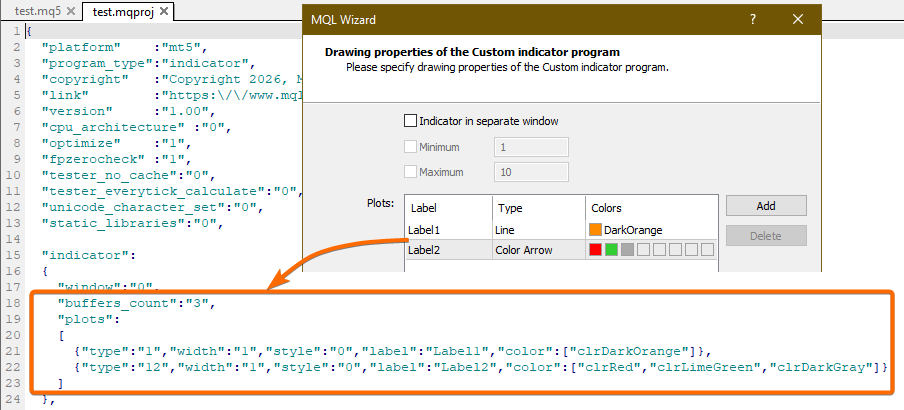
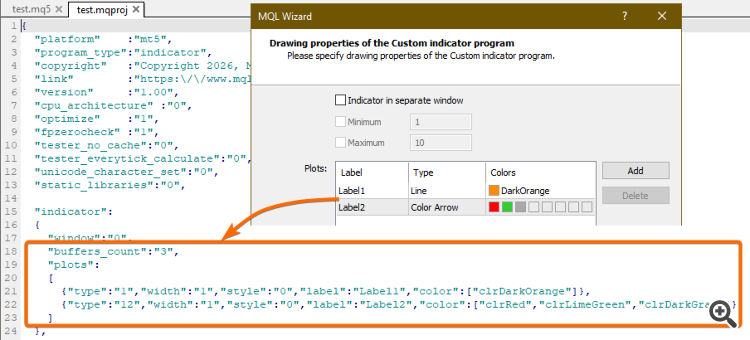
  • buffers and plots will be specified in the .mqproj file if, when creating the project, you add plots through the wizard:


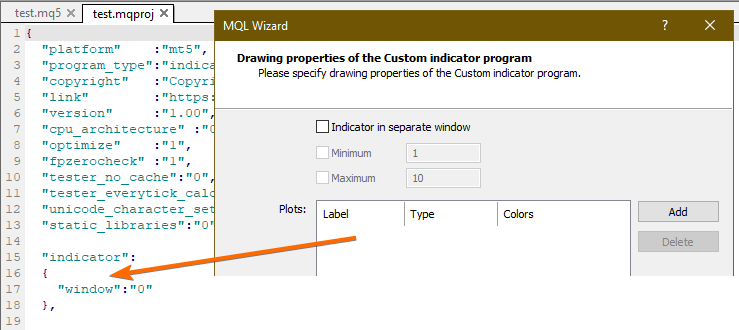
  • If you do not add plots through the wizard, the compiler will take buffers and plots from #property (these properties will not be specified in the .mqproj file):