Purchased algo nnot apprearing in navigation panel
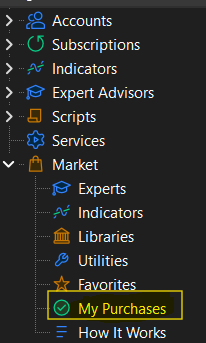
Hello, I have purchased an algo but i cannot see it in my navigator panel in the market inorder for me to attach it on the chart. Can anyone help, It wan appearing before but i mistakenly deleted it..
- MQL5 Algotrading community
- MQL5.community: Community of Traders
- How to Purchase an App - Market App Store
algo is EA/robot, right? from MQL5 Market?
If you deleted your purchase from Metatrader so you can install it once again from/to same Metatrader.
Check about how to install:

How to buy, install, test and use a MT4 Expert Advisor
- 2021.03.30
- www.mql5.com
Here is a step by step guide for buying, installing, testing and using a metatrader 4 expert advisor 1. On the left side of the market tab, click the purchased option and then click the blue install button on the right side, of the product you t see your purchase when you click the purchased option, check the below mentioned issues that you have internet explorer or microsoft edge latest version installed on your computer or vps that you are using the latest build of metatrader 4 that you are logged into your mql5 account in mt4 community tab, using your login - not your email that your mql5 account password is less than 10 characters if your password is 10 or more characters - change mql5 account password t see the product on the list of your purchases in the terminal, try the following your metatrader terminals go to c community delete all files starting from mql4

You are missing trading opportunities:
- Free trading apps
- Over 8,000 signals for copying
- Economic news for exploring financial markets
Registration
Log in
You agree to website policy and terms of use
If you do not have an account, please register