[Solved] No purchased tab
Hello, I have a problem with my MetaTrader 5 terminal (Build 5147 ). I have successfully logged into my MQL5 account 'IwanSuryo', and the journal confirms 'MQL5.community activated'. However, the 'Purchased' tab in the Market section is not visible, even after restarting the terminal. Because of this UI bug, I cannot reinstall my purchased products, for example 'Aussie Victor MT5'. My purchases are all visible on the website. Can you please help?

Productivity - USA - Fundamental Analysis - Price Charts, Technical and Fundamental Analysis - MetaTrader 5 Help
- www.metatrader5.com
The productivity index measures the output produced for each hour of labor worked. This indicator is useful for predicting inflation and output...
- my purchased indicator is not showing up in my mt4 terminal in the market tab
- Automatic checking of products in the Market (questions and suggestions)
- Signals Tab
The latest official/stable build of MT5 is 5120 so seems you are using beta build.
The purchase tab is located in Nevigator now:
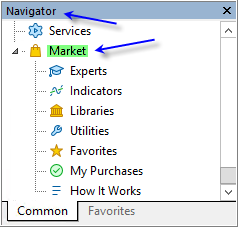
And make sure that you are using the latest Windows versions (Windows 10 64-bit or Windows 11 64-bit with all the updates).
Sergey Golubev #:
The latest official/stable build of MT5 is 5120 so seems you are using beta build.
The purchase tab is located in Nevigator now:
And make sure that you are using the latest Windows versions (Windows 10 64-bit or Windows 11 64-bit with all the updates).
Thank you very much. It has been solved now

You are missing trading opportunities:
- Free trading apps
- Over 8,000 signals for copying
- Economic news for exploring financial markets
Registration
Log in
You agree to website policy and terms of use
If you do not have an account, please register