Error in the 'reports' module?


Thanks!!
I seems to be an error with how MT5 builds the history and stores it. On my desktop PC I have buggy equity on the report.
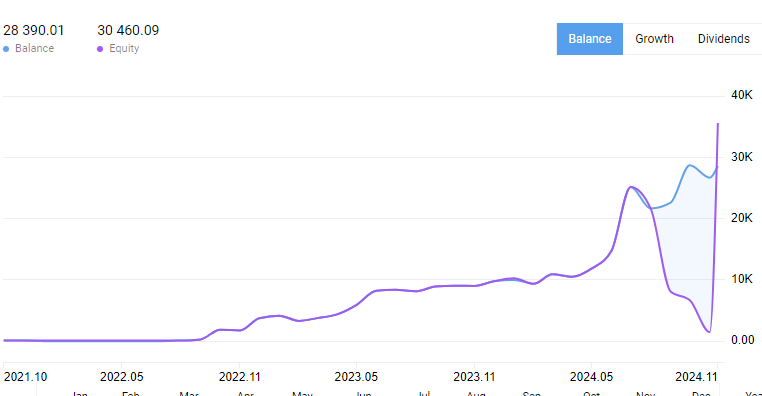
However on VPS if I run the report for the first time on the account it shows correct values.
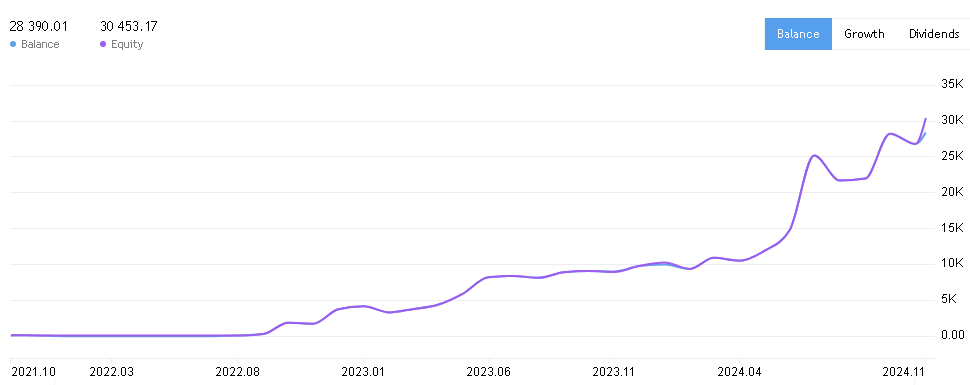
I fixed by deleting the cache and letting MT5 recreate it:
1) Open up your data folder in MT5 (ctrl+shift+d)
2) Close down MT5
3) Navigate to this folder: bases\<BrokerServer>\trades\<accountnumber> For me this was similar to bases\Exness-MT5Real10\Trades\12345678
4) Delete all files in the folder
5) Re-open MT5 and open the account report again, it will rebuild cache and show correct equity.
I seems to be an error with how MT5 builds the history and stores it. On my desktop PC I have buggy equity on the report.
However on VPS if I run the report for the first time on the account it shows correct values.
I fixed by deleting the cache and letting MT5 recreate it:
1) Open up your data folder in MT5 (ctrl+shift+d)
2) Close down MT5
3) Navigate to this folder: bases\<BrokerServer>\trades\<accountnumber> For me this was similar to bases\Exness-MT5Real10\Trades\12345678
4) Delete all files in the folder
5) Re-open MT5 and open the account report again, it will rebuild cache and show correct equity.
Great, thanks for replying!
This solution works correctly!, Thanks @StraySilver
Thanks for the solution.

- Free trading apps
- Over 8,000 signals for copying
- Economic news for exploring financial markets
You agree to website policy and terms of use
Hello everyone.
I want to share this possible "mistake" and understand if I am misinterpreting the data or this is an error in the Platform
The module reports does not show correctly the info related to equity
As you can see, the Equity in the info is a $8.411,81 but the report in the line is another number ($3.327,40)
The real number, based in the history is the "box" value.
Is this an error? Has anyone else experienced the same problem?
I want to confirm that the previous low equity value is also incorrect, and the last position was closed 3 hours ago. I have restarted MT5 three times.
2024.07.23 08:11:40.387 Terminal MetaTrader 5 x64 build 4410 started for MetaQuotes Software Corp.
2024.07.23 08:11:40.388 Terminal Windows Server 2019 build 17763 on VMware, 4 x Intel Xeon Platinum 8260 @ 2.40GHz, AVX2, 1 / 7 Gb memory, 100 / 149 Gb disk, UAC, admin, GMT+1