Libraries: BestInterval
It may seem that the library has something in common with such a chart in the standard MT5 Tester report
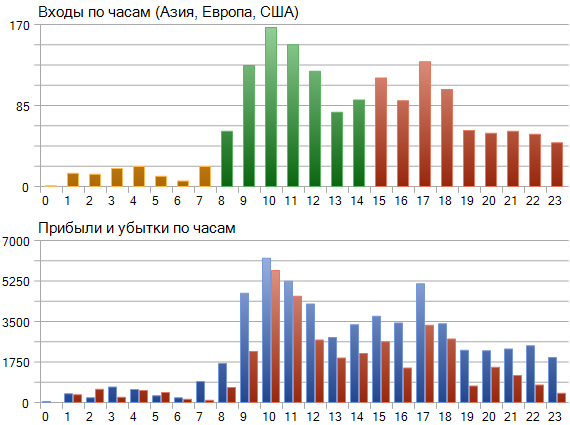
An example of how to get data for such a chart is below
#include <MT4Orders.mqh> // https://www.mql5.com/en/code/16006
#include <fxsaber\BestInterval\BestInterval.mqh> // https://www.mql5.com/en/code/22710

void OnStart()
{
  BESTINTERVAL BestInterval; // Created an object to calculate the best trading interval

  BestInterval.Set(); // Posted a history of bidding
  BestInterval.DeleteWorseInterval() // Threw away a bad interval

  double Profit[24], Loss[24];

  ArrayInitialize(Profit, 0);
  ArrayInitialize(Loss, 0);

  for (int i = BestInterval.GetAmount() - 1; i >= 0; i--)
  {
    const DEAL Deal = BestInterval[i];     // i-th deal in the recalculated trade history
    const int hour = Deal.OpenTime % 3600; // hour of the i-th transaction

    // Distribute the profit to the respective arrays
    if (Deal.Profit > 0)
      Profit[hour] += Deal.Profit;
    else
      Loss[hour] -= Deal.Profit;
  }
}
But in fact the library is not intended for single runs or visualisation. It is 99% necessary for TS Optimisation, because it allows you to dig out cool modes of any TS, if such modes are embedded in it, albeit secretly.
The log shown in the library is the stage of analysis after Optimisation: a single run. This log simply makes it clear how a particular instance of the TS (a set of input parameters) behaves at the calculated intervals. I.e. it is an additional control, but at the final stage. The basis is Optimisation.
The library uses MT4Orders to retrieve the trading history.
There may be various reasons why MT4Orders should not be used. For example, for third-party trade analysers.
In any case, this scenario is provided:
#include <fxsaber\BestInterval\BestInterval.mqh> // Calculation of the best trading interval

void OnDeinit( const int )
{
  BESTINTERVAL BestInterval; // Created an object to calculate the best trading interval

  // Array of closing deals
  DEAL Deals[];

  // We need to write two fields for each closing transaction
  // Deals[i].Profit - profit of the deal closing the position
  // Deals[i].OpenTime - time of opening (not closing) the position that the deal closes

// BestInterval.Set(); // Put trading history - uses MT4Orders
  BestInterval.Set(Deals); // Posted a self-prepared bidding story

  const int AmountIntervals = 3; // How many worst-case trade intervals to throw away

  for (int i = 0; i < AmountIntervals; i++)
    if (BestInterval.DeleteWorseInterval()) // If something was thrown away
      Print(BestInterval.ToString());       // Let's print out the obtained trade data
    else
      break;                                // Otherwise, we're out
}
I.e. you can input whatever data you want to calculate the best interval. The library is platform-independent.
Please note that the bibla algorithm does not involve any internal optimisation of parameters. There is no overshooting, because the basis is single-pass: O(n) (n is the number of trades closing positions ). And the "slowest" link is one QuickSort: O(n*log(n)). That's why it fits perfectly for Optimisation, because it doesn't slow down the process.
Developers could adopt the algorithm (since it is single-pass), to put its results into the single-pass report and create a standard indicator.
Identifier | Description of statistical indicator | Type |
STAT_PROFIT | Net profit at the end of the test, the sum ofSTAT_GROSS_PROFIT and STAT_GROSS_LOSS (STAT_GROSS_LOSS is always less than or equal to zero). | double |
STAT_BESTPROFIT | Profit on the best interval. | double |
The idea of the library is clear and the implementation is amazingly easy to use. Thank you for the work done.
However, I have a suggestion for the author: we need an example of using it on a specific Expert Advisor - from the beginning of enabling the libraries to the formation of the filter.
The idea of the library is clear and the implementation is amazingly easy to use. Thank you for the work done.
However, I have a suggestion for the author: we need an example of using it on a specific Expert Advisor - from the beginning of enabling libraries to filter formation.
I support 101% :)
You need an example of using it on a specific Expert Advisor - from the beginning of enabling libraries to the formation of a filter.
Take a look at BestInterval_Example.mq5.
Чтобы применить найденный интервал после его расчета, нужно во входных параметрах указать BestInteval Action = true.
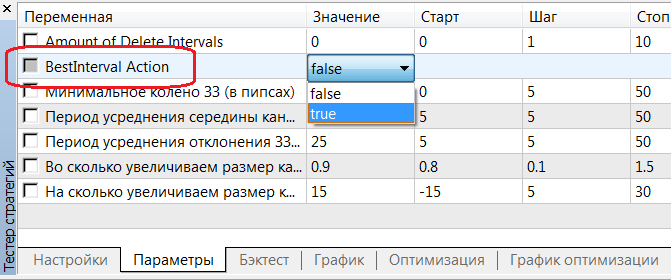
Features.
S
Please share in the comments the results of applying (as above) the library BEFORE and AFTER in the form of pictures and corresponding pieces of MT4/5 single pass logs.
It has become much easier to apply the calculation result to the Expert Advisor. To do this, you only need to click a few times.
As a small summary.
1. take any Expert Advisor and write these lines in its beginning.
#include <MT4Orders.mqh> // https://www.mql5.com/en/code/16006

#define  BESTINTERVAL_ONTESTER // The optimisation criterion is the profit of the best interval.
#include <fxsaber\Virtual\Virtual.mqh> // https://www.mql5.com/en/code/22577
#include <fxsaber\BestInterval\BestInterval.mqh> // https://www.mql5.com/en/code/22710
2. Set the number of intervals to be thrown and the option not to apply them.

3. Set Optimisation, or immediately single run. There will be calculation data in the Tester log if you are interested.
Amount of Delete Intervals = 0
00:00:00 - 23:59:59 : Profit = 18385.00, Total = 1070, PF = 1.61, Mean = 17.18, DD = 1769.00, RF = 10.39
SUMMARY: 00:00:00 - 23:59:59 : Profit = 18385.00, Total = 1070, PF = 1.61, Mean = 17.18, DD = 1769.00, RF = 10.39

Amount of Delete Intervals = 1
00:00:00 - 10:07:47 : Profit = 4279.00, Total = 181, PF = 2.02, Mean = 23.64, DD = 834.00, RF = 5.13
11:06:12 - 23:59:59 : Profit = 17349.00, Total = 768, PF = 1.95, Mean = 22.59, DD = 933.00, RF = 18.59
SUMMARY: 00:00:00 - 23:59:59 : Profit = 21628.00, Total = 949, PF = 1.97, Mean = 22.79, DD = 862.00, RF = 25.09
4. After the single run, switch on the option to activate the best interval and start the single run again.
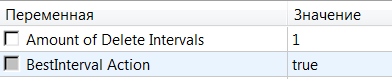
5. You will get the Tester's report
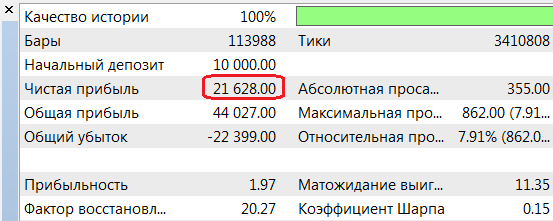
And data on the applied intervals in the log.
Amount of Delete Intervals = 1
00:00:00 - 10:07:47 : Profit = 4279.00, Total = 181, PF = 2.02, Mean = 23.64, DD = 834.00, RF = 5.13
11:06:12 - 23:59:59 : Profit = 17349.00, Total = 768, PF = 1.95, Mean = 22.59, DD = 933.00, RF = 18.59
SUMMARY: 00:00:00 - 23:59:59 : Profit = 0.00, Total = 0, PF = Max, Mean = 0.00
In summary, all results BEFORE and AFTER + detailed data (added maximum drawdown and recovery factor - by balance) for each sub-interval of the best interval.
You can check out the library on this advisor.
What do you mean?
'OnTester' - function already defined and has body BestInterval.mqh 504 8
won't compile
What do you mean?
won't compile.
What did you do?
What did you do?
I haven't done anything yet, I'm just trying to compile this code:
#include <MT4Orders.mqh> // https://www.mql5.com/en/code/16006

#define  VIRTUAL_TESTER // Run in a virtual trading environment
#define  BESTINTERVAL_ONTESTER // The optimisation criterion is the profit of the best interval.
#include <fxsaber\Virtual\Virtual.mqh> // https://www.mql5.com/en/code/22577
#include <fxsaber\BestInterval\BestInterval.mqh> // https://www.mql5.com/en/code/22710

#include <..\Experts\fxsaber\TesterEA\TesterEA.mq4>
without Virtual , it compiles,
without BestInterval it compiles too,
but it won't compile together.

- Free trading apps
- Over 8,000 signals for copying
- Economic news for exploring financial markets
You agree to website policy and terms of use
BestInterval:
The library for calculating the best trading interval.
Author: fxsaber