Experts: VR---ZVER v.2 - page 5

You are missing trading opportunities:
- Free trading apps
- Over 8,000 signals for copying
- Economic news for exploring financial markets
Registration
Log in
You agree to website policy and terms of use
If you do not have an account, please register
I thought you promised to make that would work with a stop loss equal to zero, and add indicators to the chart, or have you already changed your mind?
Thank you.
After clarification in the code, the solution has changed: for the VR---ZVER XXXX series of Expert Advisors, Stop Loss and Take Profit are mandatory parameters. That is, these Expert Advisors can only work if the stops are greater than zero (by the way, this is immediately indicated in the input parameters).
Hello Vladimir. I don't understand what principle this Expert Advisor works on, in the description it is written that when a fast moving average is crossed, a position will be opened. I now have only three moving averages enabled in the settings. There was no crossing of them, but it opened a position for some reason and closed it at the stop loss.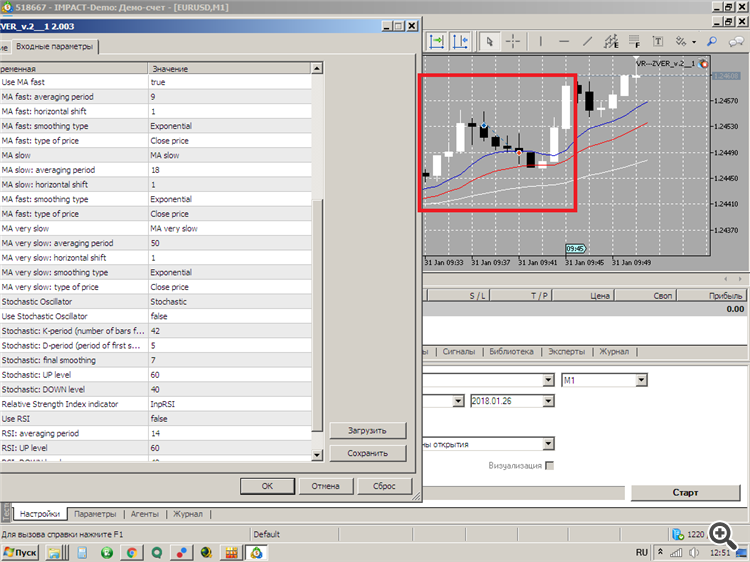
Could you please clarify what the problem is? Thank you.
Hello Vladimir. I don't understand what principle this Expert Advisor works on, in the description it is written that when a fast moving average is crossed, a position will be opened. I now have only three moving averages enabled in the settings. There was no crossing of them, but it opened a position for some reason and closed it at the stop loss.
Could you please clarify what the problem is? Thank you.
1. Please provide ALL EA settings. It is ideal to do this via a set file.
2. You need a more precise description: has the EA worked on this chart for some time before or did it open a position as soon as you attached it to the chart?
3. When trading in the terminal, you MUST provide two log files (not pictures, but log files) - from the "Tools" window: the "Experts" tab and the "Log" tab.
1. Please provide ALL settings for the EA. It is ideal to do this via a set file.
2. You need a more precise description: has the EA worked on this chart for some time before or did it open a position as soon as you attached it to the chart.
3. When trading in the terminal, you MUST provide two log files (not pictures, but log files) - from the "Tools" window: the "Experts" tab and the "Log" tab.
I've already removed it from the graph. Therefore, I can only provide two log files. The settings can be seen on the screenshot, Stochastic and RSI are disabled there. If I put the Expert Advisor on the chart now, the settings are not saved there?
If this is not enough, I will restart it and send everything again. And where to get the set file?
I do not ask to fulfil ALL points for nothing: ignoring any point means that you will not get an answer.
settings of the EA. It is ideal to do it via set file.
2. You need a more precise description: has the EA worked before for some time on this chart or as soon as you attached it to the chart, it immediately opened a position.
3. When trading in the terminal, you MUST provide two log files (not pictures, but log files) - from the "Tools" window: the "Experts" tab and the "Log" tab.
Expert Advisor settings are saved to the set file as follows:
It's not like I'm asking you to do ALL the points for a reason: ignoring any point means you won't get a response.
The EA settings are saved in a set file as follows:
Thanks got it, I'll restart the EA now and if I have any questions I'll send everything I need.
Thank you.
Thanks got it, I'll restart the EA now and if I have any questions I'll send everything I need.
Thank you.
That's why he sold three times? The advisor's been running for about an hour.
Where did you get the coloured lines on the chart???? In the code.
VR---ZVER v.2(barabashkakvn's edition).mq5
version "2.003"
uses regular iMA indicators!