Experts: EMA 6.12
When optimising in the log it writes error 2018.01.18 12:08:58.136 Core 2 genetic pass (0, 289) tested with error "incorrect input parameters" in 0:00:00.047
When optimising in the log it writes error 2018.01.18 12:08:58.136 Core 2 genetic pass (0, 289) tested with error "incorrect input parameters" in 0:00:00.047
Please look in two tabs: the "Experts" tab and the "Journal" tab.
Hello Vladimir. I am testing your Expert Advisor and I have the following questions. Trailing Stop (in pips) and Trailing Step (in pips) are set in the settings of the Expert Advisor. In the settings of the Expert Advisor I have these parameters enabled, but on the chart it is not displayed anywhere and in the "Tools" tab it is not marked either. As a result, if the price has not reached the Take Profit, the deal is closed by StopLoss at the reverse crossing of the MooVings. And this is a loss of profit and a considerable one. I have a question for you: How does Trailing Stop work in this Expert Advisor?
Thank you.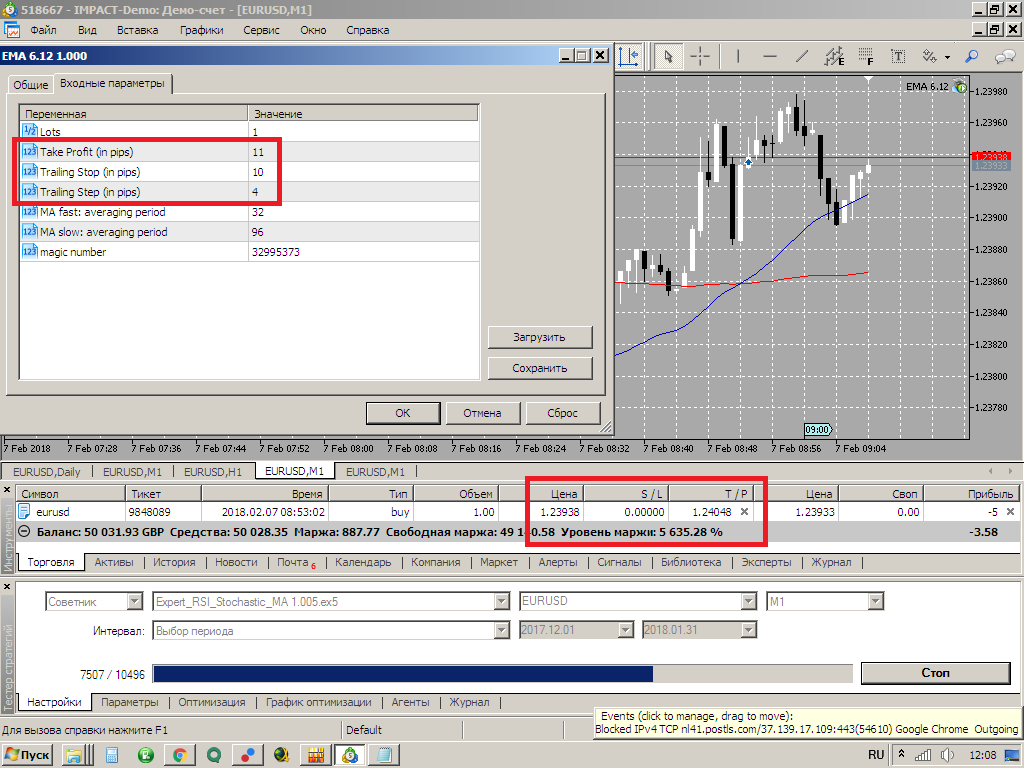
Hello Vladimir. I am testing your Expert Advisor and I have the following questions. Trailing Stop (in pips) and Trailing Step (in pips) are set in the settings of the Expert Advisor. In the settings of the Expert Advisor I have these parameters enabled, but on the chart it is not displayed anywhere and in the "Tools" tab it is not marked either. As a result, if the price has not reached the Take Profit, the deal is closed by StopLoss at the reverse crossing of the MooVings. And this is a loss of profit and a considerable one. I have a question for you: How does Trailing Stop work in this Expert Advisor?
Thank you.
Trailing works as follows (example from TrailingStop)
TrailingStop - the actual indentation between the price and the StopLoss level.
TrailingStep - protection against excessive modification of the position.
How TrailingStop works - on the example of Buy position:
at first the position StopLoss is equal to zero, we wait for the fulfilment of the condition
- i.e. when the price of Bid minus TrailingStop is greater than the opening price of the position PriceOpen:
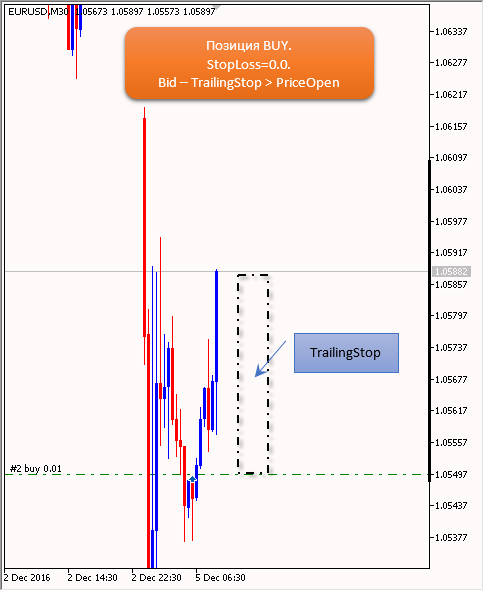
as a result we move StopLoss to the level of PriceOpen position opening price:
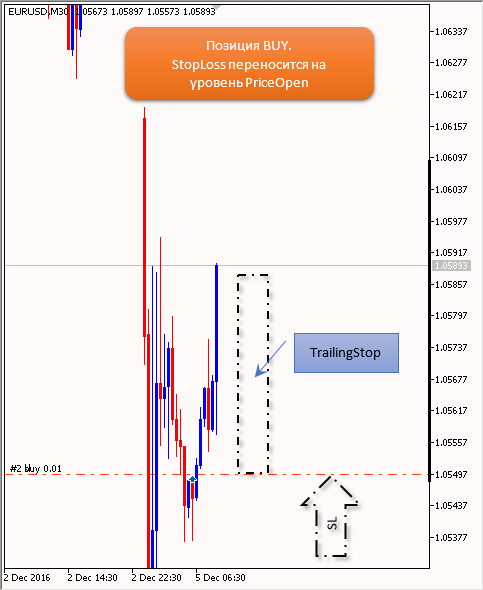
now, when the position has StopLoss (or rather when StopLoss is not equal to zero), we wait for the condition to be fulfilled:
- i.e. when the price of Bid minus TrailingStop minus TrailingStep is greater than the price of StopLoss. Note that here we enter the TrailingStep value into the check - this is necessary to prevent position modification on EVERY TICK:
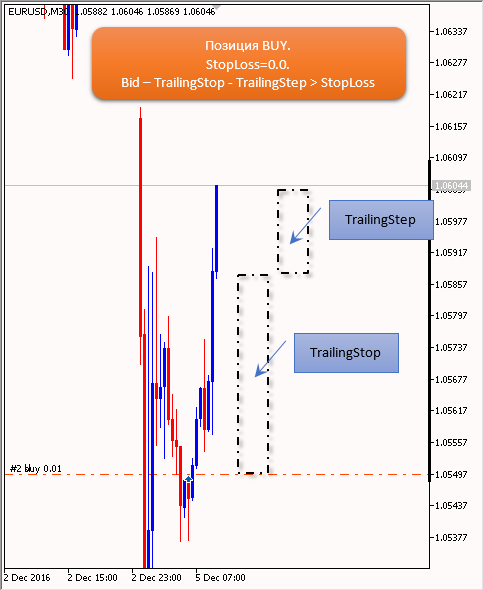
as a result, we move StopLoss to the Bid level minus TrailingStop:
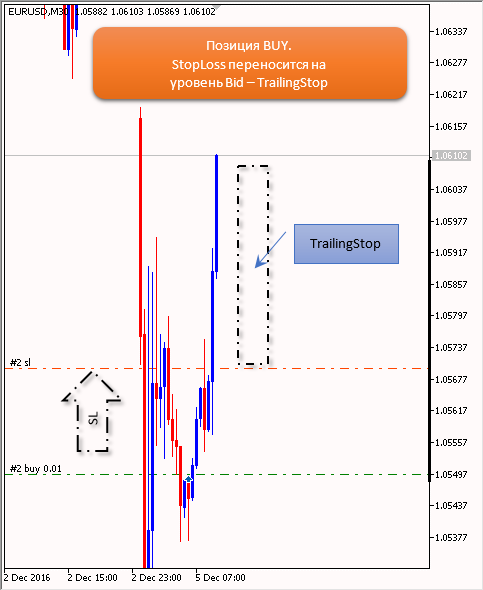
Now let me explain clearly why the TrailingStep protection was needed:
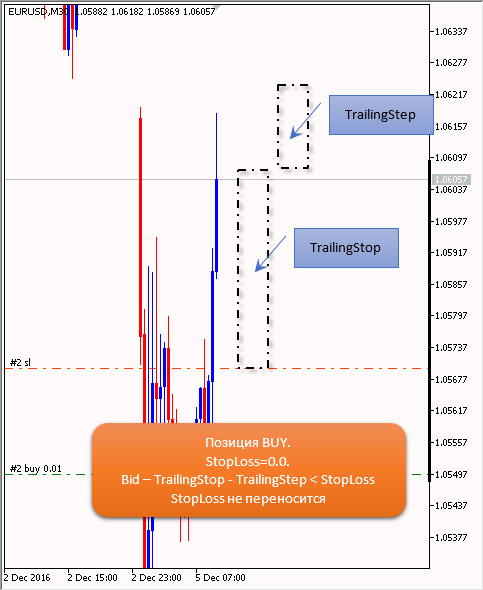
Trailing works like this (example from TrailingStop)
TrailingStop - the actual indentation between the price and StopLoss level.
TrailingStop - protection against excessive modification of a position.
How TrailingStop works - on the example of Buy position:
at first the position StopLoss is equal to zero, we wait for the fulfilment of the condition
- i.e. when the price of Bid minus TrailingStop is greater than the opening price of the position PriceOpen:
as a result we move StopLoss to the level of PriceOpen position opening price:
now, when the position has StopLoss (or rather when StopLoss is not equal to zero), we wait for the condition to be fulfilled:
- i.e. when the price of Bid minus TrailingStop minus TrailingStep is greater than the price of StopLoss. Note that here we enter the TrailingStep value into the check - this is necessary to prevent position modification on EVERY TICK:
as a result, we move StopLoss to the Bid level minus TrailingStop:
Now let me explain clearly why the TrailingStep protection was needed:
This is roughly clear to me. I asked why it does not work in this Expert Advisor and is not displayed either on the chart or in the Tools tab, although it is enabled in the settings. After all, trailing stop should work earlier than stop loss if the price first went to the side of position opening, and then returned to the stop loss level, i.e. the reverse crossing of the mvings.
I understand that roughly. I asked why it does not work in this EA, and is not displayed on the chart or in the Tools tab, although it is enabled in the settings. After all, a trailing stop should trigger earlier than a stoploss if the price first went to the side of position opening, and then returned to the stoploss level, i.e. the reverse crossing of muwings.
Add up the prices in the calculator and get the answer. To get an accurate answer, please give the exact question: date, price...
Add up the prices in the calculator and get the answer. To get an accurate answer, give the exact question: date, price...
Here's from the report:2018.02.07 02:51:00 8829461 EURUSD buy in 1.00 1.23893 9842118 0.00 0.00 0.00 50,036.94
is the opening of the trade. And here is the close:2018.02.07 07:39:01 8833159 EURUSD sell out 1.00 1.23886 9845832 0.00 0.00 - 5.01 50,031.93
Mooving has a value: 32 and 96.
Thanks.
Here's from the report:2018.02.07 02:51:00 8829461 EURUSD buy in 1.00 1.23893 9842118 0.00 0.00 0.00 50,036.94
is the opening of the trade. And here is the close:2018.02.07 07:39:01 8833159 EURUSD sell out 1.00 1.23886 9845832 0.00 0.00 - 5.01 50,031.93
Muvings have a value: 32 and 96.
Thanks.
Please re-read carefully everything I wrote above.
Added: to start with, set Trailing Stop == 1 and Trailing Step ==1.
Please re-read carefully everything I wrote above.
Thank you, I will look into it.

- Free trading apps
- Over 8,000 signals for copying
- Economic news for exploring financial markets
You agree to website policy and terms of use
EMA 6.12:
The Expert Advisor uses the signals of "crossover of two iMAs (Moving Average, MA)". The EA uses Trailing Stop and Take Profit.
Author: Vladimir Karputov