How can i put objects in front all graphic elements ?
I don't understand what i am doing wrong. I've seen many indicators and EAs around the internet showing dialog boxes in front the graphic elements... but i cannot do it
Disable the "Chart on foreground" checkbox in the Chart Properties or in code ChartSetInteger(0,CHART_FOREGROUND,0,false)
Ovo:
Disable the "Chart on foreground" checkbox in the Chart Properties or in code ChartSetInteger(0,CHART_FOREGROUND,0,false)
Disable the "Chart on foreground" checkbox in the Chart Properties or in code ChartSetInteger(0,CHART_FOREGROUND,0,false)
Good.
99% of window elements where overlapped by object, EXCEPT open orderns arrows... See the image.. below
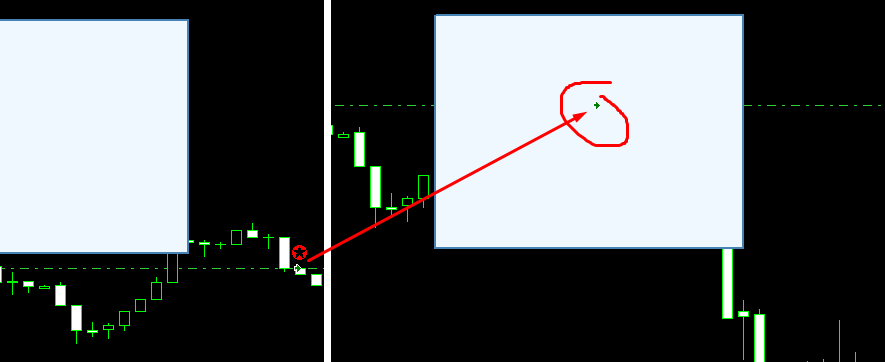
The arrows when open/close orders... can i put the labels in front of them too?
wemersonrv: The arrows when open/close orders... can i put the labels in front of them too?
The objects are drawn in the order created, if you delete and recreate your object it works fine.
use this code when you creat your objects:
ObjectSetInteger(0,name,OBJPROP_BACK,false);
If you watch for when an event has occurred that will create a new object afterwards, you can force a redraw with:
ObjectSetInteger(0,"objectname",OBJPROP_TIMEFRAMES,OBJ_NO_PERIODS);
ObjectSetInteger(0,"objectname",OBJPROP_TIMEFRAMES,OBJ_ALL_PERIODS);
Richard James Northcott #:
If you watch for when an event has occurred that will create a new object afterwards, you can force a redraw with:
ObjectSetInteger(0,"objectname",OBJPROP_TIMEFRAMES,OBJ_NO_PERIODS);
ObjectSetInteger(0,"objectname",OBJPROP_TIMEFRAMES,OBJ_ALL_PERIODS);
This helped! Perfect!
Thanks For Sharing Amazing Informations.

Hello.
I am creating some label objects, and need to put them in front all elements on the graphic window... but not works. Is there any specific property for that?
My code: