 MetaTrader 5
 Experts
 Indicators
 Scripts
 Libraries
 Storage
Watch how to download trading robots for free
Find us on Twitter!
Join our fan page
Join our fan page
You liked the script? Try it in the MetaTrader 5 terminal

H4 Breakout Retest EA for Gold (XAUUSD) - expert for MetaTrader 5

- Views:
- 15
- Published:
-
 You are missing trading opportunities:
- Free trading apps
- Over 8,000 signals for copying
- Economic news for exploring financial markets
Registration Log inYou agree to website policy and terms of use
If you do not have an account, please register -
 Need a robot or indicator based on this code? Order it on Freelance
Go to Freelance

H4BreakoutRetest_XAU trades gold using a simple breakout and retest pattern. The first four hours of the trading day (server time) define a zone comprising the high and low of that period. When an M5 candle closes outside the zone, the EA waits for the price to return and test the broken level (the retest). When an M5 candle closes outside the zone again, it enters in the direction of the breakout. Stop-loss and take-profit levels are fixed percentages of the entry price (default 2% and 4%, risk-to-reward ratio 1:2). The lot size is calculated based on the risk percentage and the stop distance.
DISCLAIMER: this Expert Advisor is provided for educational and research purposes only and does not constitute financial advice. Trading CFDs on gold carries a high level of risk and you may lose more than your deposit. Back-test results are hypothetical; they do not include all real-world costs (slippage, requotes, changing spreads and swaps) and do not guarantee future results. Test it on a demo account first and never risk money you cannot afford to lose. The author accepts no responsibility for any loss.
How it works:
- Zone: the high and low of the first ZoneHours period of the server day (default 00:00–04:00)
- Breakout: an M5 candle closes above the zone high (long) or below the zone low (short)
- Retest: the price returns to touch the broken level
- Entry: an M5 candle closes outside the zone again in the direction of the breakout, using a market order
- Exit: fixed stop loss and take profit, no trailing
- Protections: maximum spread, maximum number of entries per day, minimum lot risk check, free margin check, drawdown guard that pauses the EA when equity falls to MaxDrawdownPercent below its peak
Inputs:
- ZoneStartHour, ZoneHours: start time and duration of the zone (server time)
- StopLossPercent, TakeProfitPercent: stop and target as a percentage of the entry price
- RiskPercent: risk per trade as a percentage of equity
- MaxMinLotRiskPct: skip the trade if the broker’s minimum lot size would risk more than this percentage of equity
- MaxSpreadPoints, MaxTradesPerDay, MaxDrawdownPercent, DrawdownCooldownDays, MagicNumber, DeviationPoints
- AllowStacking: see below
AllowStacking (important):
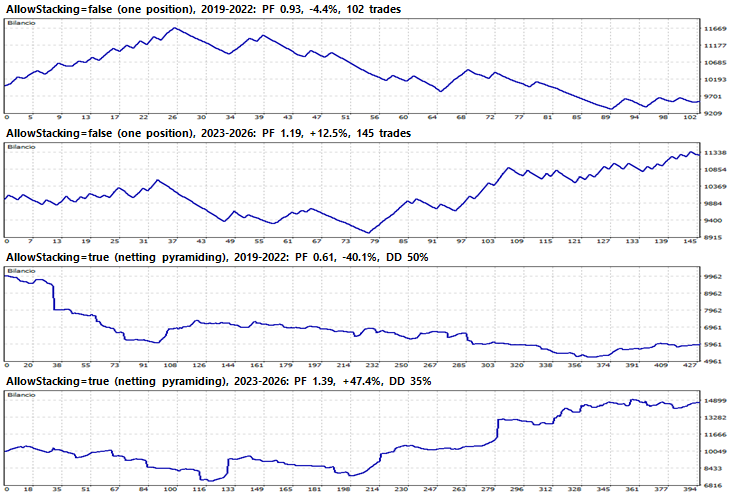
When AllowStacking = false (default), the EA holds only one position at a time. When AllowStacking = true, a new signal can add to an open position. On a netting account, the volumes are combined and the stop and target are replaced by those of the most recent trade; consequently, the EA behaves like a pyramiding trend follower: it yields much higher returns in strong trends but also experiences much deeper drawdowns. Two presets are included (default and stacking).
Backtest summary (Strategy Tester, GOLD M5, 10,000 EUR, risk 1%, 1-minute OHLC model, ActivTrades data; the every-tick model yielded the same results within 2%):
Period 2019–2022: AllowStacking=false PF 0.93, -4.4%, max drawdown 20.7% | AllowStacking=true PF 0.61, -40.1%, max drawdown 49.6%
Period 2023 to September 2026: AllowStacking=false PF 1.19, +12.5%, maximum drawdown 14.7% | AllowStacking=true PF 1.39, +47.4%, maximum drawdown 34.9%
Period 2025 to September 2026: AllowStacking=false PF 1.50, +18.1%, maximum drawdown 7.4% | AllowStacking=true PF 2.17, +63.6%, maximum drawdown 13.6%
IMPORTANT NOTES ON THE RESULTS:
- The results are heavily dependent on the trend in gold prices. Gold rose sharply between 2024 and 2026, whilst between 2019 and 2022 the EA incurred losses in both modes.
- Adjusting the stop loss (1.5–2.5 per cent) and take profit (3–6 per cent) around the default settings did not yield stable results in 2019–2022: there is no proven edge outside the rally. Use the EA as a learning tool rather than as a ready-made system.
- The zone uses the broker’s server time. Set `ZoneStartHour` to match your broker’s time if their trading day does not begin at 00:00, which corresponds to the first H4 candle.
- It was tested on a netting account. Hedging accounts handle multiple positions separately and produce different results.
- Works on gold (XAUUSD / GOLD). Other symbols have not been tested.
How to use:
1. Copy H4BreakoutRetest_XAU.mq5 into the MQL5\Experts folder of your trading platform (File – Open Data Folder) and compile it in MetaEditor.
2. Attach the EA to a gold chart (any timeframe) and enable AutoTrading.
3. Load one of the attached presets from the Inputs tab (Load) or set AllowStacking as you prefer.
4. Test it on the Strategy Tester and on a demo account before doing anything else.
Translated from Italian by MetaQuotes Ltd.
Original code: https://www.mql5.com/it/code/78537
 Swap Cost Panel — tonight's rollover cost for every open position
On-chart panel that estimates tonight's swap for each open position in account currency, marks the triple-swap day, and compares it with the cost of closing before rollover and re-opening after (spread + commission).
MTF Trend Dashboard — trend, position and volatility on six timeframes at a glance
One on-chart table for M15, H1, H4, D1, W1 and MN1: EMA slope, price vs EMA, Donchian position, ATR percentile and a combined UP / DOWN / RANGE regime. Completed bars only. Any symbol.
Accelerator Oscillator (AC)
The Acceleration/Deceleration Indicator (AC) measures acceleration and deceleration of the current driving force.
MACD Signals
Indicator edition for new platform.