 MetaTrader 5
 Experts
 Indicators
 Scripts
 Libraries
 Storage
Join our fan page

Elliott Wave Auto Counter / Automatic Wave Labeling - indicator for MetaTrader 5

- Views:
- 1556
- Rating:
- Published:
- Updated:
-
 You are missing trading opportunities:
- Free trading apps
- Over 8,000 signals for copying
- Economic news for exploring financial markets
Registration Log inYou agree to website policy and terms of use
If you do not have an account, please register -
 Need a robot or indicator based on this code? Order it on Freelance
Go to Freelance
Need a robot or indicator based on this code? Order it on Freelance
Go to Freelance

This indicator automates the first step of Elliott Wave analysis: finding swing points on the chart and testing whether the most recent sequence of swings can be labeled as a valid Elliott impulse wave (1-2-3-4-5) followed by a corrective wave (A-B-C).
Concept
The indicator first detects swing highs and lows using a fractal-based method (a bar is a pivot if it is the highest/lowest point within a symmetric window of bars). Consecutive swings of the same type are merged, and only swings that move a minimum distance (in points) and are separated by a minimum number of bars are kept, this filters out noise so the wave count is built from meaningful market turns rather than every small fluctuation.
Starting from the most recent pivots and working backward, the indicator looks for the freshest six-point sequence that satisfies three of the core Elliott impulse rules:
- Wave 2 does not retrace beyond the start of Wave 1.
- Wave 3 is not the shortest of waves 1, 3 and 5.
- Wave 4 does not overlap the price territory of Wave 1.
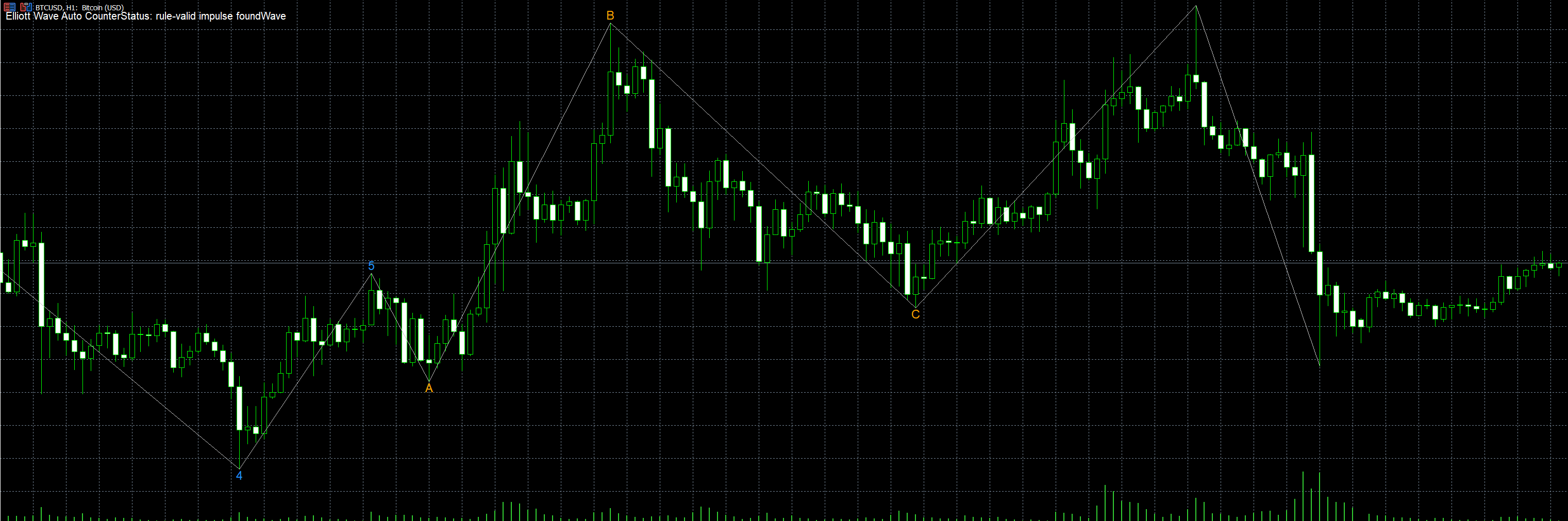
If a sequence passes all three checks, it is labeled 1-2-3-4-5 on the chart, and the next three swings (if available) are labeled A-B-C as the following correction. If no sequence in the visible pivots satisfies the rules, the indicator falls back to labeling the last few swings sequentially with a "?" suffix (e.g. "3?") to make clear this is an unconfirmed, low-confidence count rather than a validated impulse.
How to interpret the labels
- Blue numbers (1-5): a rule-validated impulse wave, in the direction shown by the sequence of highs/lows.
- Orange letters (A-B-C): the corrective wave that follows a validated impulse.
- Gray numbers with "?": no valid impulse was found in the current pivots - this is only a sequential placeholder, not a confirmed count.
- The info panel (top-left corner) shows the retracement percentage of waves 2 and 4, and the length of wave 3 relative to wave 1, so you can quickly see how the count aligns with typical Fibonacci relationships (38%, 50%, 62% retracements; 162%, 262% extensions).
This is a decision-support and visualization tool, not a signal generator — Elliott Wave counting is inherently subjective, and the labels should be treated as a starting point for your own analysis, not a trading signal.
Input parameters
- InpDepth - number of bars on each side used to confirm a swing high/low (larger = fewer, more significant pivots).
- InpDeviationPts - minimum price move, in points, required for a new swing to be accepted.
- InpBackstep - minimum number of bars required between two swings of the same type.
- InpMaxPivots - maximum number of recent pivots kept in memory for wave counting.
- InpHistoryBars - how many bars of history are scanned (0 = all available; lower this on very long histories for better performance).
- InpShowPanel - show/hide the info panel.
- InpImpulseColor / InpCorrectiveColor / InpUnconfirmedColor — colors for confirmed impulse, confirmed correction, and unconfirmed fallback labels.
- InpTextColor, InpFontSize, InpFontName - appearance of the info panel and labels.
- InpPrefix - prefix used for all chart objects created by the indicator (change if it conflicts with another tool).
Recommended symbol / timeframe
Works on any symbol and timeframe. Default settings are tuned for a swing-trading view on major forex pairs and metals (e.g. XAUUSD, EURUSD) on H1-H4. On lower timeframes or less volatile instruments, reduce InpDeviationPts; on higher timeframes or more volatile instruments, increase it.
Broker Info Panel MT5
A lightweight MT5 chart indicator that displays live broker and symbol trading specifications including spread, tick size, tick value, volume limits, stop level and freeze level.
Nadaraya_Watson_Envelope_NR
Calculates a non-repainting Nadaraya-Watson envelope using Gaussian smoothing and marks price crosses beyond the upper and lower bands with arrows.
Market Session Separator Indicator
Marks the start/end of up to three trading sessions (Asian, London, New York, or any custom windows) with vertical separators and/or shaded background boxes, repeated daily across a rolling recent window. Purely visual — no calculations, no signals, just clean session boundaries.
IronHawk Fibonacci Structure Map
Free MT5 indicator that automatically maps Fibonacci levels across multiple timeframes and highlights confluence zones, market structure, premium/discount areas and key price reactions.