Multi Volume Profile
- 指标
- 版本: 1.0
- 激活: 10

Multi Volume Profile – Professional Market Analysis Tool
Understand the Market Beyond Price
Volume Profile is a powerful market analysis indicator designed to help traders identify important price levels based on trading activity. Instead of displaying volume over time, it organizes volume across different price levels, revealing where the market has experienced the greatest and lowest trading activity.
By visualizing market participation and price acceptance, Volume Profile helps traders understand market structure, identify potential support and resistance zones, and recognize areas where price may react or accelerate.
Whether you trade Forex, Gold, Indices, or other financial instruments, Volume Profile provides valuable market context for making more informed trading decisions.
Three Volume Profile Modes
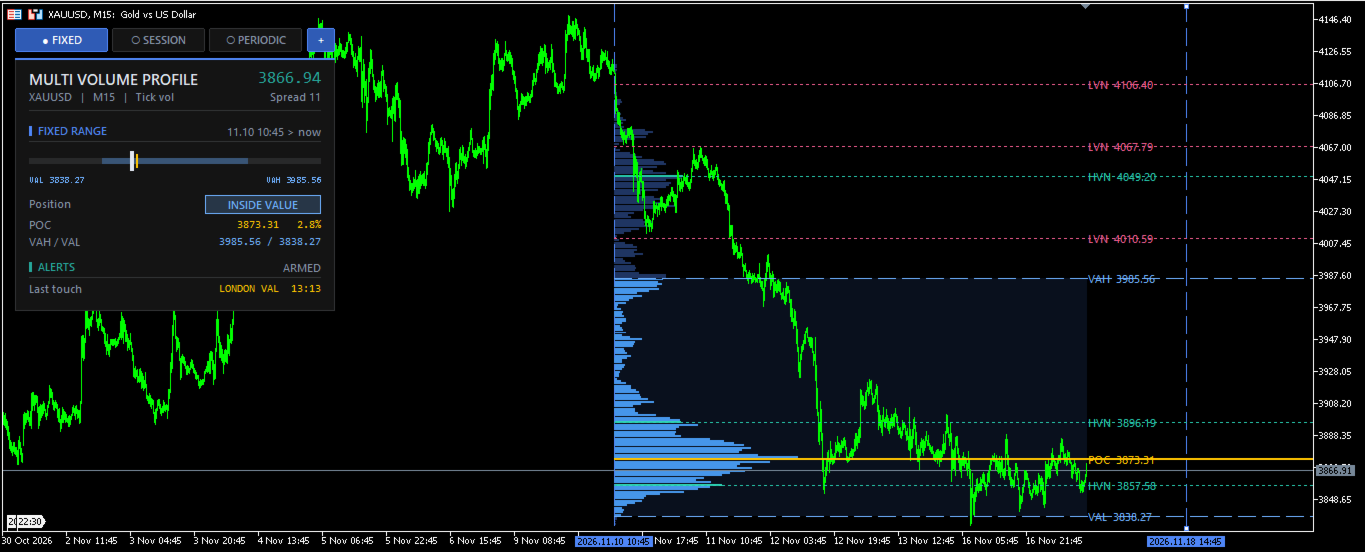
1. Fixed Range Volume Profile (FRVP)
Analyze volume within a manually selected price range.
Particularly useful for:
-
Analyzing individual market swings.
-
Studying specific bullish and bearish movements.
-
Identifying important volume zones within consolidation areas.
-
Evaluating historical price acceptance and rejection.
Choose a specific range on the chart and examine how trading activity is distributed across its price levels.
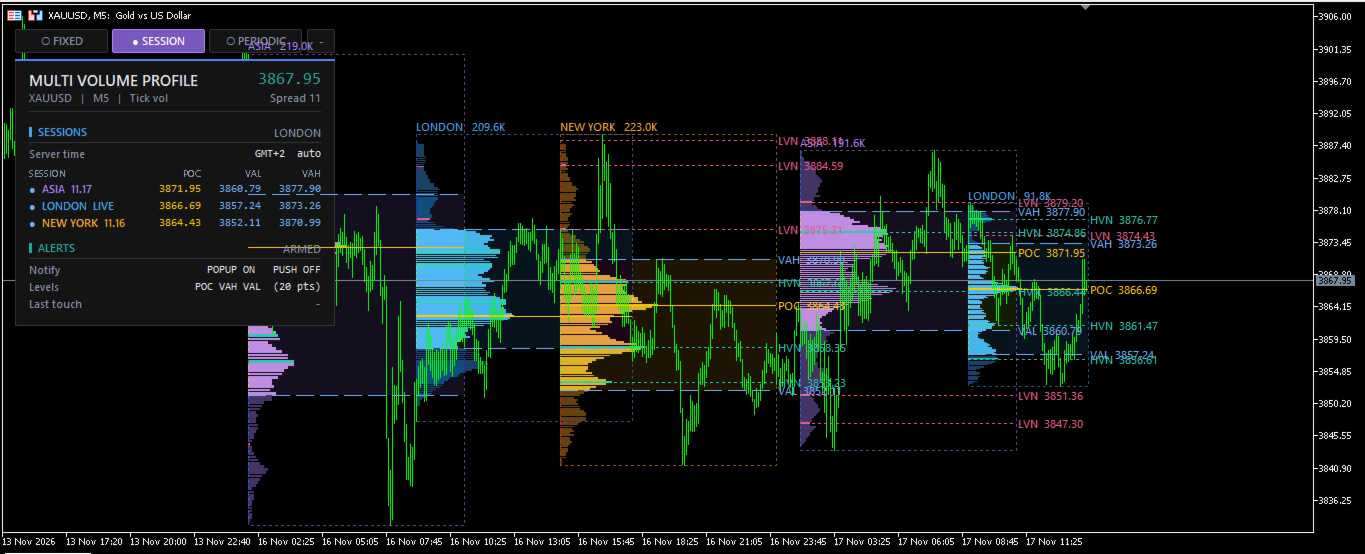
2. Session Volume Profile
Analyze volume distribution during a particular trading session.
Particularly useful for:
-
Studying Asian, London, and New York sessions.
-
Comparing trading activity between market sessions.
-
Identifying session-specific POC, VAH, and VAL levels.
-
Understanding how market participation changes throughout the trading day.
Gain a better understanding of how different trading sessions contribute to price development.
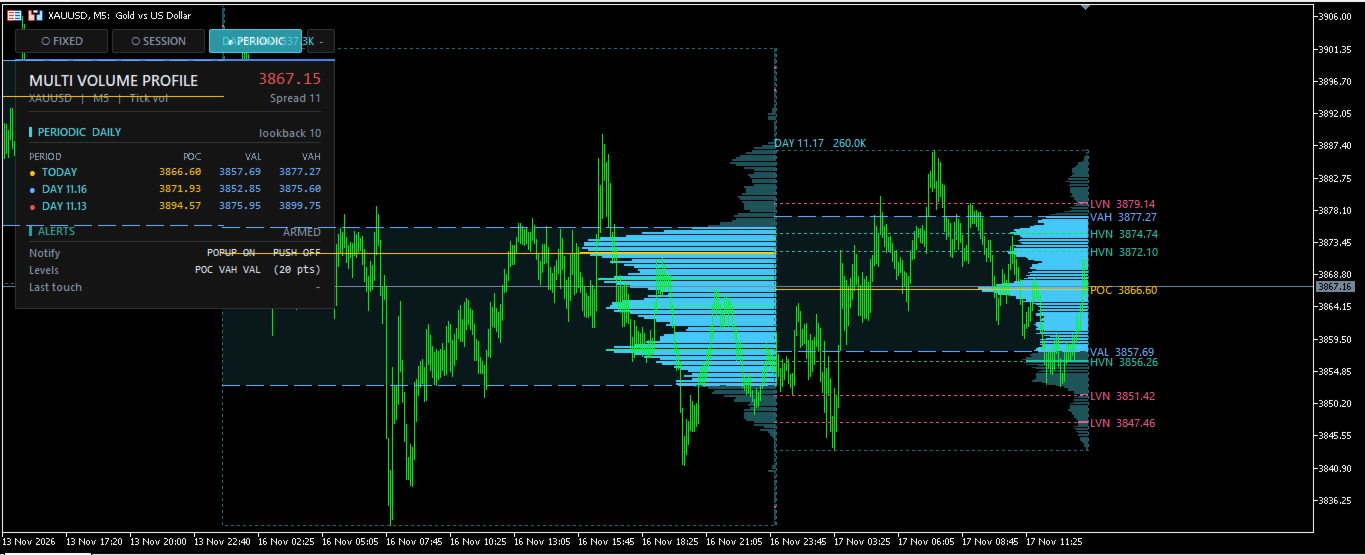
3. Periodic Volume Profile
Measure volume distribution across recurring time periods, such as daily, weekly, or monthly.
Particularly useful for:
-
Identifying daily, weekly, and monthly value areas.
-
Tracking changes in market acceptance over time.
-
Comparing volume distribution across different periods.
-
Identifying important historical price levels.
Understand the broader market picture through recurring volume analysis.
Key Features
1. Point of Control (POC)
Identifies the price level with the highest accumulated volume within the selected profile range. POC helps traders locate areas of significant market activity and potential price attraction.
2. Value Area High (VAH)
Displays the upper boundary of the Value Area, representing the price level above which approximately 70% of the selected range's trading volume was not accumulated.
3. Value Area Low (VAL)
Displays the lower boundary of the Value Area, helping traders identify the lower limit of the market's primary trading activity.
4. High Volume Nodes (HVN)
Highlights price areas with relatively high trading activity. These zones can indicate market acceptance, consolidation, and potential areas of price reaction.
5. Low Volume Nodes (LVN)
Identifies areas with relatively low trading activity. These zones can help traders recognize potential price rejection areas or regions where price may move more rapidly.
Trading Applications
Volume Profile can be used for multiple trading approaches:
-
Support and Resistance: Identify important price zones based on historical trading activity.
-
Trend Analysis: Observe how the market's value area shifts over time.
-
Breakout Trading: Monitor price acceptance or rejection around important volume levels.
-
Reversal Trading: Identify potential turning points around significant volume areas.
-
Market Structure: Understand market balance, acceptance, and price distribution.
-
Trade Planning: Use volume levels to identify potential entry, stop-loss, and take-profit reference zones.
How to Use
1. Fixed Range Volume Profile (FRVP)
Drag the two vertical chart lines, FRVP START and FRVP END, to select your desired price range. The Volume Profile updates automatically based on the selected range.
2. Session Volume Profile
Fully automatic session calculation. Trading sessions are defined in UTC and automatically converted to broker server time using the live server GMT offset.
No manual time adjustment is required. The indicator is designed to work across different brokers.
3. Periodic Volume Profile
Choose between three profile periods:
-
Daily: Displays daily Volume Profiles.
-
Weekly: Displays weekly Volume Profiles.
-
Monthly: Displays monthly Volume Profiles.
Lookback OFF: Displays only the current (latest) day, week, or month.
Lookback ON: Displays historical profiles for every day, week, or month according to the selected lookback count.
4. On-Chart Controls
Use the buttons directly on the chart to:
-
Toggle Fixed Range Volume Profile.
-
Toggle Session Volume Profile.
-
Toggle Periodic Volume Profile.
-
Switch between dashboard display modes, including compact mode.
5. Price Level Alerts
Receive notifications when the market price touches important Volume Profile levels:
-
POC
-
VAH
-
VAL
Available alert options include popup and push notifications.
Note: Push notifications require your MetaQuotes ID to be configured under MetaTrader 5 → Tools → Options → Notifications.
Designed for Flexible Market Analysis
Volume Profile provides a practical way to analyze market activity without relying solely on traditional support and resistance methods.
Use it independently or combine it with your existing trading strategy, price action, market structure, Smart Money Concepts (SMC), and other technical analysis tools.
Whether you are a scalper, day trader, or swing trader, Multi Volume Profile provides the flexibility to examine market activity from multiple perspectives.
Important Information
Volume Profile calculations depend on the available historical market data and the selected calculation method. For OTC Forex and CFDs, volume data generally represents broker-provided tick volume rather than centralized exchange-traded volume.
Volume Profile is an analytical tool, not a trading signal generator. It does not guarantee future price movements or trading results.
Trade with better market context. Understand where the market trades, where it accepts value, and where opportunities may develop.