Line Sweep Watch
- 指标
-
Irina Tarabrina
 ChartZenFX develops technical indicators for MetaTrader 5, focusing on liquidity analysis, trading sessions and market structure.
- 版本: 1.5
Draw a horizontal line. After each candle closes, Line Sweep Watch tells you whether price swept it (the wick went through, the candle closed back) or broke it (the candle closed beyond). It does not alert on a mere touch.
Free. It works with your own horizontal lines: it does not find levels by itself, gives no entry signals and promises no profit.
HOW TO USE
1. Draw a horizontal line at your level.
2. Click the line, then press Track line (top right corner of the chart).
3. Read the label at the left edge of the chart, just above the line, or wait for the alert when a candle closes.
WHAT THE LABEL SAYS
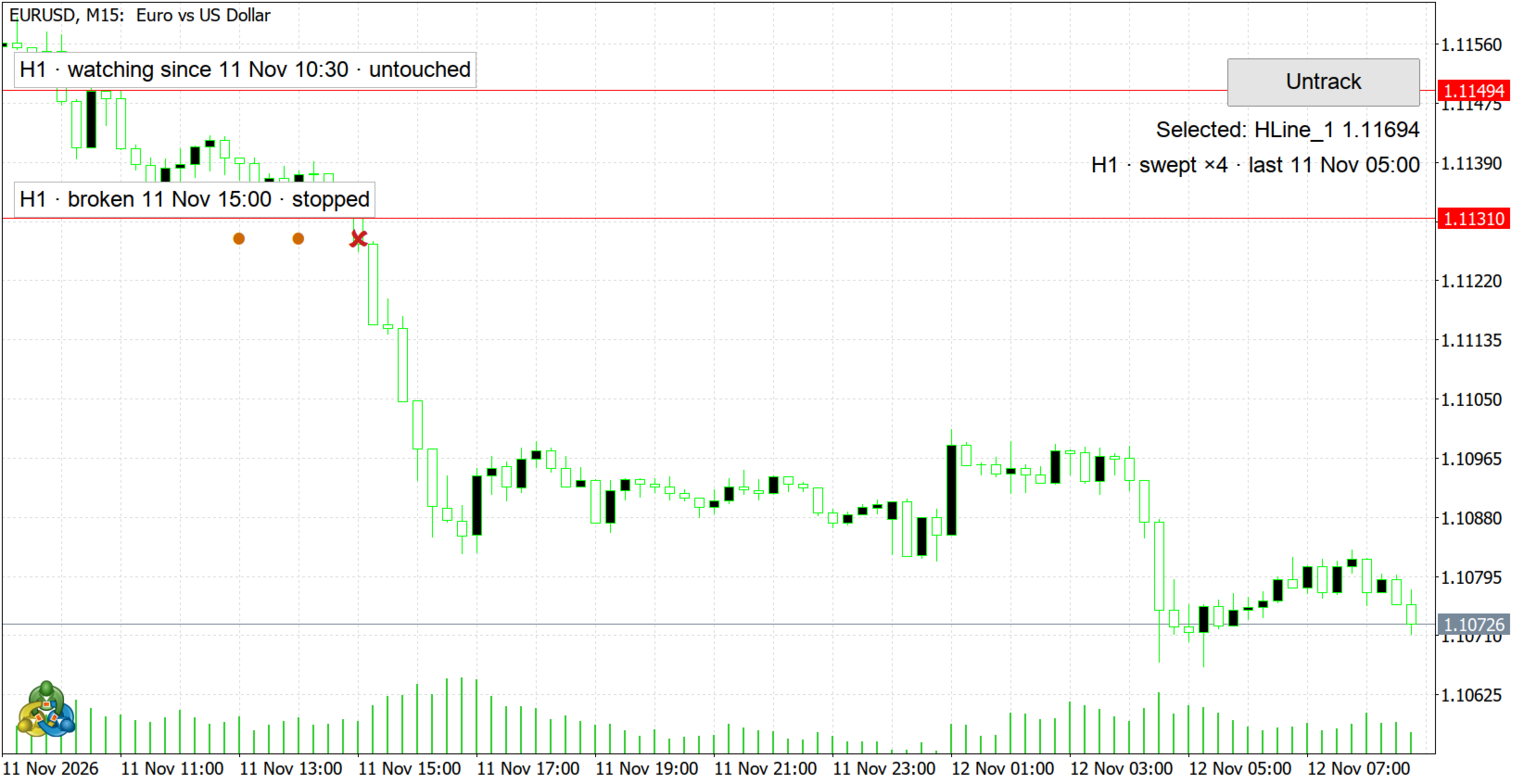
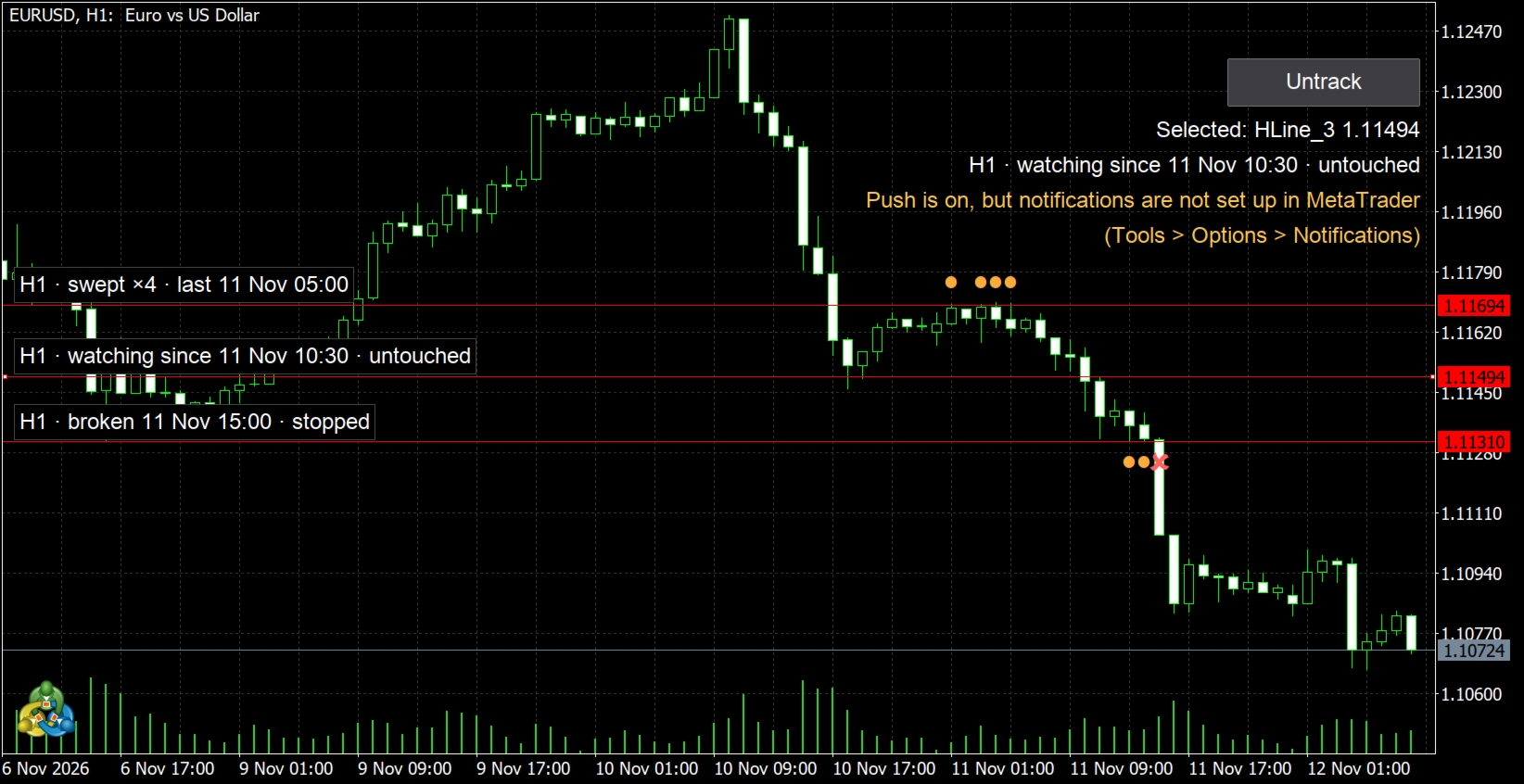
- H1 · watching since 14:05 · untouched — nothing has happened yet.
- H1 · swept ×2 · last 15:00 — swept twice; the line is still watched.
- H1 · broken 16:00 · stopped — a candle closed beyond the line; watching stopped. Press Restart or move the line to watch it again.
On the line, a dot marks each sweep candle and a cross marks the break candle. Hover over a mark for details, or over a label to see which line it belongs to. Labels of nearby lines are stacked so they never overlap.
RULES (closed candles only)
- Level above price: a close above the line is a break; otherwise a high above the line is a sweep.
- Level below price: a close below the line is a break; otherwise a low below the line is a sweep.
- A wick exactly on the line is not a sweep. A close exactly on the line is not a break.
- "Min wick beyond line" (points) raises the bar for a sweep only. A close beyond the line is always a break.
- If a candle opens beyond the line (gap), the event is marked "gap".
- The side of the level is set by the open of the first candle after you press Track line. If that candle opens exactly on the line, by the close of the last candle that had closed before you pressed it.
With the default 0 points these are the same sweep and break rules as in Session Sweep Map.
TIMEFRAME
Each line is evaluated on the timeframe it was marked on. Moving or restarting a line keeps that timeframe. Switching the chart to another timeframe changes nothing: a line marked on H1 still shows H1 events on an M15 chart. For another timeframe, switch the chart, press Untrack, then Track line.
ALERTS
- One alert per event, when the candle closes. The popup is on by default.
- Push: turn on "Push notification" in the inputs and set up your MetaQuotes ID in MetaTrader (Tools > Options > Notifications). If push is on but MetaTrader cannot send it, the chart says so.
- If the indicator was not running (terminal closed, indicator removed and added again), you get one summary alert per line about what happened meanwhile.
- MetaTrader limits push notifications (about 10 per minute). If many lines trigger at once, some pushes may be delayed or not sent; the chart shows which. Popups are not affected.
- Push is tried at most 3 times per event.
- "Sent" means MetaTrader accepted the push. MetaTrader does not confirm delivery to the phone.
HISTORY BEFORE MARKING (off by default)
Pale marks show how price reacted to the level before you marked it, and the line label adds the count: "before marking: swept N, broken M (level chosen later)". Context only: you chose the level after that history.
INPUTS
- Min wick beyond line for a sweep (points) — 0. Applies to sweeps only.
- Alert popup — true.
- Push notification — false.
- Show history before marking — false.
- History bars before marking — 300 (10–5000).
- Button corner — right upper.
- Font size — 9.
- Instance ID — 1. Letters, digits or "-", up to 16. A second copy on the same chart needs another ID.
LIMITATIONS
- Only horizontal lines that you draw in the main chart window. No trend lines or rectangles.
- Closed candles only: no alert on a touch or inside the current candle. A candle counts as closed when the next one starts, so the last Friday candle is reported with the first new candle.
- The state is saved per chart. On a newly opened chart you mark lines again.
- No alerts or push in the Strategy Tester: MetaTrader does not send them there.
- Times in labels and alerts are your broker's server time.
- Moving a line starts watching anew and removes its marks. Renaming a line removes its tracking.
- Results depend on your broker's prices and the loaded history.
Questions — in the comments of this product.