MSM Candlestick Support Resistance

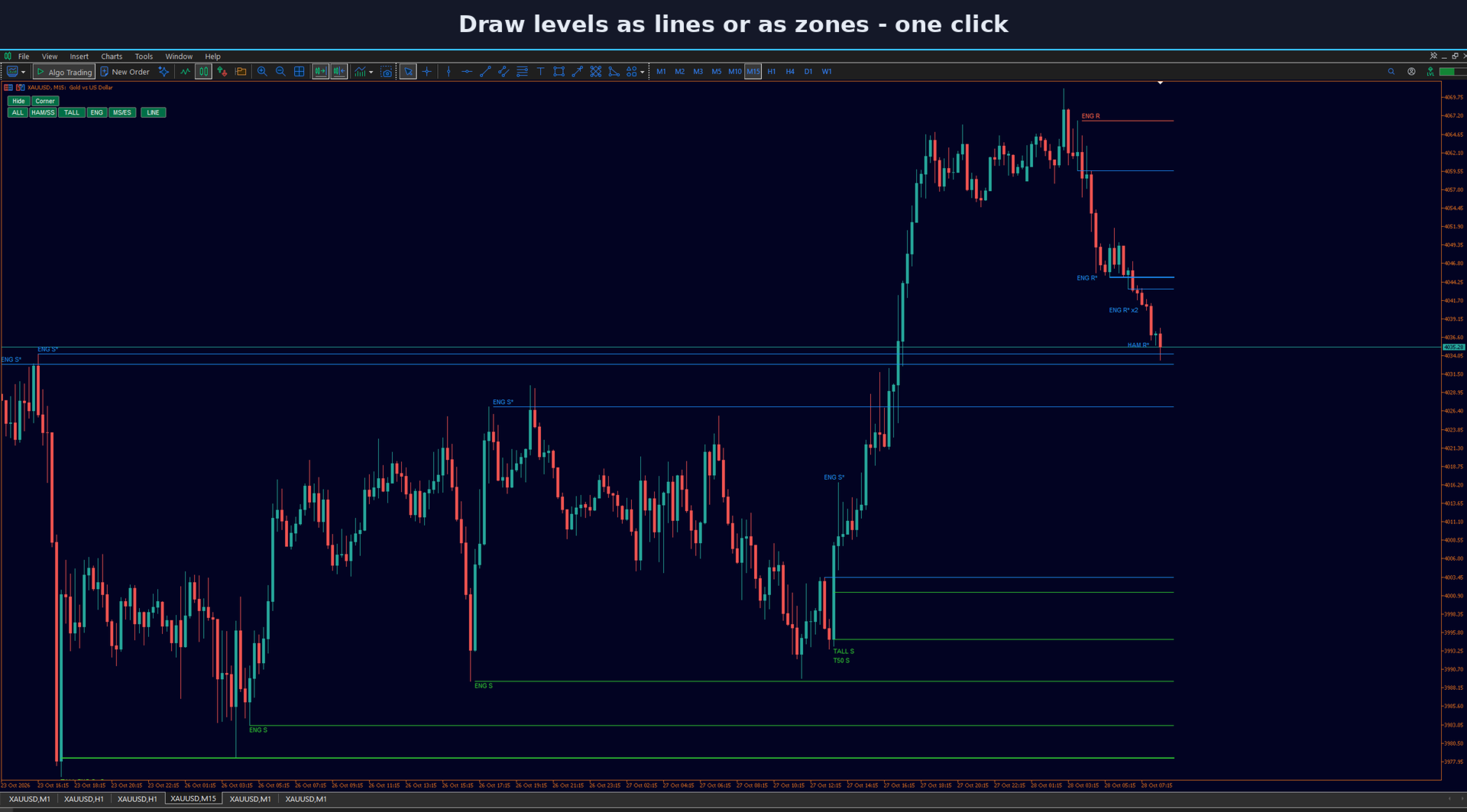
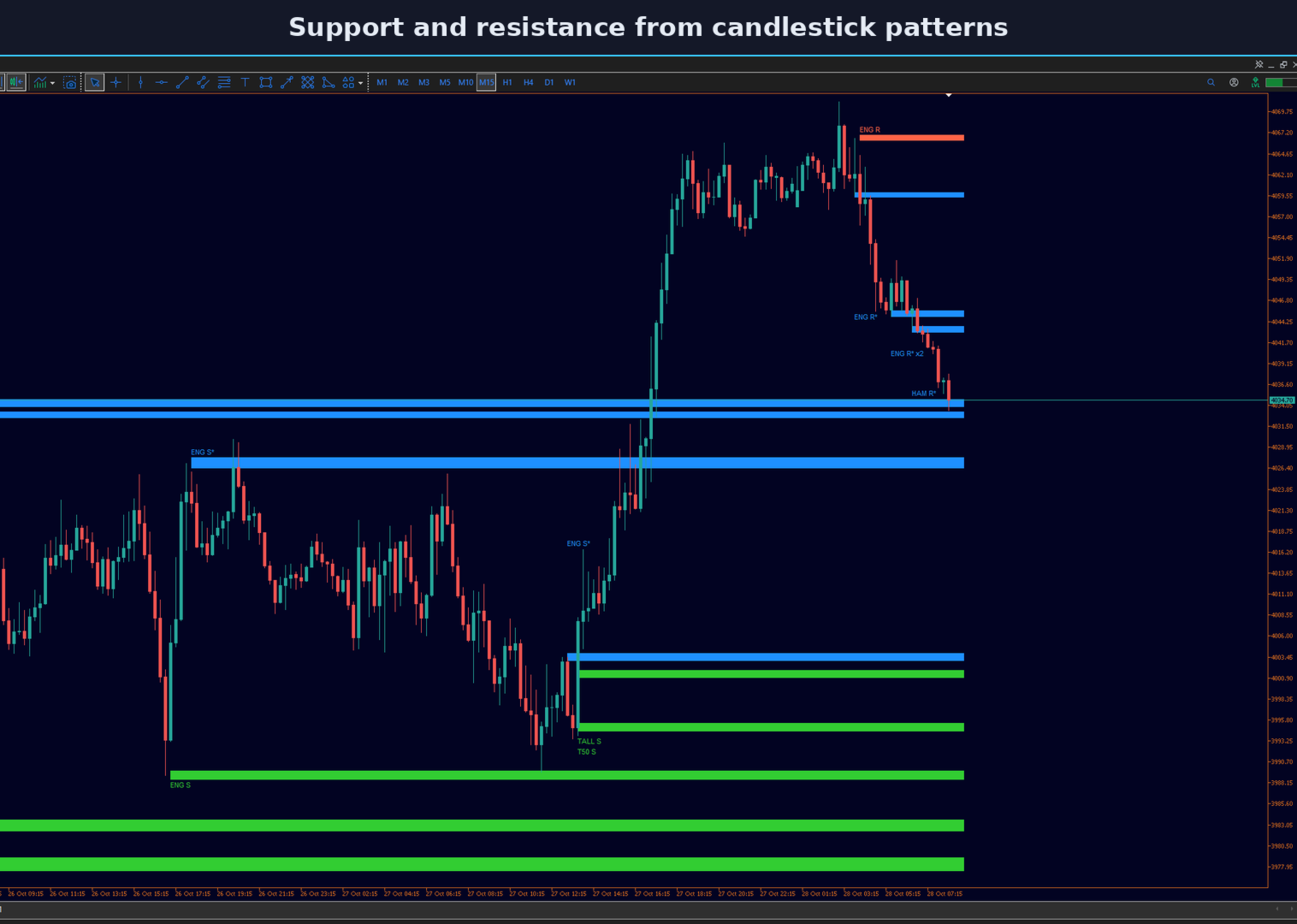
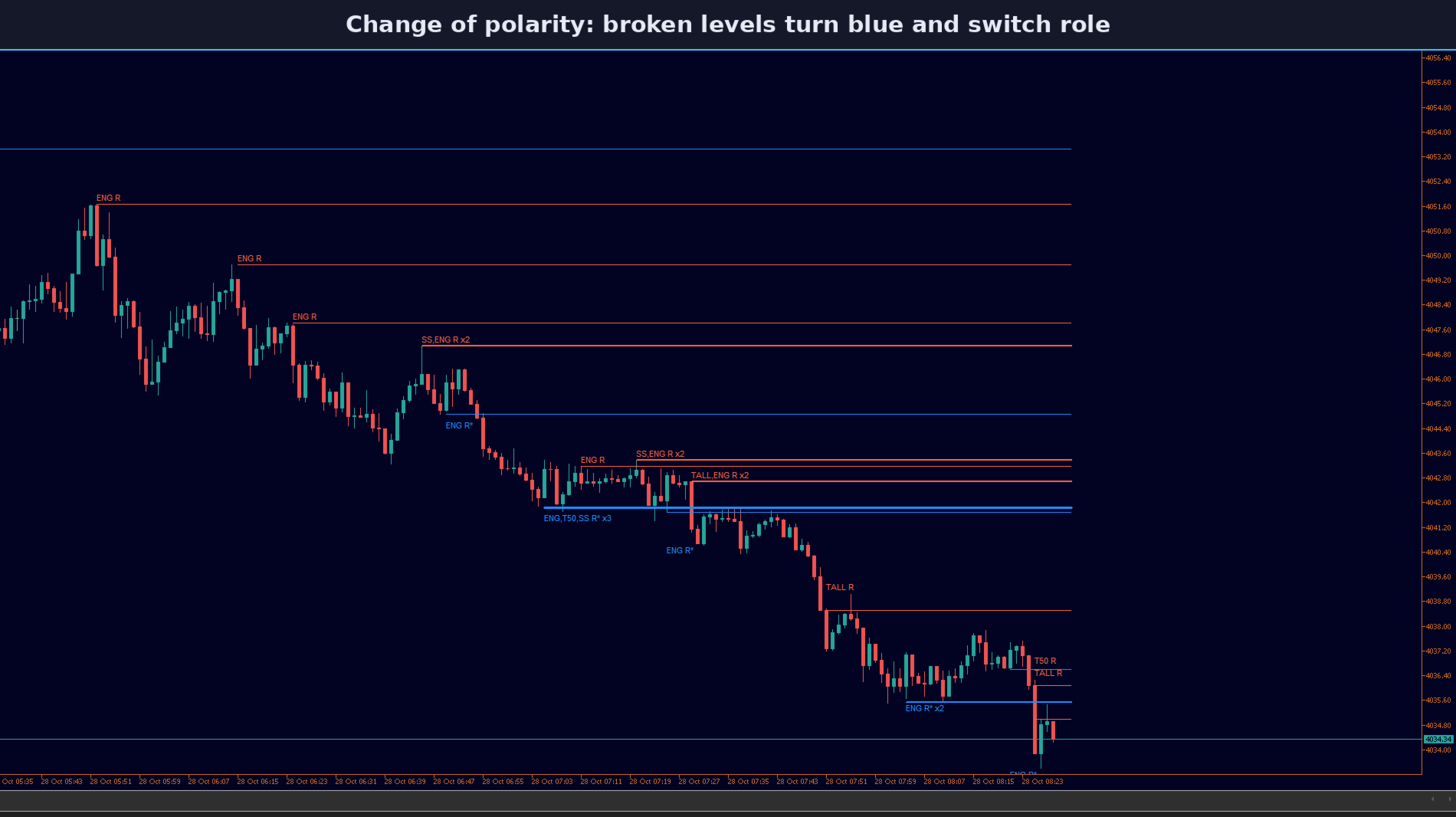
MSM Candlestick Support Resistance finds well-known Japanese candlestick patterns on your MetaTrader 5 chart and turns each one into a support or resistance level. When price closes through a level, the level changes its role: support becomes resistance and resistance becomes support. The indicator only draws levels; it does not open or manage trades.

Patterns and their levels

  • Hammer and shooting star (long shadow): the low of a hammer is support, the high of a shooting star is resistance.
  • Engulfing: the lowest low (bullish) or highest high (bearish) of the two candles.
  • Morning star and evening star: the lowest low or highest high of the three candles.
  • Tall candle: the open of a long candle, plus its 50% midpoint as a second level.

Reversal patterns can be required to follow a short trend, so patterns in the middle of a range are skipped. Only closed candles are used.

Change of polarity

A level stays green (support) or red (resistance) until a candle closes beyond it. It then turns blue, changes its role and gets a * mark in its label. After the set number of role changes the level becomes invalid. Invalid levels can be hidden or shown as grey dotted lines.

Clean chart

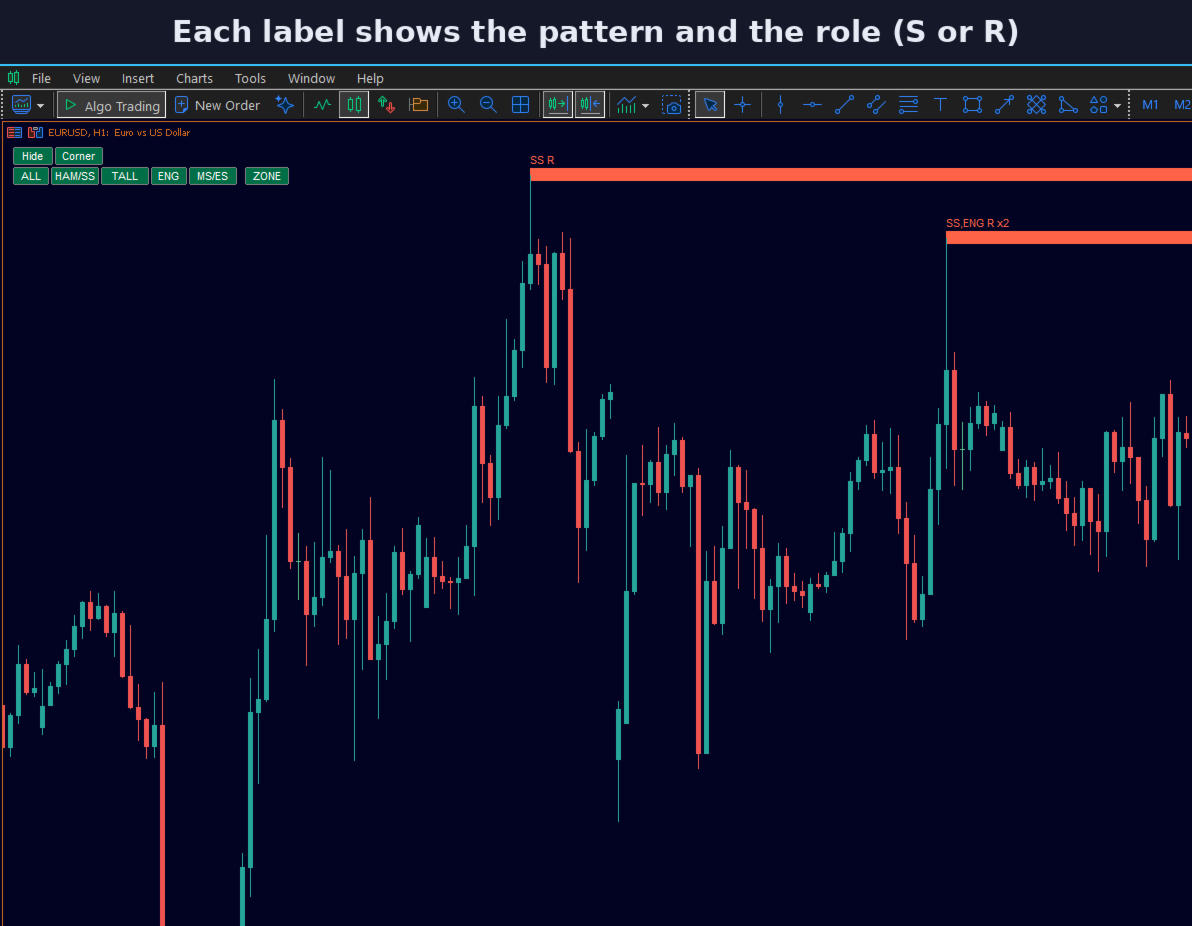
  • Levels that are close together are merged into one zone, and the label shows how many patterns built it (for example x2).
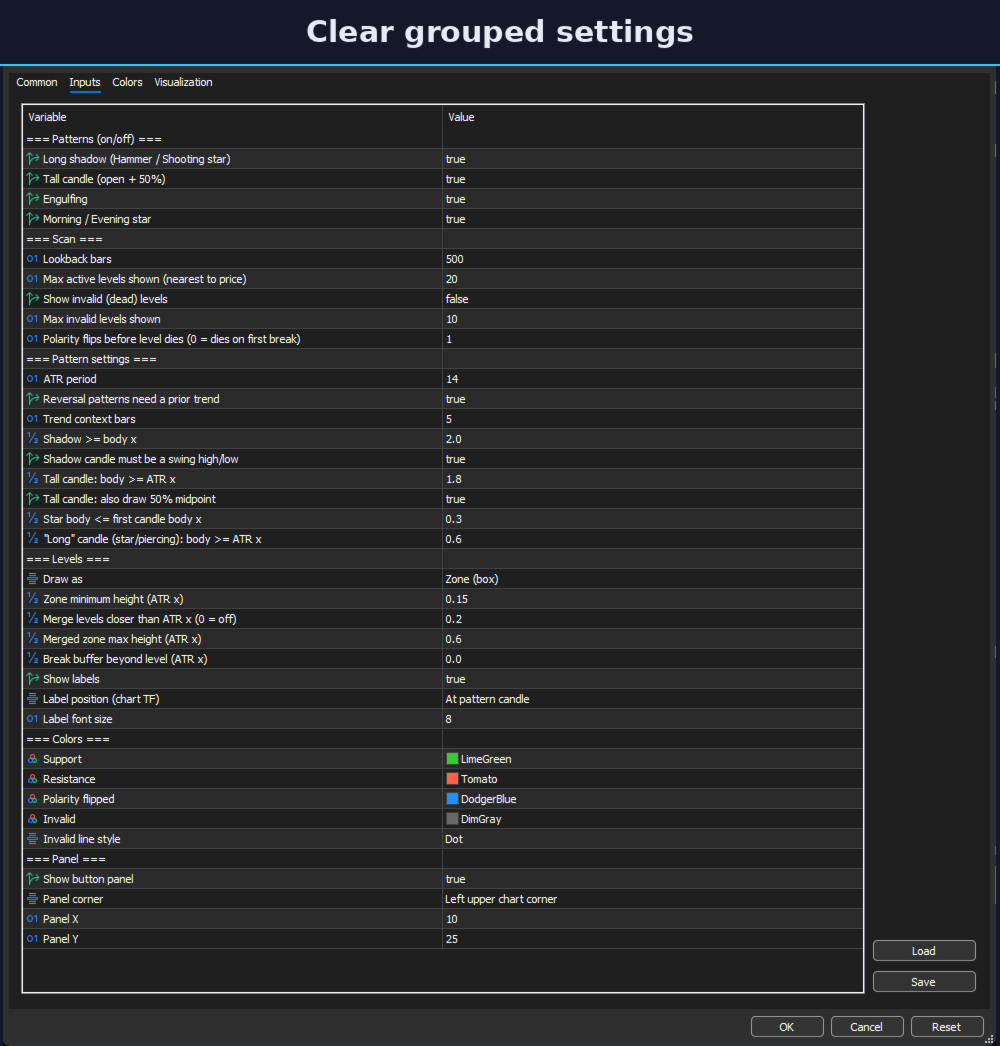
  • Only the levels nearest to the current price are shown (20 by default).
  • Draw levels as zones (boxes) or as lines.
  • Labels show the pattern and the role (for example ENG S). They sit at the pattern candle or at the right edge, and they move away from candles, from the panel and from each other.

On-chart buttons

A small panel turns each pattern on and off, switches between ZONE and LINE, hides all buttons with one click and moves the panel to any chart corner. Your choices are kept when you change the chart timeframe. In the Strategy Tester the buttons cannot be clicked, so please use the input settings there.

Settings

Lookback bars, number of levels, shadow and body ratios, tall candle size, trend filter, merge distance, zone height, colors and label position can all be changed in the inputs. Sizes are measured with ATR, so the same settings work on forex pairs, gold and indices.

Trading on margin involves a high risk of loss. This indicator only shows price levels; the trading decisions are yours. It cannot guarantee profit. Please test on a demo account first.
作者的更多信息
MSM Multi Chart Crosshair Sync keeps several MetaTrader 5 charts on the same moment in time. Click on one chart and all other charts scroll to the same time, even far back in history. It is useful when you study one symbol on several timeframes, or several symbols side by side, and want to see what happened on every chart at the same candle. How it works Attach the indicator to every chart that should stay in sync. Left-click on any chart. The other charts move so that the clicked time is in the
FREE
MSM Pivot Points Mid Levels
Muhammad Sirazul Monir
MSM Pivot Points Mid Levels draws daily, weekly or monthly pivot points on your MetaTrader 5 chart, together with mid pivot levels, clear name and price labels, and a small BIAS button. It is made to work next to your other indicators and panels, so you can read the levels without filling the chart. It does not open or manage trades. Levels Pivot types: Classic, Fibonacci, Woodie and Camarilla. Pivot (P) and up to four support and resistance levels (S1 to S4, R1 to R4). Mid pivots between each p
FREE
Msm Currency Power Meter
Muhammad Sirazul Monir
MSM Currency Power Meter is a chart dashboard for MetaTrader 5 that shows the relative strength of eight major currencies: EUR, GBP, AUD, NZD, USD, CAD, CHF and JPY. Each currency has two gradient bar meters, so you can see at a glance which currencies are strong and which are weak. The indicator does not open trades and does not give buy or sell signals. How the score works For each pair in the list, the indicator checks where the current price sits inside the day's high-low range. The results
FREE
MSM VBSM is a volume-based momentum indicator for MetaTrader 5. It is an MQL5 implementation of the Volume Buy Sell Momentum concept and is shown in a separate window below the chart. It does not open trades and does not give buy or sell orders. It shows whether price changes are happening on rising or falling volume. Concept credit: the Volume Buy Sell Momentum idea was published on TradingView by Siyeon. This is an independent MQL5 implementation. How it works For every bar, the indicator meas
FREE
MSM Trade Manager
Muhammad Sirazul Monir
MSM Trade Manager is a manual trading panel for MetaTrader 5. You choose the entries. The panel sizes the lot by risk, places the stop loss and take profit, and manages the trade on the chart. It does not generate signals and never opens trades on its own on a live or demo account. One-click trading with fixed risk Buy and Sell in one click. The lot is sized from a fixed money risk per trade ($20, $50 or $100 by default) or from a percentage of the balance (1%, 2% or 5%). One button switches bet
MSM Local Trade Copier
Muhammad Sirazul Monir
MSM Local Trade Copier copies trades from one MetaTrader 5 account (Master) to one or more MetaTrader 5 accounts (Slave) running on the same Windows computer or VPS. You decide the trades on the Master; the copier repeats them on the Slave with your own lot and risk settings. One file works in both roles. Set Mode = Master on the source terminal and Mode = Slave on the receiving terminal, and use the same Channel name on both. Trades are passed through a small local file, without DLL and without
筛选:
无评论
回复评论