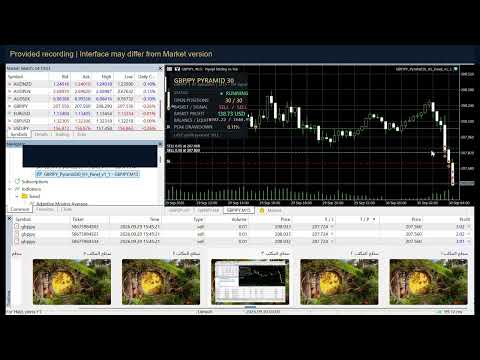
GbpJpy Pyramid 30
- 专家
- 版本: 1.22
- 激活: 5

GBPJPY Trend Pyramid
GBPJPY Trend Pyramid is a MetaTrader 5 Expert Advisor that combines a higher-timeframe trend filter with momentum-based entries and fixed-volume pyramiding. GBPJPY is the intended starting instrument for evaluation. ThesGe settings have not been independently validated for profitability.
Trading method
The robot compares 50-period and 200-period exponential moving averages on H4. Entries also require alignment of the 20-period and 50-period exponential moving averages on M15, the previous M15 closing price, and an RSI filter. Signals use completed candles.
After the first entry, another entry may be opened when the most recent entry reaches a configurable floating profit threshold and the directional signal remains valid. Each entry uses the same broker-adjusted volume. The robot does not multiply the lot size after losses.
Initial stops and trailing stops use ATR from H1. Entries and trailing are evaluated on incoming ticks, subject to execution timing controls. Attaching the robot to an H1 chart is recommended for a consistent setup; the internal H4, M15 and H1 calculation periods remain fixed on other chart timeframes.
Basket management
The maximum basket size defaults to 30. With CloseAtMaxPositions enabled and the basket profit target disabled, the robot attempts to close the basket when this limit is reached, including when the basket is losing. If that option is disabled, it stops adding at the limit and continues managing stops and protection exits.
A positive basket profit target is monitored at every basket size. Basket profit and last-entry profit thresholds are expressed in the account deposit currency. Floating basket calculations include position profit and swap, but exclude commissions, fees and already closed trades. A target is therefore not a guarantee of the final realized cycle result.
Protection and execution
The robot includes a floating basket loss threshold and an account equity floor. The default basket loss limit is 20% of current account balance. The default equity floor is 70% of a saved reference balance, meaning a 30% decline from that reference can trigger a trading halt. These defaults permit substantial drawdown and are not a recommended risk level for every account.
The equity floor observes total account equity but closes only positions belonging to this strategy on its attached symbol. Other account activity can therefore trigger it. The reference balance and halt state are saved in terminal global variables across restarts. Deposits and withdrawals do not automatically reset the reference. Closing requests are retried on subsequent ticks when trading is available.
Volume is adjusted to the broker's minimum, maximum and volume step. A broker minimum above the requested lot size increases the effective entry size; check the initialization message before use. Entry checks include margin availability, directional volume limits, trade permissions and spread. Prices are aligned to the symbol tick size.
Account setup
On hedging accounts, each entry is a separate position with its own stop. On netting accounts, entries merge into one position with a shared stop. The size limit is measured as the merged volume divided by the effective entry lot, rounded upward. The add-profit condition uses the latest recorded entry deal, which can differ from a complete requested entry after partial execution. Netting and hedging results can differ.
Use one running instance per symbol and strategy ID. On netting accounts, dedicate the symbol to this robot; manual trades and other robots must not trade the same symbol. Do not change volume or strategy ID while a basket is open.
No external indicators, DLL imports or external licensing services are required. The robot trades its chart symbol and has no GBPJPY-only execution lock. Availability of trades depends on its filters, history, broker specifications and account conditions; results on other instruments have not been established.
Installation and evaluation
Attach the robot to the intended symbol, enable automated trading, review the effective volume and set a unique strategy ID. Provide sufficient H4, M15 and H1 history. Evaluate using real-tick testing where available, including realistic commission, swap and execution conditions, followed by demo-account testing.
Support is provided through MQL5 product comments or MQL5 messages. Trading involves risk. Stop orders, equity limits and basket exits cannot guarantee execution prices or prevent losses during gaps, slippage, disconnections or unavailable trading. Historical testing does not guarantee future performance.