Expert Advisor Based on Weekly Pivot Indicator

工作已完成

执行时间6 天
员工反馈
Thanks for the project. Looking forward to the next one!
客户反馈
Great understanding of how Expert Advisors works and specific specifications to a project. Will get the project requirements down and complete with 100% satisfaction. A+

指定

The expert advisor will use the weekly pivot indicator and either buy above the weekly pivot level to the next level(R1) or sell below the weekly pivot level to the next level (S1). This EA will be able to place stop losses and take profit based on prior weeks support and resistance levels. 

Please refer to documentation as specific rules must be followed to execute the trade. No trade will be held longer than a week, any trade will be closed prior to close of market on Friday at 430pm (EST).


Requirements Document:

The purpose of this document is to layout specific requirements


Pivot Level Trading Plan:


Indicators used:

Pivot Level Indicator with 7 support and resistance levels:

S1 = Support 1

S2 = Support 2

S3 = Support 3

WP = Weekly Pivot

R1 = Resistance 1

R2 = Resistance 2

R3 = Resistance 3


Buy Order Placement:

In order to be a buy order the following conditions must be met:


·            The price must close above the weekly pivot (WP)

·            1 bar must fully close above the weekly pivot (WP)

·            The barmustclose above the opening bar for that week (the very first bar for that week

·            Barmustbe a full/complete buy bar (no indecisive or small bars)


Afterallthe above conditions have been met then the following will apply to the order placed:


·            Lot size of 14.0 will be placed (should be adjustable/able to alter based on stop loss placement) 

·            Stop loss for the order will be placed be 20 pips below weekly pivot (WP) for that week

·            Take profit will be placed at resistance 1 for that week OR the system will look back 5 weeks in the past to look at the “best” place for take profit placement


Order will be closed if the take profit OR the stop loss has been executed for that trade


Example:


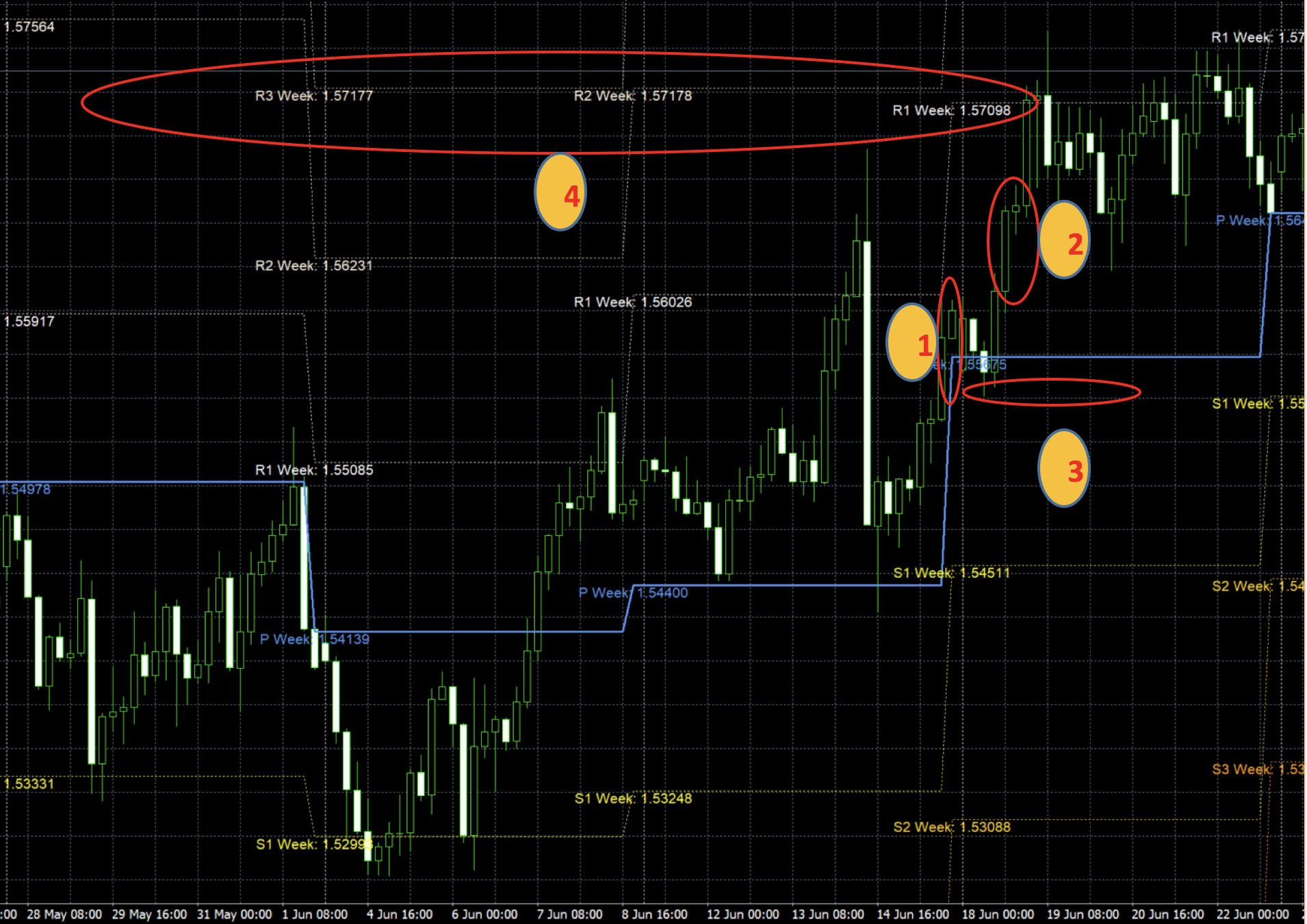
1.        This denotes that this is the first opening bar of the week

2.        This denotes that this is the bar that the trade should be entered on. This is a long buy bar that is above the blue line weekly pivot (WP) for that week

3.        This denotes that the stop loss should go below 20 pips below the blue line weekly pivot (WP) for that week

4.        This denotes that the take profit should be placed somewhere in that region belowR2/R3 week of either of the previous weeks. The system should be able to look at the current week for the pivot levels that are formed R1, R2 or R3 to see if a take profit will be suitable there OR look back 5 weeks to see if it will be better suited there. For this example it is better to place the take profit somewhere in the past (where the red oval highlights) R3 for the week of June 1stto June 8th, R2 for the week of June 8thfor June 18thor R1 for the week June 18thto June 22th.. There are three possible cases to place the take profit in this situation which have been outlined by the red oval.


Sell Order Placement:


In order to be a sell order the following conditions must be met:


·            The price must closebelowthe weekly pivot (WP)

·            1 bar must fully closebelowthe weekly pivot (WP)

·            The barmustclose below the opening bar for that week (the very first bar for that week

·            Barmustbe a full/complete buy bar (no indecisive or small bars)


Afterallthe above conditions have been met then the following will apply to the order placed:


·            Lot size of 14.0 will be placed

·            Stop loss for the order will be placed be 20 pips above weekly pivot (WP) for that week

·            Take profit will be placed at support 1 for that week OR the system will look back 5 weeks in the past to look at the “best” place for take profit placement


Order will be closed if the take profit OR the stop loss has been executed for that trade


Example:


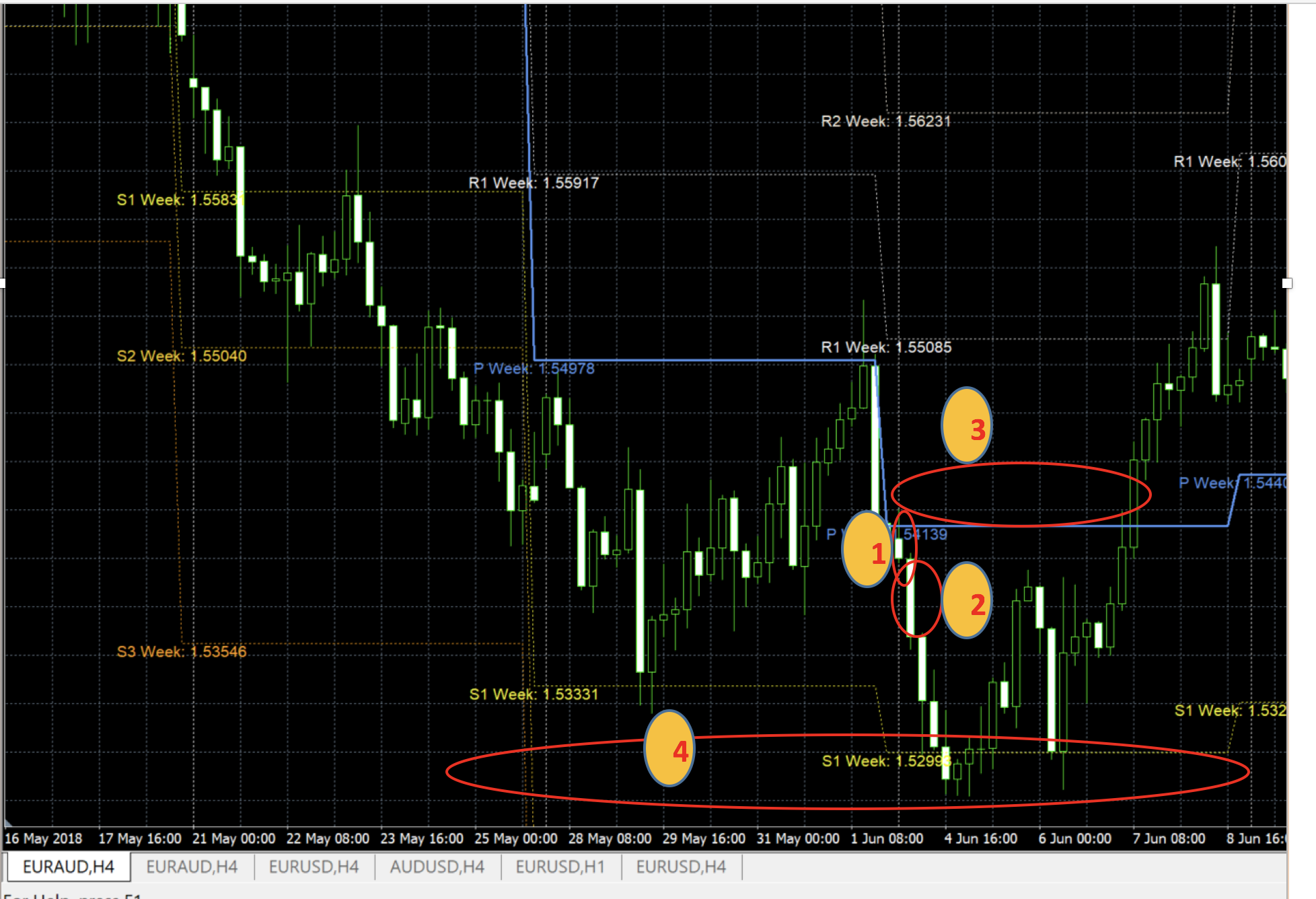
1.        This denotes that this is the first opening bar of the week

2.        This denotes that this is the bar that the trade should be entered on. This is a long sell bar that is below the blue line weekly pivot (WP) for that week

3.        This denotes that the stop loss should go below 20 pips above the blue line weekly pivot (WP) for that week

4.        This denotes that the take profit should be placed somewhere in that regionaboveS1 week for that week. The system should be able to look at the current week for the pivot levels that are formed S1, S2 or S3 to see if a take profit will be suitable there OR look back 5 weeks to see if it will be better suited there. For this example, it is better to place the take profit somewhere for that week (where the red oval highlights) S1 for the week of June 4THto June 8th. The System can look back in the past at S3 week for the week of May 21stto May 25thor S1 for May 28thto June 1st. 


反馈

1
开发者 1
等级
(4)
项目
5
20%
仲裁
3
33% / 33%
逾期
0
空闲
2
开发者 2
等级
(9)
项目
10
10%
仲裁
4
25% / 75%
逾期
3
30%
空闲
3
开发者 3
等级
(503)
项目
970
74%
仲裁
27
19% / 67%
逾期
100
10%
工作中
发布者: 1 文章, 6 代码
4
开发者 4
等级
(206)
项目
333
35%
仲裁
66
12% / 58%
逾期
87
26%
空闲
相似订单
All other Necessary filters already coded , Mostly it is referring to another expert copy pasting . Live Chart Optimization . Optimization from Signal Trigger Point . Apply to stay ahead . While applying please explain the correct trailing stop loss for value gap entries
Patrick 30 - 200 USD
//+------------------------------------------------------------------+ //| EURUSD Daily Strategy EA | //+------------------------------------------------------------------+ extern int MA_Fast = 50; extern int MA_Slow = 200; extern int RSI_Period = 14; extern double RiskReward = 2.0; extern double StopLossMultiplier = 1.5; void OnTick() { if (TimeCurrent() != iTime(NULL, PERIOD_D1, 0)) return;
I can Program or do any Developing for you for MQL5 or 4 I can work 1 - 5 days deposit is required before im doing anything for both our safety as these work takes a lot of time and energy inbox me and we can discuss the job im reliable and trustworthy looking forward to working with you
Ai robot 30 - 50 USD
1️⃣ System Architecture An AI robot typically consists of the following subsystems: 🔹 1. Perception Layer Collects environmental data using: RGB / Depth cameras LiDAR Ultrasonic sensors IMUs (Inertial Measurement Units) Microphones Data is processed using: Computer Vision (e.g., object detection, SLAM) Signal processing Sensor fusion algorithms 🔹 2. Cognition / Intelligence Layer Implements AI models such as
Trailing Stop Based on Thresholds . Other Necessary Filters already Coded . Live Chart Only . The strategy already coded - needs a fresh new draft . To Start from Signal Trigger
MT5 backtestest helper 30 - 200 USD
Sure 😊 — here’s a simple file-style write-up about your robot that you ordered on MetaTrader 4. You can copy it into Word or save it as a document. Title: My Trading Robot on MetaTrader 4 Introduction I recently ordered a trading robot on MetaTrader 4 to help me trade in the financial markets. A trading robot, also known as an Expert Advisor (EA), is a program that automatically analyzes the market and places trades
Data Integrity 500 - 1000 USD
The trading bot is an automated software system designed to monitor financial markets, execute trades, and manage risk based on predefined strategies. The bot aims to maximize profits while minimizing human intervention and emotional decision-making. Scope: Supports automated trading on selected exchanges (e.g., Binance, Bitget, Coinbase). Executes trades based on technical indicators, signals, or AI models. Provides
I need help in modifying an amibroker AFL indicator the indicator already works but I need per symbol static variable isolation, parameters persistence per symbol after restart, non declining trailing stop logic, parameter auto restore when switching symbols and a global reset function for static variables. For better understanding As discussed, this is the official offer for restructuring my RAD Chandelier stop loss
Gold robot Ga1 30 - 200 USD
mport pandas as pd import numpy as np def detecter_tendance(data): # Code pour détecter la tendance pass def identifier_niveaux(data): # Code pour identifier les niveaux de support et de résistance pass def calculer_stop_loss(tendance, support, resistance): # Code pour calculer les stop loss pass def calculer_profils(tendance, support, resistance): # Code pour calculer les profils mport pandas as pd
Hello there Hpe you are doing good I am in search of a pine script expert developer who can build strategy in apudFlow in pinescript. Kinldy bid on this project if you can do this

项目信息

预算
30+ USD