First Feature to Edit/De-Bug:
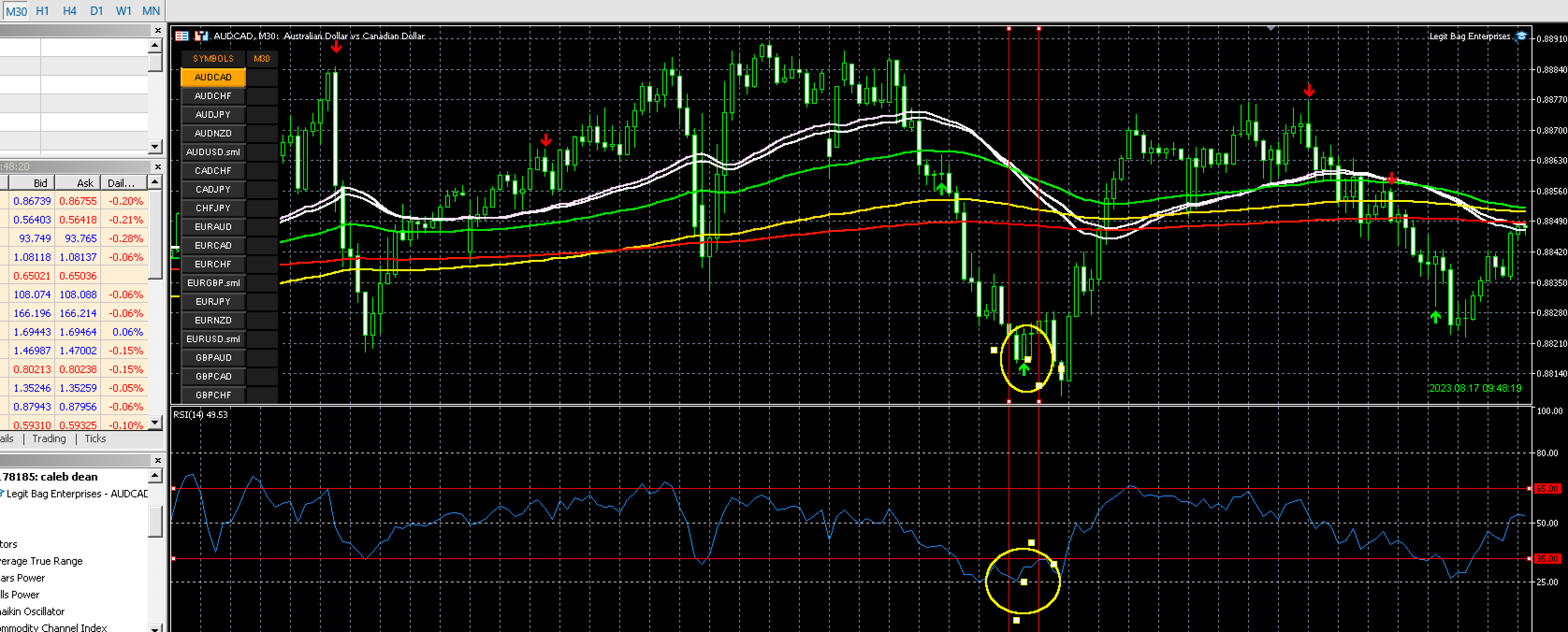
A bullish execution:
The Price is below all indicators with a Bullish three-line strike printed
1.Execute these trades only going forward when this specific criteria is met on the bullish side
2.Trade is executed when:
- The price is below the specified 35 line on the RSI (RED LINE TOP) or the Price is Below the 25 (RED LINE BOTTOM) line on the RSI (open)
- The previous candle shows that it was below the price of 35 line drawn (which will be included in the update in a new line)
Example:
Second Feature to edit:
- A bearish execution
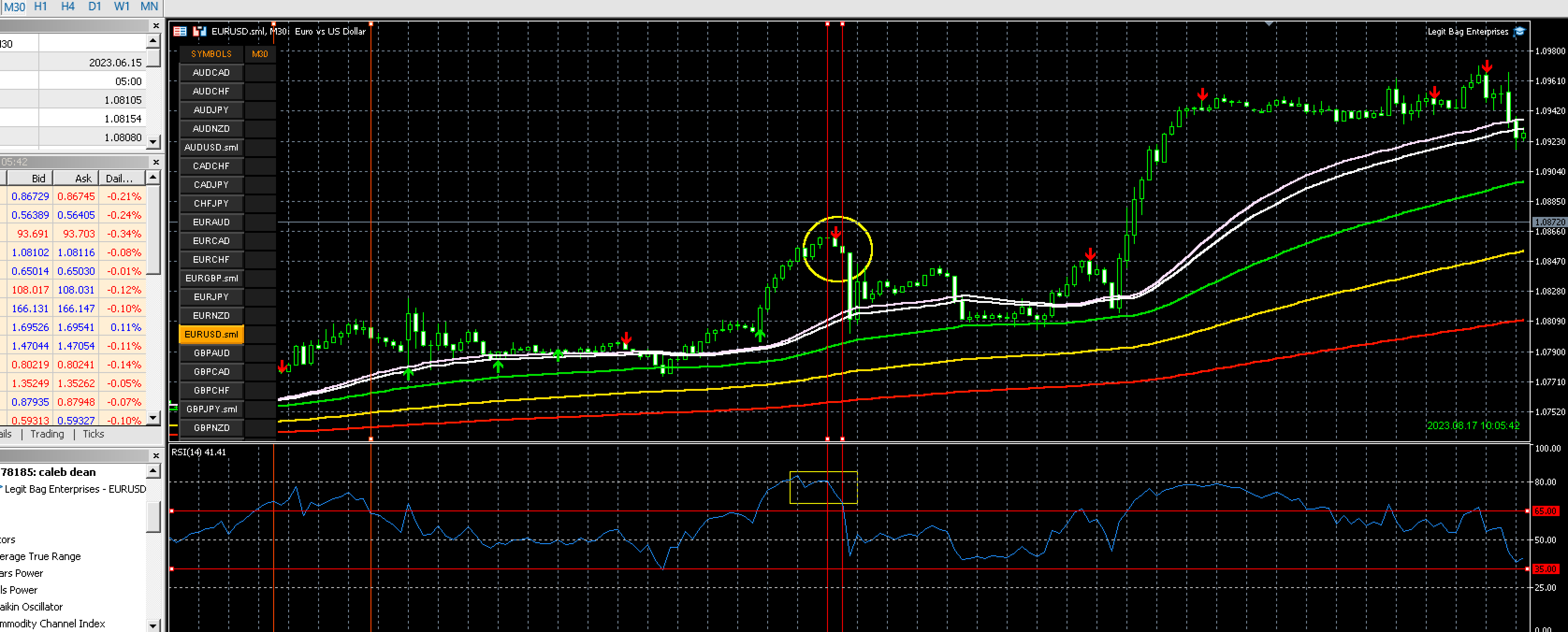
•The only bearish trades I want executed have to executed automatically consist of the
following criteria
•The Open price of the RSI must be above the 65 line
•Only open SHORT positions if the criteria with the RSI aligns example below
Example:
New Features to Add PT.1
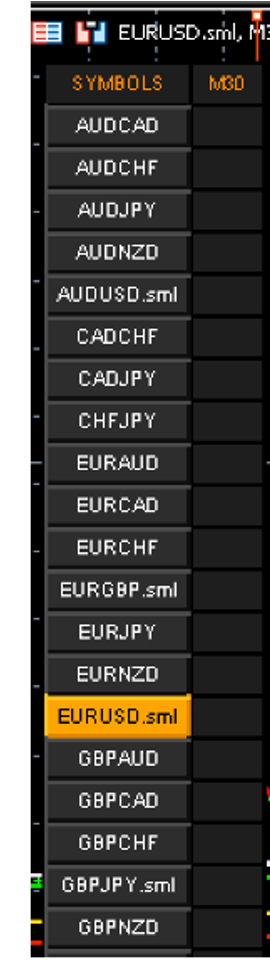
•Currency symbols menu tab (Left) on chart
•As emerging 3line strike patterns form and Arrow first begins to print highlight both boxes (meaning the currency pair on the symbols tab and time frame box) in light red/Light Green with either the red/green arrow displayed. take the trade on the emerging signal that is printing
•Upon close: Send the push notification and execute the trade ONLY if it meets the new criteria given above
IF THE EMERGING ARROW DOES NOT PRINT INTO THE CLOSE OF THE SELECTED TIMEFRAME CANDLE EXIT THE TRADE
Example
New Features to Add - RSI
Add RSI (close)
•Custom RSI added automatically with Bot is loaded to MT5
•14, 41, 41
the levels:
•Top: 80
•Middle: 50
•bottom: 25
•
Two additional lines added:
•- 65 RED
•- 35 Red or Green
Example:

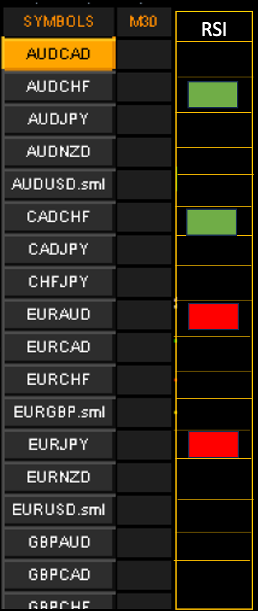
New Addition: RSI Monitoring
Add RSI tab next to the pairs tab on right of screen
•Add Another tab to the right of the Time column and label it RSI: Actively display the current OPEN RSI level
•When the RSI is showing above the 65 level highlight the tab next to the currency pair in light RED
•When the RSI is showing below the 35 level highlight the tab next to the currency pair GREEN
•If it is in between the RSI levels leave box with no color
Example:

New Feature – Integrated Quick Order tool
Quick order tool functionality
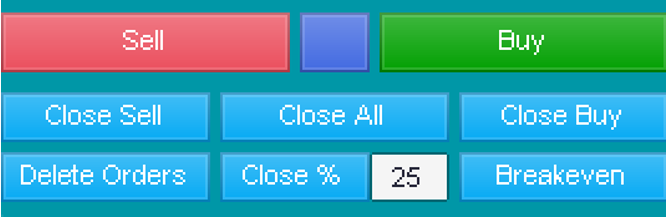
•I want this to be on the main screen with 4 buttons that read Break Even Close 25% - Close 50% - Close All
•Close 25%: Close 25% of the pair that is selected
•Close 50%: Close 50% of the pair that is selected
•Close All: Close all trade that are open no matter if they are in profit or loss
•Break even: Selected Pair break even (automatically move stop loss to break even of buy/sell active orders)
Example:
New Features – Selected pairs (settings)
•Settings: option to choose how many trades can be open - Example: only trade 5 pairs at a time.
•Create a checkbox in the settings tab - to scan and trade “only selected pairs on list. - Display all pairs selected on the left via which box is selected. When this setting is selected those are the only pairs displayed on the Currency pair menu tab.
•Settings:
•Add “only trade selected pairs” On/Off
•Add XAUUSD to pairs
•Add US30 to list
•Add NAS100/UT100
*FINAL ADJUSTMENTS*
- This indicators code MUST be able to be uploaded to the MQL5 MARKETPLACE the first one did not let me upload to the marketplace.
- I will also give you the powerpoint presentation I made regarding this
- I want my name on the first screen as developed by "x" on the first screen going into the settings when EA is loaded
- In order to receive funds this must meet the criteria of a POSITIVE backtest and proven equity curve over the standard of at least 30 days in backtesting which will be verified by me
- In order for successful deployment of funds - the added features and adjustments must be working 100% as described
相似订单
1. PROJECT OVERVIEW Development of a custom automated and manual trading bot for NinjaTrader 8, primarily designed for Nasdaq Futures (NQ/MNQ). The bot will contain the original trading strategy, configurable risk management, automatic and manual operating modes, alerts, profit/loss management, partial profit taking, Break Even, backtesting functionality, and the additional configurable contract-averaging system
Swing Breaks & AMD Expert Advisor The Swing Breaks & AMD Expert Advisor is an automated trading system designed around two core market-structure concepts: Swing Breaks and the AMD (Accumulation, Manipulation, Distribution) model . The EA is designed to analyze price action, identify meaningful swing structures, detect potential breaks of those structures, and evaluate the surrounding market behavior for possible AMD
We are looking for an expert algorithmic trading developer to build a high-performance, fully automated Custom Expert Advisor (EA) or trading bot. The bot must integrate advanced Smart Money Concepts (SMC) , Inner Circle Trader (ICT) methodologies, and Volume Spread Analysis (VSA) with a high-frequency trading (HFT) style execution and scaling model. The core objective is to program a bot that identifies
Develop an Expert Advisor for MetaTrader 5 that manages existing positions. Features Automatically detect all open positions. Apply Break-Even after price reaches a configurable profit. Partial Close: Close X% of volume at the first target. Move Stop Loss to Break-Even. ATR Trailing Stop (optional). Magic Number filter. Comment filter. Symbol filter. Trading session filter. Retry mechanism for trade operations
I have a fast execution ea that need a little touch, it trade on gold and my problem is about the risk ratio the tp is 3pip and stop loss 20 but i cannot get it right to make the average win larger and average loss lower. I would like to know if i can get help to get it right without touching the tragedy and the trade frequency. Those two pictures I attached is the example of what my bot actually do like i explained
Hello everybody, I'm looking for an experienced MQL4/MQL5 developer to optimize a High-Frequency Trading (HFT) Expert Advisor for both MT4 and MT5. The EA performs consistently and profitably on demo accounts, but when it is run on Raw and Standard live accounts under what appear to be the same trading conditions, it begins generating losses. I do not have the original source code (.mq4/.mq5); I only have the