 全部订单
全部订单
 规则
规则
工作已完成

指定
Dear coders,
kindly find below all the requirement specification of this robot:
1- I want you to provide me with the .mq4 source script file not only the .exe,
2- This EA does not include any trading strategy, I mean there is no entry rules or exit rules. I will insert the entry and exit rules in the script.
N.B: Before confirming the reception and the completion of the job, one or many trading strategies will be inserted in the mq4 source code for testing purposes, but the coder must provide the mq4 source code empty of any trading strategy.
3- This EA must pass the mql5 market validation as it is made for Commercial USE, this is why you can add a fake order or a real order with the smallest possible lot size on initialization (Immediate open and close order with the smallest possible lot size on initialization to pass the trading Validation check).
N.B: the coder must indicate in the mq4 source script which lines are added for validation purposes.
4- All the required features must work properly with any inserted trading strategy or strategies because all these are additional and separated features that can be found in any EA.
5- An Oval label displaying in the chart and containing the info, is required as the attached image shows, this oval label must display immediately on the chart on initialization.
this oval label will be separated into 3 parts as the image shows (kindly check the attached image):
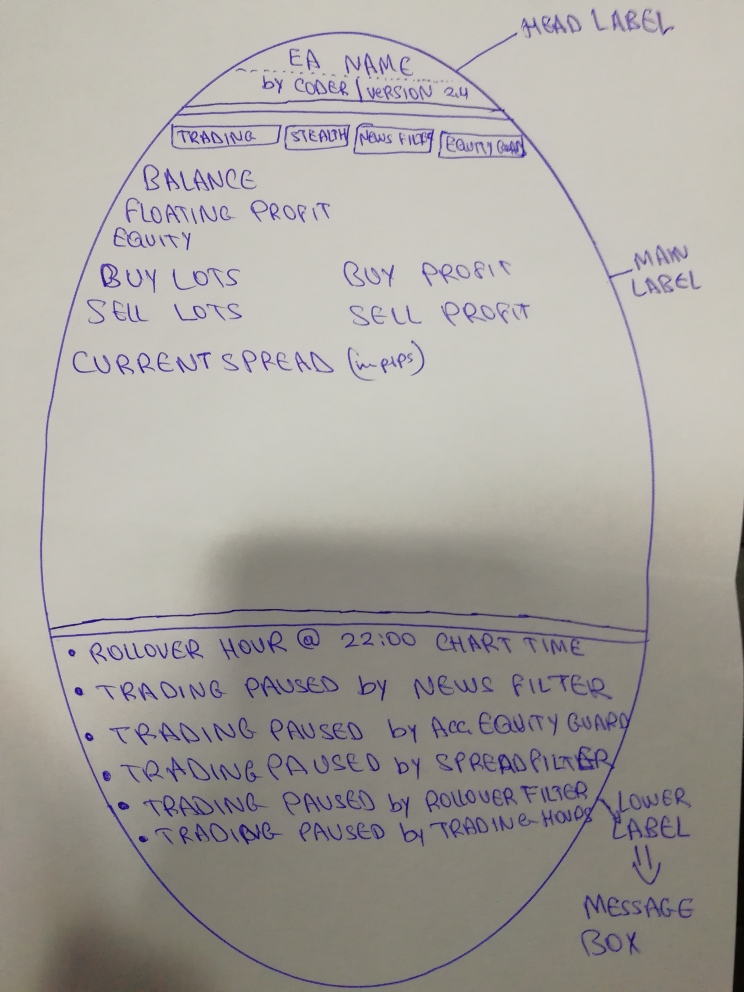
1st part: The Head Label has a specific background color (Dark Blue by default and can be changed from the inputs) and contains the following Info: “EA NAME” (color white by default and can be changed from the inputs), “by Coder” (color and font can be modified from the script, orange by default), “Version” (color and font can be modified from the script, Orange by default)
2nd part: The Main Label has a specific background color (Dark Blue by default and can be changed from the inputs) and contains 4 buttons that can be triggered ON/OFF by clicking, Buttons color is Green if the feature is TRUE or ON, and the color is RED if the Feature is OFF or FALSE.
Button #1: TRADING, if it is False the EA does not take any new trades or any pending orders, but it still can close already open positions. (extern bool found in the above inputs)
Button #2: STEALTH, if it is True all stop loss and take profit will be hidden from the broker. (extern bool found in the above inputs)
Button #3: NEWS FILTER, if it is true the News Filter is active. (extern bool found in the above inputs)
Button #4: ACCOUNT EQUITY GUARD, if it is true the account equity guard is enabled and monitors the account equity and executes the requested actions if any of the input conditions is triggered.
Under the 4 buttons, The Main Label display also the following info: (Check the Attached Image), these Info color is white by default and can be changed from the inputs.
Balance
Floating Pnl
Equity
Buy Lots Buy Profit
Sell Lots Sell Profit
Current Spread
3rd Part: The Lower Label has a specific background color (light blue by default, and can be changed from the inputs). It is is the message box of the EA, It displays one or all of the following Messages (Color is black by default and can be changed from the inputs):
Rollover Hour at.... Chart Time
Trading Paused by Rollover Filter
Trading Paused by News Filter
Trading Paused by Equity Guard
Trading Paused by Spread Filter
Trading Paused by Trading Hours Management System
6- Find below all the inputs and their explanations:
INPUTS
=============================================================EA NAME====================================================
Trading : True or false (1st button inserted in the oval main label, if false the EA does not take new trades or pending orders)
=================Broker & Spread Protection=================
Max Entry Spread: Max spread for entry/ open position ( Value in pips)
Max Exit Spread: Max spread for Exit/ close position ( Value in pips)
Max Slippage: value in Pips
Stealth Mode: True or false. it represents the Button #2: STEALTH, if it is True all stop loss and take profit will be hidden from the broker.
======================Money Management====================
Use fixed lots: True Or false
Fixed Lot: 0.01 by default
Use Percent: True or false
Lot Risk %: 5 (by default)
====================Notifications================
Email Notification: True or false
Moblie Notification: True or False
========================News Filter====================
News Filter: true or false. if false it does not work. it represents the Button #3: NEWS FILTER, if it is true the News Filter is active.
Sorce URL: 2 choices: investing.com or dailyfx.com
Investing.com URL WEB:.....................................................
dailyfx.com URL web:..........................................................
Low Impact News: true or false ( default false)
a-Pause Trading before Low Impact News release ( in Minutes): 20 default
b-Start Trading after Low Impact News release ( in Minutes): 20 default
Medium Impact News: true or false ( default false)
a-Pause Trading before Medium Impact News release ( in Minutes): 60 default
b-Start Trading after Medium Impact News release ( in Minutes): 60 default
High Impact News: true or false ( default false)
a-Pause Trading before High Impact News release ( in Minutes): 90 default
b-Start Trading after High Impact News release ( in Minutes): 90 default
Draw lines on the chart: True or false
a-bullish News chart line color: Green default
b-bearish news chart line color: Red default
===============================GMT Settings===========================
GMT OFFSET: True or false
Offset Value: 3 default
( if gmt offset = true, trading hour= trading hour + offset value. if GMT offset = false, trading hour= trading hour)
== =======================================Rollover detection time and spreads================================
Rollover auto detection time: true or false (true by default), it detect the rollover hour in chart time
Rollover Time Filter: True or false
a-pause trading before rollover ( Minutes ): 90 by default
b- start trading after rollover ( minutes): 90 by default
X_Max Spread Filter During Rollover: True or false (false default) ( if true max spread during rollover will be max spread initial x value
X_ Max spread filter Value: 2 default
=============================Trading Hours Management System============================
Trading Hours Management System: True or False. False by default. ( if true it opens new positions only during the specified hours in the specified days, if false it open positions 24/24)
Monday Trading Hours: 0,1,22,23 ( separated by comma, in this case the EA trades on monday from hour 0 to 1 and from 1 to 2 and from 22 to 23 and from 23 to 24, it opens positions only during these intervals)
Tuesday Trading Hours: 0,1,22,23
Wednesday Trading Hours: 0,1,22,23
Thursday Trading Hours: 0,1,22,23
Friday Trading Hours: 0,1,22,23
Saturday Trading Hours: 0,1,22,23
Sunday Trading Hours: 0,1,22,23
==============================Friday Exit==================================================
Friday Exit: True or False ( false by default)
a-Exit Hour: 22 by default
b-close All Open positions: True or False ( true by default)
c-Delete All Pending Orders: True or False ( true by default)
==========================================Account Equity Guard============================
Account Equity Guard: True or false. (false by default) (this input represent the Button #4 in the label if it is true the account equity guard is enabled and monitors the account equity and take the rquested actions if any of the input conditions is triggered)
Equity: equity value to be manually set ( 5000 by default)
Conditions
Profit Type: Amount Or percent. (Amount by default)
Profit Value: 3000 By default
loss Type: Amount or percent. ( percent by default)
Loss Value: 20 By default
Actions On Trigger
Disable Trading: True or False. if true it turns off the trading button and the EA does not take any new positions
Close All Open Positions: True or false . true by default
Delete All Pending Orders: True or False. True by default
Explanation of the account equity guard: the user funds his account with 5000, he must set the amount of equity that he wants the guard to monitor it for example 5000, with the above inputs, if the equity jumps to 8000 or drops by 20% to 4000 the requested actions will be executed.
=========================================Message Box Display=============================
(Message box is the lower label of the oval object)
Rollover Hour Auto detected time: True or false. true by default ( if true its display the following message:Rollover hour at 22.00 for example Chart time)
News Filter: True or false. true by default. (if true it displays the following message when trading is paused by news filter: Trading is paused by News Filter)
Account Equity Guard: True or false. true by default. (if true it displays the following message when equity guard action/actions is/are triggered: Trading is paused by Account Equity Guard)
Spread Filter: True or false. true by default. (if true it displays the following message when the spread is above the Max Allowed: Trading is paused by Spread Filter)
Rollover Filter: True or false. true by default. (if true it displays the following message when time is at Rollover forbidden interval: Trading is paused by Rollover Filter)
Trading Hours Management System: True or false. true by default. (if true it displays the following message when time is out of allowed trading hours: Trading is paused by trading Hours Management System)
=====================================Oval Label Color===================================
Head label background color: Dark blue by default
EA Name Color: White by default
Main Label background color: Dark violet by default
All Info inside Main Label Color: White by Default
Lower Label Background Color: Light Blue By default
All Info inside Lower Label Color: Orange By Default