脚本: VR 订单历史 MT5 轻量版
原来 CSV 格式与 MT4 类似格式不同。那么第五版的意义何在?
fxsaber:
原来 CSV 格式与 MT4 类似格式不同。那第五版的意义何在?
什么意思?
代码中最吸引人的是这一行。
FileWrite(file_handle,SeparatorLine,SeparatorLine,SeparatorLine,SeparatorLine,SeparatorLine,SeparatorLine,SeparatorLine,SeparatorLine,SeparatorLine,SeparatorLine,SeparatorLine,SeparatorLine,SeparatorLine,SeparatorLine,SeparatorLine,SeparatorLine,SeparatorLine,SeparatorLine,SeparatorLine,SeparatorLine,SeparatorLine,SeparatorLine,SeparatorLine,SeparatorLine,SeparatorLine,SeparatorLine,SeparatorLine,SeparatorLine,SeparatorLine,SeparatorLine,SeparatorLine,SeparatorLine,SeparatorLine,SeparatorLine,SeparatorLine,SeparatorLine,SeparatorLine,SeparatorLine,SeparatorLine,SeparatorLine,SeparatorLine,SeparatorLine,SeparatorLine,SeparatorLine,SeparatorLine,SeparatorLine);
弗拉基米尔,你从未见过处理字符串的函数吗?
StringInit(SeparatorLine, 46, StringGetCharacter(SeparatorLine, 0));
Alexey Viktorov:
代码中最吸引人的是这一行。
弗拉基米尔,你从未见过处理字符串的函数吗?
但用户会很清楚 )))))
Vladimir Pastushak:
是的,是的...
但用户会很清楚 )))))
Vladimir Pastushak:
什么意思?
MT5 历史记录的分析方法与 MT4 历史记录截然不同。几乎没有人使用 MT5 报告,并将 MT5 历史记录上传到 CSV,与最初提供的一模一样。
Vladimir Pastushak:
我们的目标是获得按仓位细分的历史记录,清楚地看到 仓位的起点和终点,以及在哪个仓位进行了哪些交易...
但情况并非如此。
fxsaber:
这就是不存在的原因。
不是的,是有的,只是版主要求我去掉分隔符。
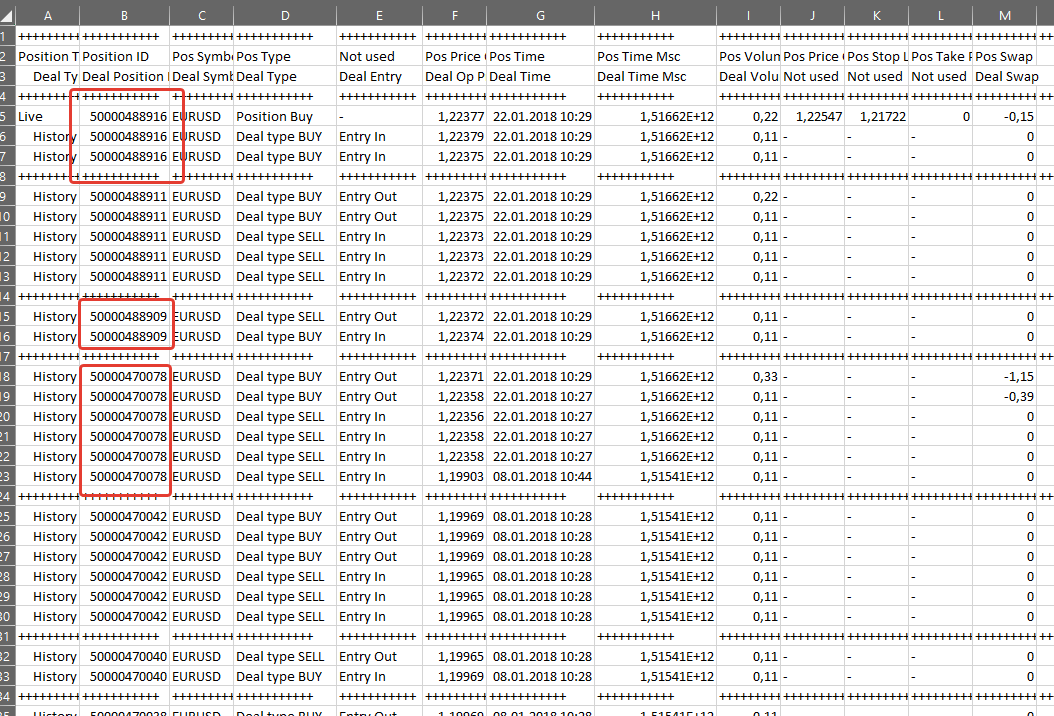

VR 订单历史 MT5 轻量版:
作者: Vladimir Pastushak