Опубликованные продукты
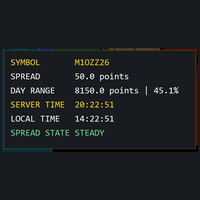
A small heads-up display for one corner of your chart:
- the symbol name - the **current spread** in points, updated live - today's **high–low range** in points, and where the current price sits inside that range as a percentage - **server time and your local time**, side by side, both ticking every second
Its bottom line is the **Spread State**: the indicator keeps a rolling 60-second baseline of the spread and judges the live spread against it — **STEADY, WIDE, or BLOWOUT** — so a spread blo
FREE
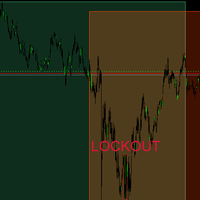
SessionBands draws the three major sessions directly on your chart:
- **Tokyo, London and New York boxes** for the last N days (default 5), each spanning its session's actual high–low range - sessions are defined in **server time**, with every start and end hour adjustable in the settings - each box carries its session's **name label** and a distinct color, blended against your chart background at an adjustable opacity - today's active session box grows with the session in progress - a corner r
FREE
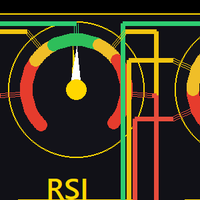
One chart. Five classic indicators. Three periods each. No sub-window clutter.
The Five-Stack Panel displays RSI, CCI, ATR, ADX and MFI at three periods simultaneously (defaults 7 / 18 / 28, all adjustable) in a compact on-chart panel, with a plain-language state tag for each reading:
- **RSI** — tag: OVERBOUGHT (≥70) / MID / OVERSOLD (≤30) - **CCI** — tag: STRETCH UP (>+100) / STRETCH DN (<−100) - **ATR** — shown in price units at your symbol's precision - **ADX** — tag: CHOP (<20) / WEAK TRE

Tell CageCalc two things — the money you are willing to risk on one trade, and where your stop goes — and it does the lot-size arithmetic for any instrument:
- **Your risk in money** (default $8) and your stop, either as a price or a distance in points - it reads the instrument's real tick value, tick size and volume limits from your broker feed — no symbol tables, no guesses - shows the **loss per 1.0 lot** at your stop distance, the **lots that fit your risk** (floored to the broker's volume