MQL5 Programming for TradersCreating application programsGraphical objectsSetting levels in level objects
- Object types and features of specifying their coordinates
- Time and price bound objects
- Objects bound to screen coordinates
- Creating objects
- Deleting objects
- Finding objects
- Overview of object property access functions
- Main object properties
- Price and time coordinates
- Anchor window corner and screen coordinates
- Defining anchor point on the object
- Managing the object state
- Priority of objects (Z-Order)
- Object display settings: color, style, and frame
- Font settings
- Rotating text at an arbitrary angle
- Determining object width and height
- Visibility of objects in the context of timeframes
- Assigning a character code to a label
- Ray properties for objects with straight lines
- Managing object pressed state
- Adjusting images in bitmap objects
- Cropping (outputting part) of an image
- Input field properties: alignment and read-only
- Standard deviation channel width
- Setting levels in level objects
- Additional properties of Gann, Fibonacci, and Elliot objects
- Chart object
- Moving objects
- Getting time or price at the specified line points
Setting levels in level objects
Some graphical objects are built using multiple levels (repetitive lines). These include:
- Andrews pitchfork OBJ_PITCHFORK
- Fibonacci tools:
- OBJ_FIBO levels
- Time zones OBJ_FIBOTIMES
- Fan OBJ_FIBOFAN
- Arcs OBJ_FIBOARC
- Channel OBJ_FIBOCHANNEL
- Extension OBJ_EXPANSION
MQL5 allows you to set level properties for such objects. The properties include their number, colors, values, and labels.
Identifier |
Description |
Type |
|---|---|---|
OBJPROP_LEVELS |
Number of levels |
int |
OBJPROP_LEVELCOLOR |
Level line color |
color |
OBJPROP_LEVELSTYLE |
Level line style |
ENUM_LINE_STYLE |
OBJPROP_LEVELWIDTH |
Level line width |
int |
OBJPROP_LEVELTEXT |
Level description |
string |
OBJPROP_LEVELVALUE |
Level value |
double |
When calling the ObjectGet and ObjectSet functions for all properties except OBJPROP_LEVELS, it is required to provide an additional modifier parameter with the number of a specific level.
As an example, let's consider the indicator ObjectHighLowFibo.mq5. For a given range of bars, which is defined as the number of the last bar (baroffset) and the number of bars (BarCount) to the left of it, the indicator finds the High and Low prices and then creates the OBJ_FIBO object for these points. As new bars form, Fibonacci levels will shift to the right to more current prices.
#property indicator_chart_window
|
The direct setting of the object is done in the auxiliary function DrawFibo. In it, in particular, the levels are painted in rainbow colors, and their style and thickness are determined based on whether the corresponding values are "round" (without a fractional part).
bool DrawFibo(const string name, const datetime &t[], const double &p[],
|
Here is a variant of what an object might look like on a chart.
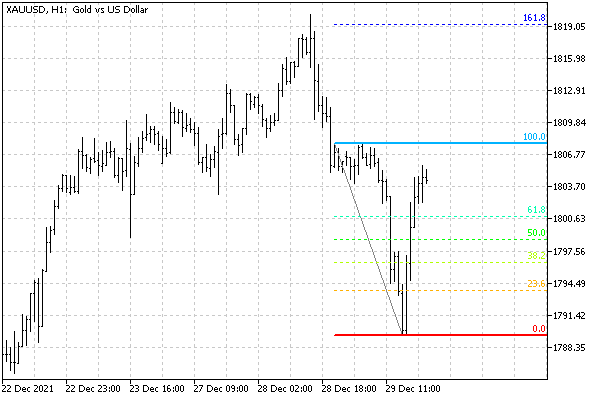
Fibonacci object with level settings