Shadow Counter Pro
- Experts
- 버전: 1.64
- 활성화: 5

Reversal Grid Expert Advisor with ADX Trend Protection
Shadow Counter Pro is a Reversal Grid Expert Advisor designed to trade market pullbacks and counter-moves while using an ADX filter to avoid opening new positions when the market enters a strong trend.
The EA is designed primarily for traders who understand grid-based trading and want additional control over position sizing and market conditions.
How Shadow Counter Pro Works
Shadow Counter Pro uses the direction of the previous candle to determine the trading direction:
- Previous candle is Bearish → BUY
- Previous candle is Bullish → SELL
- Doji candle → No new entry
If subsequent candles continue in the same direction, the EA can add positions according to the selected lot management mode.
The objective is to build a basket during a counter-move and manage the positions as a group.
ADX Trend Protection
The built-in ADX filter is designed to protect the EA from continuously adding new positions during strong market trends.
When:
ADX > Maximum ADX Level
→ New entries are blocked.
When:
ADX ≤ Maximum ADX Level
→ New entries are allowed again.
Important:
The ADX filter does NOT automatically close existing positions.
Existing positions remain managed by the normal basket logic.
This makes the ADX filter a new-entry protection mechanism, rather than an emergency close system.
Lot Management
Shadow Counter Pro v1.060 provides multiple lot management options, including the newly added:
FIXED LOT
With Fixed Lot mode enabled, every grid position uses the same lot size.
Example:
0.01 0.01 0.01 0.01 0.01 ...
This provides a simpler and more conservative alternative to increasing lot sequences.
Other available lot sequence modes can be selected according to the trader's risk preference.
Grid Management
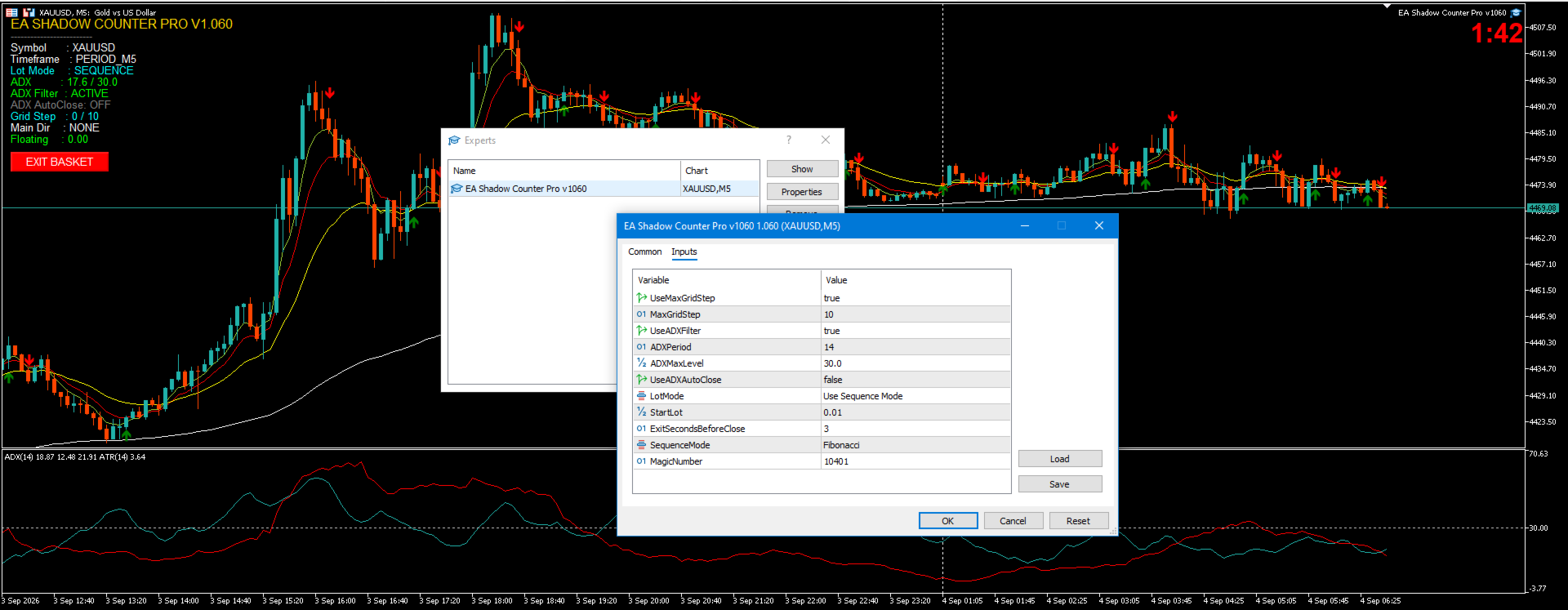
The EA includes configurable grid management, allowing traders to control the maximum number of positions and other grid parameters.
The grid is directional:
- BUY basket → additional BUY positions only
- SELL basket → additional SELL positions only
The EA does not automatically reverse an existing basket simply because the candle direction changes.
Basket Management
Shadow Counter Pro manages positions as a basket rather than treating each position independently.
The EA includes:
- Basket profit management
- Automatic basket exit option
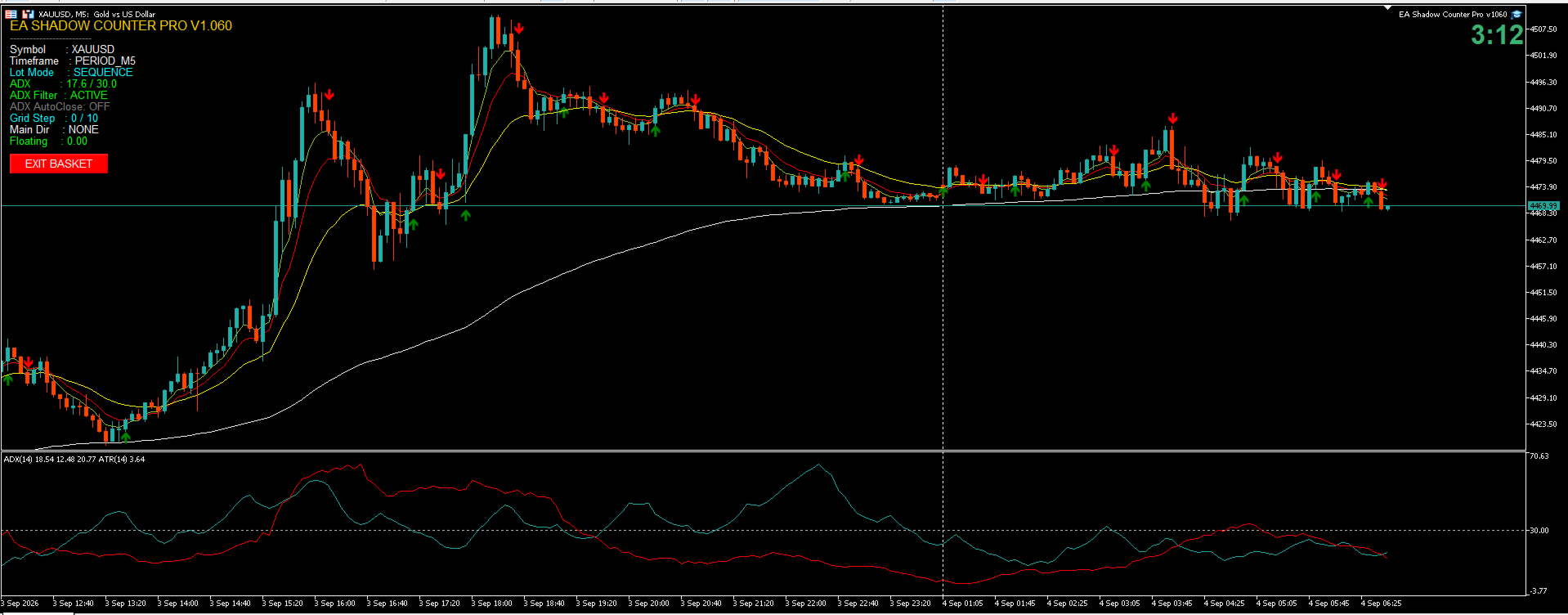
- Manual EXIT BASKET button
- Automatic state reset after basket closure
The manual EXIT BASKET button allows the trader to close the current Shadow Counter basket manually when desired.
Key Features
✅ Reversal Grid trading logic
✅ FIXED LOT mode
✅ Fibonacci lot sequence
✅ Martingale lot sequence
✅ Configurable Start Lot
✅ Configurable Maximum Grid
✅ ADX Trend Protection
✅ Configurable ADX Period
✅ Configurable ADX Maximum Level
✅ Automatic Basket Close option
✅ Manual EXIT BASKET
✅ On-chart information panel
✅ No symbol restriction
✅ No timeframe restriction
✅ Suitable for testing on different instruments and timeframes
Recommended Usage
Shadow Counter Pro can be used on different symbols and timeframes.
However, because this is a grid-based strategy, performance can vary significantly depending on:
- Symbol volatility
- Market trend strength
- Timeframe
- Spread
- Broker execution conditions
- Account leverage
- Lot size
- Maximum grid setting
For this reason, users should perform their own backtesting and forward testing before using the EA on a live account.
Risk Warning
Shadow Counter Pro is a grid-based Expert Advisor and carries significant trading risk.
A strong and prolonged market trend can cause multiple positions to accumulate floating losses.
The ADX filter is designed to prevent new entries during strong trends, but it does not guarantee that existing positions will recover or that losses will be avoided.
Always use appropriate lot sizes and maximum grid settings according to your account size and risk tolerance.
Never assume that previous backtest or trading results will be repeated in the future.
Shadow Counter Pro
Trade the Counter-Move. Respect the Trend.
Strategy Character
Shadow Counter Pro is a reversal grid EA that performs best in ranging/sideways market conditions with controlled volatility. It uses an ADX filter to detect trend strength and automatically holds off new entries when the market starts trending strongly.
Because of the nature of grid strategies, the best performance is achieved on instruments that historically tend to move within a range, rather than instruments prone to sharp breakouts.
Recommended Pairs
Tier 1 — Best Fit
| Pair | Reason |
|---|---|
| EURGBP | High economic correlation between the Eurozone and UK, low volatility, one of the most range-bound pairs in forex |
| AUDNZD | Both commodity-based, Pacific-region economies, often choppy and range-bound |
| EURCHF | Structurally low volatility since the post-2015 era |
Tier 2 — Reasonably Suitable
| Pair | Note |
|---|---|
| USDCHF | Relatively tighter range compared to other major pairs |
| EURCAD / GBPCAD | Lower liquidity crosses that tend to stay more range-bound |
| XAGUSD (Silver) | Sometimes more range-bound than Gold during certain sessions |
Not Recommended
| Instrument | Reason |
|---|---|
| GBPJPY | Extreme volatility, prone to large breakouts ("The Beast") |
| GBPUSD (post-Brexit) | Character has become more trending/volatile |
| Pairs involving JPY during BOJ intervention concerns | Risk of sudden sharp breakouts |
| XAUUSD | Tends to trend with risk-on/risk-off sentiment and USD strength; if still used, apply more conservative grid settings (smaller MaxGridStep, stricter ADXMaxLevel) |
Timeframe & Session Recommendations
- Timeframe: M15–H1 tends to show short-term ranging patterns more often than H4/D1, which tend to trend.
- Asian session (Tokyo): lower volume, market tends to range more often than during London/New York sessions — well suited for this strategy.
- Avoid trading ahead of major news releases (NFP, central bank rate decisions): markets often range/compress before a release, then break out sharply afterward, which carries risk for a grid system.
Important Notes for Users
A pair's ranging/trending character is not permanent — it can change due to shifts in monetary policy, geopolitical crises, or changes in economic correlation between countries. An extreme example: EURCHF changed drastically after the SNB removed its currency peg in 2015.
Users are advised to:
- Backtest on the intended pair before live trading.
- Monitor fundamental conditions that could change that pair's character.
- Adjust ADXMaxLevel , MaxGridStep , and MinMarginLevelPercent according to their risk tolerance and broker conditions.
- Understand that grid/martingale strategies carry inherent risk during extended trending conditions, and that this EA's margin protection is a safety mechanism, not a profit guarantee.