i just purchase the ea. i have concern about the resizing of the main panel the cadle itself seems the buuton on the upper side +/- button not responding. can you also give me the detailed manual and updated video about this ea
i just purchase the ea. i have concern about the resizing of the main panel the cadle itself seems the buuton on the upper side +/- button not responding. can you also give me the detailed manual and updated video about this ea
Hi jpenjerry
Thank you for the order. Greatly appreciated. I have the instruction video on youtube which is linked in the product page about how to get it setup and get it working correctly. Yes, The buttons at the top, the small ones, were to compress the candles, but i have removed this feature as it has auto scroll enabled. There is an r button there which brings back the candle to view in centre, a reset button. If you tell me the look you are trying to achieve, i will get it setup for you. If you want to see more candles on the chart, you must decrease the font of the candles, and decrease the width, this way you will see more candles. And if you want to see less, bigger candles, increase the text and the width of the candles. The main panels have its own x and y position and you can place them where you like within the mt5 platform.
Thank you for the order. Greatly appreciated. I have the instruction video on youtube which is linked in the product page about how to get it setup and get it working correctly. Yes, The buttons at the top, the small ones, were to compress the candles, but i have removed this feature as it has auto scroll enabled. There is an r button there which brings back the candle to view in centre, a reset button. If you tell me the look you are trying to achieve, i will get it setup for you. If you want to see more candles on the chart, you must decrease the font of the candles, and decrease the width, this way you will see more candles. And if you want to see less, bigger candles, increase the text and the width of the candles. The main panels have its own x and y position and you can place them where you like within the mt5 platform.
Hope this answered your query.
Kind regards
AJ
Please find a thorough settings guide in PDF file.
i have encounter problem. im encounter freezing about an hour of running the display while i notice at the rightside, the cursor for prize is running. do you encounter this on your mt5 terminal,
i have encounter problem. im encounter freezing about an hour of running the display while i notice at the rightside, the cursor for prize is running. do you encounter this on your mt5 terminal,
Hi jpenjerry
Thank you for the comment. Please message me directly as this is for leaving comments. You should not encounter any problems like this as i run the EA for hours to make my videos and I use it as well. What could cause the freeze might be a number of issues from MT5 new update, your CPU usage, if you have too many things running, or your memory is very small. For the EA to run efficiently, please keep 2 or 3 tabs of pairs Max because there is a lot of calculations happening. Right click your mouse and open task manager and find how your CPU is running. Most likely you have too many things in the background running. Please message me directly if you have more queries.
how cant i scroll horizontally between footprint bars?
thanks
Hi Jackie
Thank you for the order. Greatly appreciated. I have not added this function. But I will try and add some zoom functionality on the next update. I will add the capability to zoom out so you can see more candle on the chart.
If you want to seem more candles on the chart disable the bar volume profile and decrease the candle width and font and the spacing between each candles. This way you can squeeze more candles on the chart.
Please wait for the next update as I will add this feature as well.
Thank you for the order. Greatly appreciated. I have not added this function. But I will try and add some zoom functionality on the next update. I will add the capability to zoom out so you can see more candle on the chart.
If you want to seem more candles on the chart disable the bar volume profile and decrease the candle width and font and the spacing between each candles. This way you can squeeze more candles on the chart.
Please wait for the next update as I will add this feature as well.
New Dynamic Supply and Demand Zone added with button to toggle on/off New Fundamentals panel to show daily upcoming news events with button to toggle on/off New mini session chart to show session activity with button to toggle on/off New zoom function added. Now can zoom out/in and view the chart in a zoomed out perspective or zoomed in. New Up/Down button to move the candles horizontally and vertically. New button added for Per Bar Volume Profile to view the bar volume profile and toggle on/off New button added for Per Bar delta Statistics to view with toggle on/off
Best New Feature Added:
9 different Footprint Styles with one click change through the different Footprint Styles:
Minimalist ( no candle frame or wick, just Bid x Ask with imbalance) Background Cells Candle Frame Volume Profile Candle Frameless (Thin candle on the left with Bid x Ask and imbalance) Middle Candle (Thin candle in the middle with Bid x Ask and imbalance) Delta Cells Candle Bid x Ask Profile Bid x Ask Cells
All cells and profile is with colour intensity per levels Summary Table has now colour intensity levels All footprint Style has its own 6 individual (3 buyer/ 3 seller) imbalance colour to override
New Themes
2 Global Theme. Dark and Light Theme with 1 click change. 16 New 2 colour combinations:
New Buttons Added (For if you prefer a minimalist look)
Summary Table Panel is now collapsible via button on chart (to view or not) 9 Footprint Styles panel is now collapsible via button on chart (to view or not) Chart Analyst, Signal Meter, Dom, Time and Sales and Volume Profile Panel acts as one now and can be collapsible via button on chart (to view or not)
Chart Analyst, Signal Meter, Dom, Time and Sales and Volume Profile Panel updated for better calculation and better signal generation. Volume Profile updated with new cleaner visual.
Tick Feed Updated
The feed has been greatly updated to reflect to real volume as possible.
I purchased the indicator, but I met a text size issue about the top button and the VP/DOM layout, the whole page text sizing is too small, I do not find method to change the text size.
I just attached the screenshot for your reference. could you help check that how to improve it?
I purchased the indicator, but I met a text size issue about the top button and the VP/DOM layout, the whole page text sizing is too small, I do not find method to change the text size.
I just attached the screenshot for your reference. could you help check that how to improve it?
Hi Bianjiang
Thank you for the message. Please use the message service to message me and I will help. It seems you have a high resolution screen? Not 1920x1080? The text size settings are in the end of the settings section. There 3 fonts size settings for all which can be changed.
I purchased the indicator, but I met a text size issue about the top button and the VP/DOM layout, the whole page text sizing is too small, I do not find method to change the text size.
I just attached the screenshot for your reference. could you help check that how to improve it?
Hi Bianjiang1
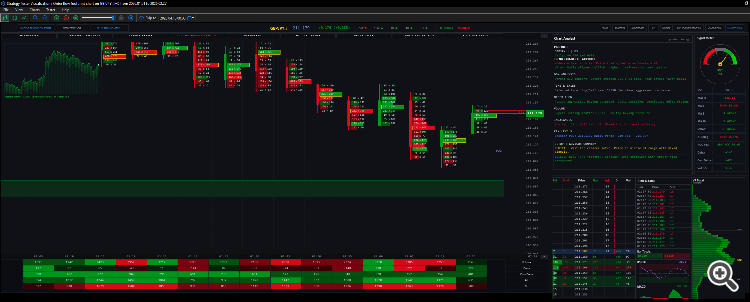
This is how it looks on a high resolution screen of 2560 x 1080 resolution.


hi good day
i just purchase the ea. i have concern about the resizing of the main panel the cadle itself seems the buuton on the upper side +/- button not responding. can you also give me the detailed manual and updated video about this ea
hi good day
i just purchase the ea. i have concern about the resizing of the main panel the cadle itself seems the buuton on the upper side +/- button not responding. can you also give me the detailed manual and updated video about this ea
Hi jpenjerry
Thank you for the order. Greatly appreciated. I have the instruction video on youtube which is linked in the product page about how to get it setup and get it working correctly. Yes, The buttons at the top, the small ones, were to compress the candles, but i have removed this feature as it has auto scroll enabled. There is an r button there which brings back the candle to view in centre, a reset button. If you tell me the look you are trying to achieve, i will get it setup for you. If you want to see more candles on the chart, you must decrease the font of the candles, and decrease the width, this way you will see more candles. And if you want to see less, bigger candles, increase the text and the width of the candles. The main panels have its own x and y position and you can place them where you like within the mt5 platform.
Hope this answered your query.
Kind regards
AJ
Hi jpenjerry
Thank you for the order. Greatly appreciated. I have the instruction video on youtube which is linked in the product page about how to get it setup and get it working correctly. Yes, The buttons at the top, the small ones, were to compress the candles, but i have removed this feature as it has auto scroll enabled. There is an r button there which brings back the candle to view in centre, a reset button. If you tell me the look you are trying to achieve, i will get it setup for you. If you want to see more candles on the chart, you must decrease the font of the candles, and decrease the width, this way you will see more candles. And if you want to see less, bigger candles, increase the text and the width of the candles. The main panels have its own x and y position and you can place them where you like within the mt5 platform.
Hope this answered your query.
Kind regards
AJ
Please find a thorough settings guide in PDF file.
Kind regards
AJ
hi good day
i have encounter problem. im encounter freezing about an hour of running the display while i notice at the rightside, the cursor for prize is running. do you encounter this on your mt5 terminal,
hi good day
i have encounter problem. im encounter freezing about an hour of running the display while i notice at the rightside, the cursor for prize is running. do you encounter this on your mt5 terminal,
Hi jpenjerry
Thank you for the comment. Please message me directly as this is for leaving comments. You should not encounter any problems like this as i run the EA for hours to make my videos and I use it as well. What could cause the freeze might be a number of issues from MT5 new update, your CPU usage, if you have too many things running, or your memory is very small. For the EA to run efficiently, please keep 2 or 3 tabs of pairs Max because there is a lot of calculations happening. Right click your mouse and open task manager and find how your CPU is running. Most likely you have too many things in the background running. Please message me directly if you have more queries.
hi thanks for the product
i just have one question
how cant i scroll horizontally between footprint bars?
thanks
hi thanks for the product
i just have one question
how cant i scroll horizontally between footprint bars?
thanks
Hi Jackie
New Dynamic Supply and Demand Zone added with button to toggle on/off
New Fundamentals panel to show daily upcoming news events with button to toggle on/off
New mini session chart to show session activity with button to toggle on/off
New zoom function added. Now can zoom out/in and view the chart in a zoomed out perspective or zoomed in.
New Up/Down button to move the candles horizontally and vertically.
New button added for Per Bar Volume Profile to view the bar volume profile and toggle on/off
New button added for Per Bar delta Statistics to view with toggle on/off
Best New Feature Added:
9 different Footprint Styles with one click change through the different Footprint Styles:
Minimalist ( no candle frame or wick, just Bid x Ask with imbalance)
Background Cells
Candle Frame
Volume Profile Candle
Frameless (Thin candle on the left with Bid x Ask and imbalance)
Middle Candle (Thin candle in the middle with Bid x Ask and imbalance)
Delta Cells Candle
Bid x Ask Profile
Bid x Ask Cells
All cells and profile is with colour intensity per levels
Summary Table has now colour intensity levels
All footprint Style has its own 6 individual (3 buyer/ 3 seller) imbalance colour to override
New Themes
2 Global Theme. Dark and Light Theme with 1 click change.
16 New 2 colour combinations:
1. CLASSIC (Classic green/red)
2. BLUE_ORANGE
3. CYAN_MAGENTA
4. LIME_PINK
5. GOLD_PURPLE
6. TEAL_CORAL
7. SKY_CRIMSON
8. MINT_ROSE
9. ORANGE_DARK_GREY
10. GREEN_DARK_GREY
11. NAVY_SLATE
12. NAVY_GOLD
13. WHITE_DARK_GREY
14. EMERALD_WHITE
15. CHERRY_TEAL
16. OLIVE_SANDY
New Buttons Added (For if you prefer a minimalist look)
Summary Table Panel is now collapsible via button on chart (to view or not)
9 Footprint Styles panel is now collapsible via button on chart (to view or not)
Chart Analyst, Signal Meter, Dom, Time and Sales and Volume Profile Panel acts as one now and can be collapsible via button on chart (to view or not)
Chart Analyst, Signal Meter, Dom, Time and Sales and Volume Profile Panel updated for better calculation and better signal generation. Volume Profile updated with new cleaner visual.
Tick Feed Updated
The feed has been greatly updated to reflect to real volume as possible.
Hi AJ,
I purchased the indicator, but I met a text size issue about the top button and the VP/DOM layout, the whole page text sizing is too small, I do not find method to change the text size.
I just attached the screenshot for your reference. could you help check that how to improve it?
Hi AJ,
I purchased the indicator, but I met a text size issue about the top button and the VP/DOM layout, the whole page text sizing is too small, I do not find method to change the text size.
I just attached the screenshot for your reference. could you help check that how to improve it?
Hi AJ,
I purchased the indicator, but I met a text size issue about the top button and the VP/DOM layout, the whole page text sizing is too small, I do not find method to change the text size.
I just attached the screenshot for your reference. could you help check that how to improve it?
Hi Bianjiang1
This is how it looks on a high resolution screen of 2560 x 1080 resolution.
Kind regards
AJ