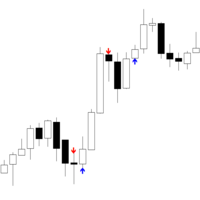
마켓 / MetaTrader 4 / 지표 / Iceblock Volume 5 FREE 게시됨: 4 10월 2025 현재 버전: 1.1 적합한 로봇을 찾지 못하셨나요? 프리랜스에서 나만의 로봇을 주문해 보세요 프리랜스로 이동 트레이딩 로봇 또는 지표 구매 구입 방법 EA를 작동시켜보세요 가상 호스팅으로 구매 전에 지표와 트레이딩 로봇을 테스트해보세요 마켓에서 수익 창출을 원하십니까? 제품의 판매량을 나타내는 방법 미리보기 리뷰 (1) 코멘트 (6) 새 소식 제품을 구매하거나 렌트한 사용자만 코멘트를 남길 수 있습니다 MK Lemew 2025.10.10 14:00 #1 This indicator is easy to use, but a bit tricky to get the hang of at first. Once you combine it with a moving average, though, it works really well! Vincent Jose Proenca 2025.10.10 14:08 #2 MK Lemew #: This indicator is easy to use, but a bit tricky to get the hang of at first. Once you combine it with a moving average, though, it works really well! Thanks for the feedback! Yes, it’s especially effective on GER40 and US30 allen2021 2025.11.03 11:46 #3 你好这个怎么下载,加载到交易软件? Vincent Jose Proenca 2025.11.03 12:09 #4 allen2021 #: 你好这个怎么下载,加载到交易软件?你好如果你想在 MetaTrader 4 (MT4) 里下载并加载指标,可以直接在软件里完成,步骤如下:1. 打开 MT4 平台。2. 在下方点击 “市场 (Market)” 标签。3. 在搜索框输入你想要的指标名称,比如 “RSI Divergence” 或 “Moving Average Colored”。4. 点击指标 → 然后点击 “下载 (Download)”。5. 下载完成后,指标会自动安装到:> MQL4 → Indicators → Market6. 打开左侧的 导航器 (Navigator) 面板,找到 自定义指标 (Indicators)。7. 双击或拖动刚下载的指标到图表上即可。完成!指标现在会出现在你的图表上。这就是你问的那句:> “你好这个怎么下载,加载到交易软件?”的答案 mm-idh 2025.11.23 07:40 #5 I cannot use it mm-idh 2025.11.25 08:14 #6 Good 제품을 구매하거나 렌트한 사용자만 코멘트를 남길 수 있습니다 트레이딩 기회를 놓치고 있어요: 무료 트레이딩 앱 복사용 8,000 이상의 시그널 금융 시장 개척을 위한 경제 뉴스 등록 로그인 공백없는 라틴 문자 비밀번호가 이 이메일로 전송될 것입니다 오류 발생됨 Google으로 로그인 웹사이트 정책 및 이용약관에 동의합니다. 계정이 없으시면, 가입하십시오 MQL5.com 웹사이트에 로그인을 하기 위해 쿠키를 허용하십시오. 브라우저에서 필요한 설정을 활성화하시지 않으면, 로그인할 수 없습니다. 사용자명/비밀번호를 잊으셨습니까? Google으로 로그인
MK Lemew 2025.10.10 14:00 #1 This indicator is easy to use, but a bit tricky to get the hang of at first. Once you combine it with a moving average, though, it works really well!
Vincent Jose Proenca 2025.10.10 14:08 #2 MK Lemew #: This indicator is easy to use, but a bit tricky to get the hang of at first. Once you combine it with a moving average, though, it works really well! Thanks for the feedback! Yes, it’s especially effective on GER40 and US30
Vincent Jose Proenca 2025.11.03 12:09 #4 allen2021 #: 你好这个怎么下载,加载到交易软件?你好如果你想在 MetaTrader 4 (MT4) 里下载并加载指标,可以直接在软件里完成,步骤如下:1. 打开 MT4 平台。2. 在下方点击 “市场 (Market)” 标签。3. 在搜索框输入你想要的指标名称,比如 “RSI Divergence” 或 “Moving Average Colored”。4. 点击指标 → 然后点击 “下载 (Download)”。5. 下载完成后,指标会自动安装到:> MQL4 → Indicators → Market6. 打开左侧的 导航器 (Navigator) 面板,找到 自定义指标 (Indicators)。7. 双击或拖动刚下载的指标到图表上即可。完成!指标现在会出现在你的图表上。这就是你问的那句:> “你好这个怎么下载,加载到交易软件?”的答案

This indicator is easy to use, but a bit tricky to get the hang of at first. Once you combine it with a moving average, though, it works really well!
你好这个怎么下载,加载到交易软件?