- do not to reset the theme/colors that the chart is using already, because it changes it to white and I use black with custom colors and on each refresh of times it resets it to white
- the info box is too big, and maybe should be transparent with a custom font color
- do not to reset the theme/colors that the chart is using already, because it changes it to white and I use black with custom colors and on each refresh of times it resets it to white
- the info box is too big, and maybe should be transparent with a custom font color
Thank you
Did you try Dark mode ? (D) if you set this it should stay black. I can possible add a third mode dark, light, "default" (do nothing) !
- do not to reset the theme/colors that the chart is using already, because it changes it to white and I use black with custom colors and on each refresh of times it resets it to white
- the info box is too big, and maybe should be transparent with a custom font color
Thank you
Added custom mode (C) so (D) & (L) settings can be totally bypassed.
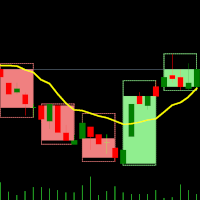
Hello, please make adjustments to your indicator. Can you change the color settings? This is necessary for better visualization of the candles inside.
And secondly, this is a very large panel that covers the chart. If possible, make it collapsible without interfering with the chart. Thanks for sharing the indicator.

Also,
- do not to reset the theme/colors that the chart is using already, because it changes it to white and I use black with custom colors and on each refresh of times it resets it to white
- the info box is too big, and maybe should be transparent with a custom font color
Thank you
Also,
- do not to reset the theme/colors that the chart is using already, because it changes it to white and I use black with custom colors and on each refresh of times it resets it to white
- the info box is too big, and maybe should be transparent with a custom font color
Thank you
Did you try Dark mode ? (D) if you set this it should stay black. I can possible add a third mode dark, light, "default" (do nothing) !
Also,
- do not to reset the theme/colors that the chart is using already, because it changes it to white and I use black with custom colors and on each refresh of times it resets it to white
- the info box is too big, and maybe should be transparent with a custom font color
Thank you
Added custom mode (C) so (D) & (L) settings can be totally bypassed.
Hello, please make adjustments to your indicator. Can you change the color settings? This is necessary for better visualization of the candles inside.
And secondly, this is a very large panel that covers the chart. If possible, make it collapsible without interfering with the chart. Thanks for sharing the indicator.