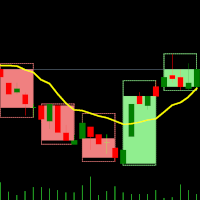
Dual Timeframes
FREE
Published:
13 February 2025
Current version:
2.7
Didn't find a suitable robot?
Order your own one
on Freelance
Go to Freelance
Order your own one
on Freelance
How to buy а trading robot or an indicator
Run your EA on
virtual hosting
virtual hosting
Test аn indicator/trading robot before buying
Want to earn in the Market?
How to present a product for a sell-through

You are missing trading opportunities:
- Free trading apps
- Over 8,000 signals for copying
- Economic news for exploring financial markets
Registration
Log in
You agree to website policy and terms of use
If you do not have an account, please register
Also,
- do not to reset the theme/colors that the chart is using already, because it changes it to white and I use black with custom colors and on each refresh of times it resets it to white
- the info box is too big, and maybe should be transparent with a custom font color
Thank you
Also,
- do not to reset the theme/colors that the chart is using already, because it changes it to white and I use black with custom colors and on each refresh of times it resets it to white
- the info box is too big, and maybe should be transparent with a custom font color
Thank you
Did you try Dark mode ? (D) if you set this it should stay black. I can possible add a third mode dark, light, "default" (do nothing) !
Also,
- do not to reset the theme/colors that the chart is using already, because it changes it to white and I use black with custom colors and on each refresh of times it resets it to white
- the info box is too big, and maybe should be transparent with a custom font color
Thank you
Added custom mode (C) so (D) & (L) settings can be totally bypassed.
Hello, please make adjustments to your indicator. Can you change the color settings? This is necessary for better visualization of the candles inside.
And secondly, this is a very large panel that covers the chart. If possible, make it collapsible without interfering with the chart. Thanks for sharing the indicator.