Try Before You Buy! The US30 Morning Break Scalper Lite version is completely free. The Lite version is limited to fixed lot sizes of 0.1 and 0.2, with auto lot sizing disabled. Download it here.
with witch modelling is this equity curve are generated?
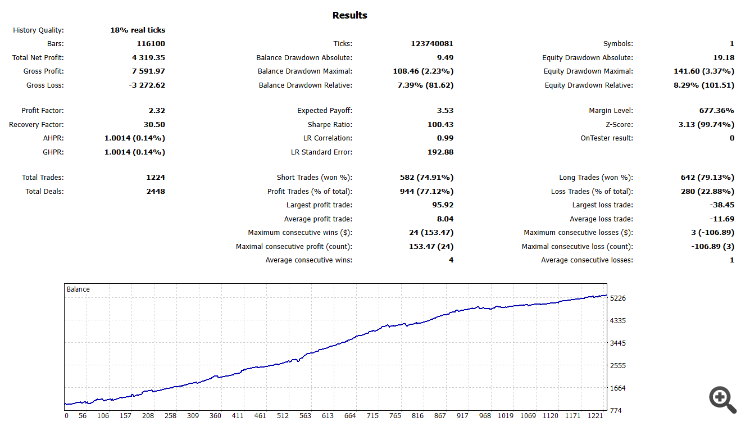
When I choise modelling "every tick" I see the equity curve you show it, but when I choise "every tick based on real ticks" I see a not profitable equiry curve. What is the reality?
with witch modelling is this equity curve are generated?
When I choise modelling "every tick" I see the equity curve you show it, but when I choise "every tick based on real ticks" I see a not profitable equiry curve. What is the reality?
Thank you for bringing this up! I understand the confusion between the equity curves. To clarify:
Modeling Used: The backtest results I provided were generated using the "Every tick based on real ticks" modeling. This ensures that the results are as close to real-market conditions as possible. I attached the settings for the backtest below.
Broker Settings:
I used IC Markets as the broker for these tests.
The time offset was set to 7, as IC Markets is 7 hours ahead of the USA (New York time).
Settings and Inputs:
Fixed lot size: 0.2 lots
Other settings were kept as default. Please refer to the attached images to see the exact configurations:
First Image: Backtest configuration settings
Second Image: Equity curve and results
Third Image: Input parameters
If you would like to replicate these results, make sure to use the same broker and settings for accurate comparison.
Thank you for your feedback and for sharing your experience with the EA.
To improve live performance, I’ve updated the stop loss parameter from 3500 points to 4300 points, which has shown more stable results in the current market conditions. Please update the EA to the latest version and give it another try.
Feel free to share your results or reach out if you have any other concerns—I’m here to help!
The stop loss parameter has been updated from 3500 points to 4300 points for improved stability in current market conditions.
This EA uses a real morning breakout strategy with scalping techniques—No Martingale, No Grid, No Averaging, No AI, and no backtest optimization tricks.
Test it yourself, optimize the scalping parameters, and adjust the stop loss (3500–5000 points recommended) before live trading.
✅ Added Option to Remove/Keep Opposite Pending Orders: Users can now choose whether to automatically remove opposite pending orders after an order is executed.
🔀 Separated Buy/Sell Lot Multipliers: Introduced individual lot multipliers for buy and sell positions, allowing for more flexible risk management.
⏰ Enable Closing Buy/Sell Orders at a Specific Time: Added an option to automatically close all Buy/Sell orders at a user-defined time for better trade control.
I've re-optimized and updated thenew set file for US30, specifically tuned for the current market conditions in2025. Feel free to test it out and let me know how it performs on your side!


Try Before You Buy! The US30 Morning Break Scalper Lite version is completely free. The Lite version is limited to fixed lot sizes of 0.1 and 0.2, with auto lot sizing disabled. Download it here.
with witch modelling is this equity curve are generated?
When I choise modelling "every tick" I see the equity curve you show it, but when I choise "every tick based on real ticks" I see a not profitable equiry curve. What is the reality?
with witch modelling is this equity curve are generated?
When I choise modelling "every tick" I see the equity curve you show it, but when I choise "every tick based on real ticks" I see a not profitable equiry curve. What is the reality?
Thank you for bringing this up! I understand the confusion between the equity curves. To clarify:
Modeling Used:
The backtest results I provided were generated using the "Every tick based on real ticks" modeling. This ensures that the results are as close to real-market conditions as possible. I attached the settings for the backtest below.
Broker Settings:
Settings and Inputs:
Please refer to the attached images to see the exact configurations:
If you would like to replicate these results, make sure to use the same broker and settings for accurate comparison.


Overview of the last few days...
Overview of the last few days...
Hi Andre,
Thank you for your feedback and for sharing your experience with the EA.
To improve live performance, I’ve updated the stop loss parameter from 3500 points to 4300 points, which has shown more stable results in the current market conditions. Please update the EA to the latest version and give it another try.
Feel free to share your results or reach out if you have any other concerns—I’m here to help!
New Version Update!
Version 2 Update!
Users can now choose whether to automatically remove opposite pending orders after an order is executed.
🔀 Separated Buy/Sell Lot Multipliers:
Introduced individual lot multipliers for buy and sell positions, allowing for more flexible risk management.
⏰ Enable Closing Buy/Sell Orders at a Specific Time:
Added an option to automatically close all Buy/Sell orders at a user-defined time for better trade control.
14 Feb - 28 Feb 2025
14 Feb - 11 Mar 2025
I make signal mix with US30 and EURUSD here:
https://www.mql5.com/en/signals/2293918
please note that Gold on this signal have been stop, only US30 and EURUSD are running.
Hello Everyone,
I’m excited to share a new setfile update with you all! 🎉
This update fine-tunes the scalper parameters, leading to even better results.
Give it a try and let me know your feedback! 🚀
Feel free to test it out and let me know how it performs on your side!
is the usage this EA on FTMO avaiable without problems with FTMO?
Hi Boris,
Thank you for your question.
I have not personally tested this EA on FTMO accounts, so I cannot guarantee full compatibility.