 MetaTrader 5
 Experts
 지표
지표
 스크립트
스크립트
 라이브러리
라이브러리
 보관함
보관함
당사 팬 페이지에 가입하십시오

Volatility Regime Shader - MetaTrader 5용 지표

- Pine script programming
- CAlgo Programming
- Full Stack Web development
- 조회수:
- 123
- 게시됨:
-
 이 코드를 기반으로 한 로봇이나 지표가 필요하신가요? 프리랜스로 주문하세요
프리랜스로 이동
이 코드를 기반으로 한 로봇이나 지표가 필요하신가요? 프리랜스로 주문하세요
프리랜스로 이동

Volatility Regime Shader classifies market volatility into three regimes and shades the chart background accordingly. Instead of comparing ATR to a fixed value, it calculates the percentile rank of the current ATR within a lookback window. A percentile of 90 means the current ATR is higher than 90% of the values in that window, so the reading adapts automatically to any symbol and timeframe.
Bars at or below the Compression threshold are shaded light blue, and bars at or above the Expansion threshold are shaded light red. Normal bars are left unshaded by default. A label in the upper-right corner shows the current regime and ATR percentile.
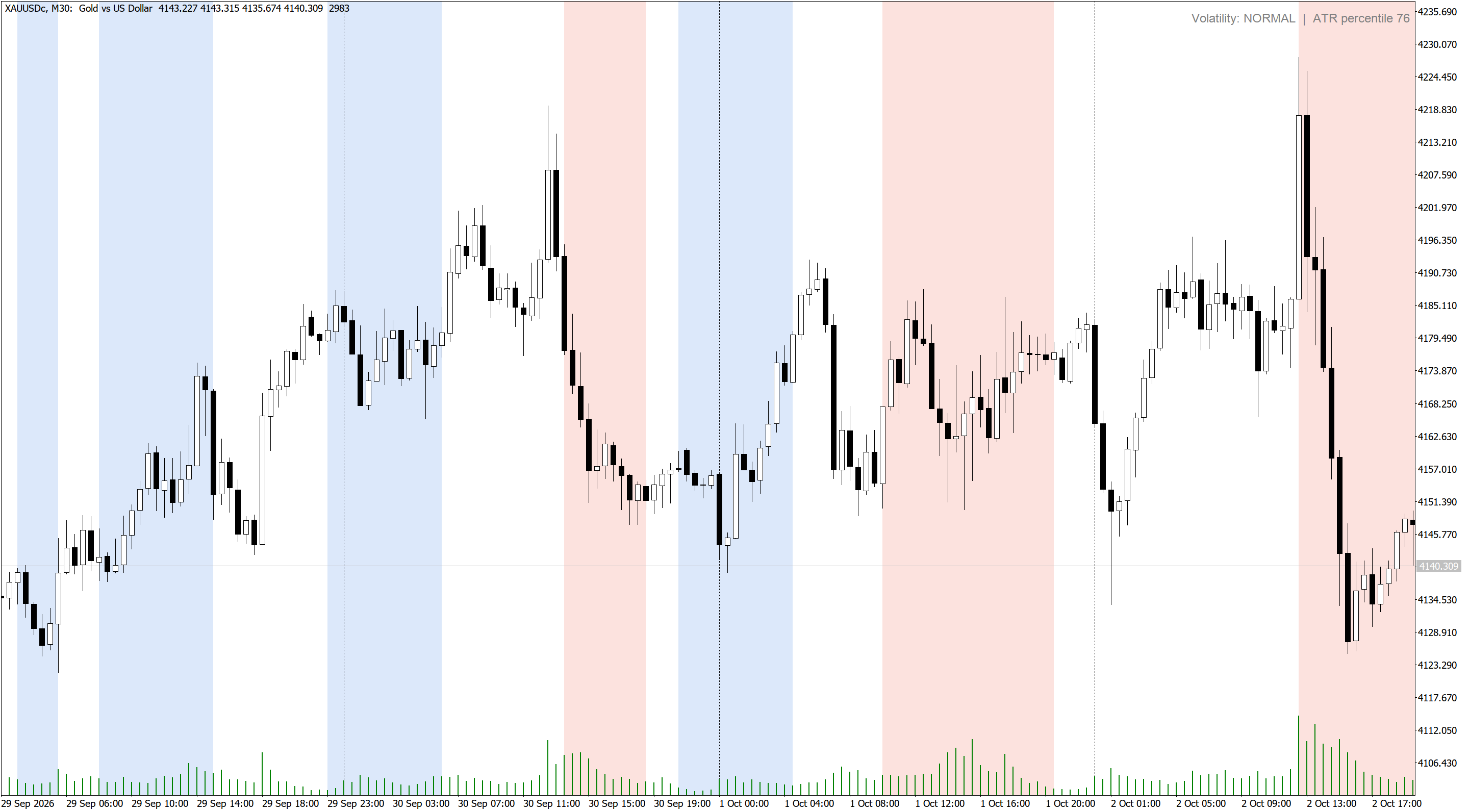
The regimes can be used as a filter for other strategies. Compression phases often come before breakouts, so breakout systems can wait for compression before arming. Expansion phases favor trend continuation and wider stops, while mean-reversion entries are usually safer in compression or normal conditions.

| Input | Description |
|---|---|
| ATR period | Period of the ATR used to measure volatility. Default 14. |
| Percentile lookback | Number of previous bars the current ATR is ranked against. Default 100. |
| Compression at or below percentile | Percentile at or below which a bar is classified as Compression. Default 20. |
| Expansion at or above percentile | Percentile at or above which a bar is classified as Expansion. Default 80. |
| Bars to calculate and shade | How many recent bars are calculated and shaded. Default 3000. |
| Compression / Expansion / Normal shade | Background colors for each regime. |
| Shade Normal regime | Also shades Normal bars when enabled. |
| Show current regime label | Shows the current regime and ATR percentile in the upper-right corner. |
| Pop-up / push / sound alerts | Alerts when a newly closed bar starts a different regime. |
Expert Advisors can read two buffers with iCustom. Buffer 0 holds the ATR percentile (0 to 100) and buffer 1 holds the regime code: 0 for Compression, 1 for Normal and 2 for Expansion. Both values are also visible in the Data Window. The values of the forming bar update with price, while alerts use closed bars only.
Session Sweep Boxes
Draws Asian, London and New York session range boxes and marks liquidity sweeps: a closed bar that wicks beyond a completed session's high or low and closes back inside. Non-repainting arrows, extended session levels, alerts and iCustom-ready buffers.
 AN Guard Lite - Trade Journal and Report for any EA
Writes a CSV journal of every trade with the exit reason, and a report that shows how far each trade ran, in R. It never trades.
ATR Candle Strength
Shades the chart background by volatility regime (Compression, Normal, Expansion) based on the percentile rank of the current ATR. Shows the current regime on the chart, alerts on regime changes and exposes buffers for Expert Advisors.
 Watchlist Chart Opener
Opens charts for all Market Watch symbols or a custom symbol list in one click, on any timeframe, with an optional template applied to each chart. Skips charts that are already open and limits how many are opened at once.