Breakout Box
FREE
Pubblicato:
11 giugno 2015
Versione attuale:
25.4
Non hai trovato un robot adatto?
Ordina il tuo
su Freelance
Vai alla sezione Freelance
Ordina il tuo
su Freelance
Come acquistare un Robot di Trading o un indicatore
Esegui il tuo EA
hosting virtuale
hosting virtuale
Prova un indicatore/robot di trading prima di acquistarlo
Vuoi guadagnare nel Market?
Come presentare un prodotto per venderlo con successo

Ti stai perdendo delle opportunità di trading:
- App di trading gratuite
- Oltre 8.000 segnali per il copy trading
- Notizie economiche per esplorare i mercati finanziari
Registrazione
Accedi
Accetti la politica del sito e le condizioni d’uso
Se non hai un account, registrati
Can someone explain it easily for me?
Hello Ian,
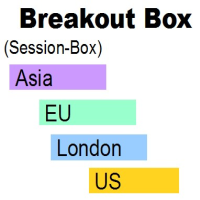
the idea is to catch an ongoing movement after an opening-session, for instance the Asia-Session. The height of the box is equal TP and SL.
Please watch higher time-frames, watch support- and resistance- level, this example is a wonderful example, but there is no gurantee for sucsess, please calculate your risk smart.
With kind Regards
Claus Dietrich
================
================
Hello!
Very usefull indicator.
One question:
Sorry about my poor english.
Best regards.
Walison
Hello!
Very usefull indicator.
One question:
Sorry about my poor english.
Best regards.
Walison
Hello Walison,
the GMT-Shift should adjust your broker-time to the London-time.
Sorry, that GMT-Shift is tricky, ... just try ...., -2 eg moves the 2 hours to the left.
You can set up your own boxes, use "customize" for the pre-settings and save the settings for your own needs and load it, when you need them.
E.g. your perfect profitable trading-time is between 10am and 2pm, set Begin 09:59 and End 13:59 and personal End 13:59 (xx:59 is important, because it uses the closing-price).
This tool is for you (!), to manage your personal trading-time, that you know, where you are, where you start and where you stop each day. Find out your best time of the day, that is suiteable for yourself.
With kind Regards
Claus Dietrich
Can you explain how ATR RANGE is calculated? Thanks
Hello Cheuk Yan Ho,
ATR refers to the current ATR x 10,000 for a 5 digit asset.
ATR 0.0014 e.g. => 14 pips.
Yours sincerely
Claus Dietrich
Does this look like I set it up properly?
I am in EST timezone in the U.S.
I am not sure if I have the settings correct?
How exactly do you use the breakout boxes for entries. I've watched your videos, and I understand how to set them up and everything, but the silent videos don't convey clearing where and how you enter. Doesn't make much sense at all?
Hi pauljudd,
I seem to have missed your comment.
Well, most breakout strategies are based on the opening phase or a whole session. That means the highest high / lowest low set entry and exit. The upper and lower boxes are exacly the same size of session-box in the middle, that is mostly a part of "break-out-strategies".
These example below is too perfect, an example that can be used to increase sales of an indicator.
In practice (picture below) it works differently. In general, the currency should be in a trend phase (higher high, higher low, etc.), then the trend should not be too steep, which is usually followed by a correction or sideways phase (usually a divergence follows - MACD and RSI can make that visible).
In addition, I use moving averages as an entry confirmation for the high, or the low of the box. So, the price should be as close as possible to the trend indicator (moving averages).
I personally set a pending order above / below the box (depends on the trend-direction), the TP (takeprofit) at the end of the next box and the exit at the other side of the box, sometimes I move the stop to breakeven and sell one part of my position and let it run to the next box (trailing-stop), and so on.
Note: the picture shows in an 1 hour-chart 6 higher highs, MACD and RSI probably slowing down, at least a correction or a sideways-phase will come very soon, please have that in mind;
With kind Regards
Claus Dietrich
P.S.
future videos will be released with voice, I am currently in negotiations with a native speaker for English, please have some patience;
Does this look like I set it up properly?
I am in EST timezone in the U.S.
I am not sure if I have the settings correct?
Hello rininzen,
I have apparently missed the last few comments, but you should also get an answer.
GMT shift is to adjust if the broker does not use GMT as time or deviations from summer time. It is important that the boxes match the respective session.
Choose in the pre-setting US and adjust your chart with GMT-Shift, then all other pre-settings should be correct.
These tools also show you your local and GMT time.
With best regards
Claus Dietrich
Hello Claus,
I will like to set up your Breakout Box indicator for the London session on my MT4.
Timeframe: 15mins
My time zone is GMT 0 (London time) and my broker’s time is 2 hours ahead of GMT.
I usually end of London trade by 1300 GMT, please how do I set this up on your indicator
Thanks
Hello Claus,
I will like to set up your Breakout Box indicator for the London session on my MT4.
Timeframe: 15mins
My time zone is GMT 0 (London time) and my broker’s time is 2 hours ahead of GMT.
I usually end of London trade by 1300 GMT, please how do I set this up on your indicator
Thanks
Hello Godwin,
I know that this is tricky, you need to try to fit it to your Brokers time, watch the candles and where the box starts, change the GMT-shift until it fits.
With kind Regards
Claus Dietrich
Hello Godwin,
I know that this is tricky, you need to try to fit it to your Brokers time, watch the candles and where the box starts, change the GMT-shift until it fits.
With kind Regards
Claus Dietrich
Great, thanks for the reply!
But I a m still struggling to set the EA up, I am not getting your instruction. And the video is not clear. How do I go about it for the London session ?
Great, thanks for the reply!
But I a m still struggling to set the EA up, I am not getting your instruction. And the video is not clear. How do I go about it for the London session ?
Hello Godwin,
ok, now I know what you try to change.
Pre-Settings are fixed values and not changeable.
The Pre-Settings London =
BOX 1 = true
BOX 2 = false
BOX 3 = false
BOX 4 = false
BOX 5 = false
Session Begin = 08:59
Session End = 09:59
personal Trading Session End = 16:59
Support Resistance Box = true
Support Resistance Box Extension End = 21:59
Switch the Pre-Settings to customize, enter the values manually and choose your favorite time.
With kind Regards
Claus Dietrich
shows a very good indicator. but I can not see him long enough to see how good the results are. shows only a few days back
shows a very good indicator. but I can not see him long enough to see how good the results are. shows only a few days back
Hi theofilos1981,
please change the number of „Bars to process".
With kind regards
Claus Dietrich
Hi Claus,
Despite several attempts, I was unable to download the indicator. Knowing that I have downloaded today other indicators from mql5 without any problem.
Can you help please ?
Best regards,
Roberto Zendrini
Hi Claus,
Despite several attempts, I was unable to download the indicator. Knowing that I have downloaded today other indicators from mql5 without any problem.
Can you help please ?
Best regards,
Roberto Zendrini
Hello Roberto,
try the download directly from the terminal (for MT4 only).
With kind Regards
Claus Dietrich
Hi Claus,
It works this way, thanks !
Roberto