Trade Assistant Pro 36 in 1

69 USD
Versione demo scaricata:
709
Pubblicato:
13 settembre 2021
Versione attuale:
6.54
Non hai trovato un robot adatto?
Ordina il tuo
su Freelance
Vai alla sezione Freelance
Ordina il tuo
su Freelance
Come acquistare un Robot di Trading o un indicatore
Esegui il tuo EA
hosting virtuale
hosting virtuale
Prova un indicatore/robot di trading prima di acquistarlo
Vuoi guadagnare nel Market?
Come presentare un prodotto per venderlo con successo

Ti stai perdendo delle opportunità di trading:
- App di trading gratuite
- Oltre 8.000 segnali per il copy trading
- Notizie economiche per esplorare i mercati finanziari
Registrazione
Accedi
Accetti la politica del sito e le condizioni d’uso
Se non hai un account, registrati
Also I just noticed when I click "move SL to BE now", it does NOT include commission calculation even though I've it enabled? so it results in a loss because it simply moves SL to entry price without including commission in the calculation (slightly away from entry to include commission)
Oh right thanks for letting me know.
I never used this function before. But no buy side? so entry price using ASK price is not existing in this version?
I'm also trying to execute a number of trades (say 5 altogether and manage them altogether). But the Manage tab only allows me to move SL and TP level but not allows me to set partial TPs (like what I'd do for 1 single trade). Also for buy/sell stop orders. I cannot manage the stop entry altogether?
1) You can activate entries using BID price for BuyLimit / BuyStop orders, when activating hidden orders: by default, buy orders are executed at the Ask price.
2) To manage multiple trades at once - first you need to select them. Since in your case the orders are located at the same level, you can draw a zone on the chart to select all trades within a given range: [ Manage -> Order -> '+Add new chart range' ]
Also I just noticed when I click "move SL to BE now", it does NOT include commission calculation even though I've it enabled? so it results in a loss because it simply moves SL to entry price without including commission in the calculation (slightly away from entry to include commission)
For the BE function, the commission/swap accounting parameter is configured separately in the settings on the [Manage] tab.
On the screenshot, you have activated the the commission accounting only for calculating the Lot size for a new trade, but not for BE calculation
For the BE function, the commission/swap accounting parameter is configured separately in the settings on the [Manage] tab.
On the screenshot, you have activated the the commission accounting only for calculating the Lot size for a new trade, but not for BE calculation
1) You can activate entries using BID price for BuyLimit / BuyStop orders, when activating hidden orders: by default, buy orders are executed at the Ask price.
2) To manage multiple trades at once - first you need to select them. Since in your case the orders are located at the same level, you can draw a zone on the chart to select all trades within a given range: [ Manage -> Order -> '+Add new chart range' ]
Can you explain a bit more or where can I read more about hidden orders?
For buy side I think you are referring to the below?
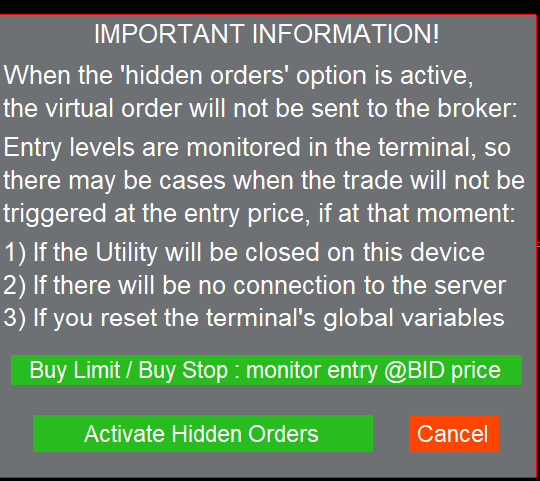
Can you explain a bit more or where can I read more about hidden orders?
For buy side I think you are referring to the below?
1) Please check the description (link on the product page)
Cool got it.
About the "multiple TP levels function", is it disabled when I'm trying to manage all trades altogether? (these 10 trades are pending at the same price level)
I only see this "multiple TP levels function" when I select 1 single trade. Can we have multiple TP levels also enabled for managing all trades?
Cool got it.
About the "multiple TP levels function", is it disabled when I'm trying to manage all trades altogether? (these 10 trades are pending at the same price level)
I only see this "multiple TP levels function" when I select 1 single trade. Can we have multiple TP levels also enabled for managing all trades?
Management of multi-tp levels is not available when selecting several trades at once
Management of multi-tp levels is not available when selecting several trades at once
Noted and good to know.
Is it possible to add this in the future? Brokers usually limit max lot size to 100 and if larger than that have to be entered in mutiple 100 orders.
In that case the management of multi TP levels would be a very fantastic instead of going through one by one.
Noted and good to know.
Is it possible to add this in the future? Brokers usually limit max lot size to 100 and if larger than that have to be entered in mutiple 100 orders.
In that case the management of multi TP levels would be a very fantastic instead of going through one by one.
Ok I'll add it
Ok I'll add it
You're the best! <3 Thanks!!!
Hey brother wondering if you would like to develop a trade copier that works perfectly with your Trade Assistant? I'm definitely interested in buying one if you got any <3
Maybe later, thanks for the suggestion
Thank you for the update!
You're welcome!
Dear Developer, thank you for ongoing development of this great tool. I have just finished my rental period and bought this Trade Manager.
Thank you for your feedback and great ideas for new features!
Como puedo ampliar el dialogo?