Notify To Telegram for MT5

79 USD
Versione demo scaricata:
206
Pubblicato:
3 dicembre 2020
Versione attuale:
4.4
Non hai trovato un robot adatto?
Ordina il tuo
su Freelance
Vai alla sezione Freelance
Ordina il tuo
su Freelance
Come acquistare un Robot di Trading o un indicatore
Esegui il tuo EA
hosting virtuale
hosting virtuale
Prova un indicatore/robot di trading prima di acquistarlo
Vuoi guadagnare nel Market?
Come presentare un prodotto per venderlo con successo

Ti stai perdendo delle opportunità di trading:
- App di trading gratuite
- Oltre 8.000 segnali per il copy trading
- Notizie economiche per esplorare i mercati finanziari
Registrazione
Accedi
Accetti la politica del sito e le condizioni d’uso
Se non hai un account, registrati
Hi, can i suggest in the next update, you include magic number / comments..
If a trader is running like 4 EAs on the terminal and i think it will be useful way for him to track them.
Hi
current EA have magic number filter. I will think about it.
Thanks
Hi
current EA have magic number filter. I will think about it.
Thanks
Ohhh but lets. say I have 4 EAs and I want to identify which EA made the trade... can I filter or display the magic number on the msg at the moment?
Ohhh but lets. say I have 4 EAs and I want to identify which EA made the trade... can I filter or display the magic number on the msg at the moment?
Hi
if you use custom message, you can add [COMMENT] - to display order comment
Hi
if you use custom message, you can add [COMMENT] - to display order comment
thanks.. let me try that or [MAGIC]
thanks.. let me try that or [MAGIC]
Hi Dat,
I tried both [COMMENT] and [MAGIC] and it didnt work.
my custom msg has to be from the .txt file?
Hi Trinh, is it possible to set in the CustomMessage predefined SL and TP pips?
For example automatically set the stoploss price to be 50 pips from the entry price and the take profit to be 100 pips.
Thank you in advance for your response!
Albéric
Hi
if you use custom message, you can add [COMMENT] - to display order comment
Hi Trinh Dat,
sorry but i just starting using the EA again and im running my MT5 with 4 EAs. I want this EA to display order comment of each EA so i can identify which EA has made the trade.
Is this what you mean by adding [COMMENT] if i use custom message?
Is there a way to get the chart to show the TA you have drawn on it or is it always blank?
Hi, is there any way that I can change the default report?
The daily and weekly and monthly.
Thanks
Hi, is there any way that I can change the default report? Thanks
Hi
need use format by custom file, then you can change file
Hi
need use format by custom file, then you can change file
Thanks for the reply.
Do you mean the CustomMessage.txt? Because I'm already using it for posting the signals but there isn't anything like a [FORMAT REPORT] session..
Thanks for the reply.
Do you mean the CustomMessage.txt? Because I'm already using it for posting the signals but there isn't anything like a [FORMAT REPORT] session..
Let download new file here https://www.mql5.com/en/blogs/post/746236
Let download new file here https://www.mql5.com/en/blogs/post/746236
That's where I have donwloaded it but there isn't a section where I can modifty the daily and weekly and monthly reports.
These are the sections I can modify in the CustomeMessage.txt file:
[FORMAT OPEN ORDER]
[FORMAT MODIFY ORDER]
[FORMAT CLOSE ORDER]
[FORMAT CANCEL ORDER]
I would expect something like: [FORMAT DAILY REPORT] [FORMAT WEEKLY REPORT] etc
Am I wrong?
Thanks again
That's where I have donwloaded
download again ? it have all format
download again ? it have all format
ok I found the problem, the one in the link here is wrong:
For Custom Message
- Download file here ,
The one at the end of the message is the full one :)
Thanks.
Hi, I have another question.
I just noticed that the sum of the pips in the report are not adding up.
This is the daily report:
as you can see I have lost 83$ but the pips are +73...
With this EA, today, when orders have closed I have received messages with (summing them all) a total loss of -161pips and total profit of +66pips.
So, from where does those +73pips come from?
This is what I have used for the DAILY REPORT DETAILS section inside the CustomMessage.txt file:
[SYMBOL]: [P/L-PIPS] pips | [P/L %]% | [P/L][CURRENCY] [FUNCTION P/L] {{U+2705},{U+274C}}
Thanks.
Hi, I have another question.
I just noticed that the sum of the pips in the report are not adding up.
This is the daily report:
as you can see I have lost 83$ but the pips are +73...
With this EA, today, when orders have closed I have received messages with (summing them all) a total loss of -161pips and total profit of +66pips.
So, from where does those +73pips come from?
This is what I have used for the DAILY REPORT DETAILS section inside the CustomMessage.txt file:
[SYMBOL]: [P/L-PIPS] pips | [P/L %]% | [P/L][CURRENCY] [FUNCTION P/L] {{U+2705},{U+274C}}
Thanks.
Edit:
now it says I have done this today after I have closed and reopened the chart and attached the EA again:
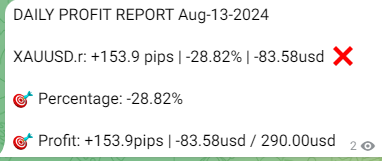
I have only added [P/L-PIPS]pips | [P/L][CURRENCY] / [BALANCE][CURRENCY] in the footer for the Profit.