EA Builder PRO

99 USD
Versione demo scaricata:
3 072
Pubblicato:
28 ottobre 2020
Versione attuale:
1.24
Non hai trovato un robot adatto?
Ordina il tuo
su Freelance
Vai alla sezione Freelance
Ordina il tuo
su Freelance
Come acquistare un Robot di Trading o un indicatore
Esegui il tuo EA
hosting virtuale
hosting virtuale
Prova un indicatore/robot di trading prima di acquistarlo
Vuoi guadagnare nel Market?
Come presentare un prodotto per venderlo con successo

Ti stai perdendo delle opportunità di trading:
- App di trading gratuite
- Oltre 8.000 segnali per il copy trading
- Notizie economiche per esplorare i mercati finanziari
Registrazione
Accedi
Accetti la politica del sito e le condizioni d’uso
Se non hai un account, registrati
Hello Arthur,
Thank you for making this very comprehensive EA available. I'm going to try to learn as much as I can from what I can do with it.
Sincerely, Jan Krekt
Hello Arthur,
Thank you for making this very comprehensive EA available. I'm going to try to learn as much as I can from what I can do with it.
Sincerely, Jan Krekt
Hello Jan,
Thanks for your message.
Arthur
Hello Arthur,
Thank you so much for this great expert,
please add M30 or H1 Pivot points level.
Hi Arthur, can you please add a "Order comment" setting to this EA`s settings as currently orders placed show "0.01000000" under the order "Comment" column in MT5 as per below?
Hi Arthur, can you please add a "Order comment" setting to this EA`s settings as currently orders placed show "0.01000000" under the order "Comment" column in MT5 as per below?
Hi, yes sure, i'll take a look in a few days
Hello Arthur,
I rented the EA Builder Pro in October 2020 for a year. I now have version 1.4.
Looks like I can't upgrade to 1.5 and 1.6. Can you help me with this? Am I doing something wrong?
Hello Arthur,
I rented the EA Builder Pro in October 2020 for a year. I now have version 1.4.
Looks like I can't upgrade to 1.5 and 1.6. Can you help me with this? Am I doing something wrong?
Hello @Jan Krekt
I've uploaded the 1.5 & 1.6 today. It takes few hours before you can download it from your metatrader (I think mql5 needs to process few things).
You can probably speed up the process by restarting your MT5. If not, you should be able to download it by tomorrow.
Regards
Hello @Jan Krekt
I've uploaded the 1.5 & 1.6 today. It takes few hours before you can download it from your metatrader (I think mql5 needs to process few things).
You can probably speed up the process by restarting your MT5. If not, you should be able to download it by tomorrow.
Regards
Thank you Arthur, its working perfect now!
Thank you again for your great job, please add ADX
Hi, thank you. I will try
Thank you again for your great job, please add ADX
Hi, @Mohammad Majd
ADX is now available.
Hi, thank you. I will try
Hello Arthur
THANK YOU for adding ADX in new version(03/04/2021)
Hello Arthur,
i bought the EA Builder Pro 2 days ago, because it looks great what is possible with it. First i enabled only one indicator and wanted to run it on Strategy Tester, but there appeared all the default indicators and not the one i choosed. I dragged the EA from the Navigator menue into Strategy Tester. Is there a description how to get the changed and saved settings of the EA into Strategy Tester?
Hello Arthur,
i bought the EA Builder Pro 2 days ago, because it looks great what is possible with it. First i enabled only one indicator and wanted to run it on Strategy Tester, but there appeared all the default indicators and not the one i choosed. I dragged the EA from the Navigator menue into Strategy Tester. Is there a description how to get the changed and saved settings of the EA into Strategy Tester?
Hello, i'm not sure to understand your question.
Did you check at the guide ?
https://www.mql5.com/en/blogs/post/740705
Hello Arthur,
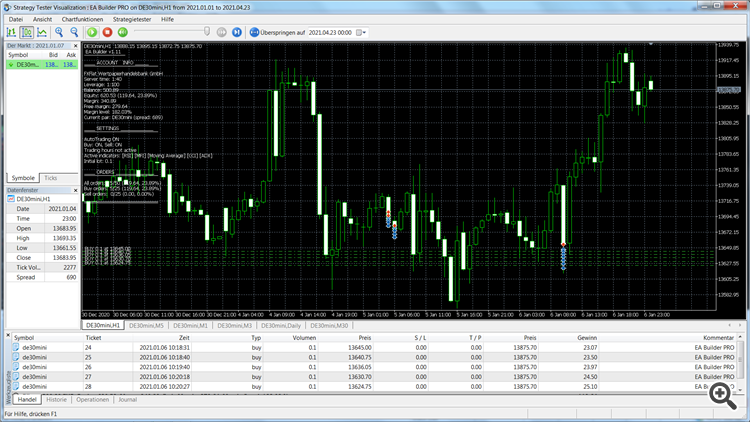
i changed the EA with my settings, but when i run the Strategy tester of MT5 only your settings appear. I took a screenshot. I have read the guide, but dont know what i make wrong.
Hello Arthur,
i changed the EA with my settings, but when i run the Strategy tester of MT5 only your settings appear. I took a screenshot. I have read the guide, but dont know what i make wrong.
Hello, what is the problem exactly?
The trading seems to work on the screenshot
Why is the EA in Strategy Tester running with 5 indicators although i enabled only the MACD (as you can see on the screenschot)? How can i achieve that the Strategy Tester is running with only one indicator as configured ?
Hello, your screenshot is not the strategy tester.
Please send me your .set file.
Hello, i think it is not a problem of your EA but my general question of how to get the changed EA settings into the Strategy Tester. Mine is running with one indicator now, but as you can see on the screenshot my preset is max order quantity:1 and in the Strategy Tester there is still: 50
This is two separate things. You have to change settings in the input tab.
https://www.metatrader5.com/en/terminal/help/algotrading/testing