Magic Correlation

30 USD
Versione demo scaricata:
13
Pubblicato:
25 maggio 2019
Versione attuale:
1.4
Non hai trovato un robot adatto?
Ordina il tuo
su Freelance
Vai alla sezione Freelance
Ordina il tuo
su Freelance
Come acquistare un Robot di Trading o un indicatore
Esegui il tuo EA
hosting virtuale
hosting virtuale
Prova un indicatore/robot di trading prima di acquistarlo
Vuoi guadagnare nel Market?
Come presentare un prodotto per venderlo con successo

Ti stai perdendo delle opportunità di trading:
- App di trading gratuite
- Oltre 8.000 segnali per il copy trading
- Notizie economiche per esplorare i mercati finanziari
Registrazione
Accedi
Accetti la politica del sito e le condizioni d’uso
Se non hai un account, registrati
I have been trying out this indicator for a little more than a day . From what I understand -
"lookback in bars" - is the initial amount of bar history that the indicator will consider for calculations.
"data reset interval" - is the time frame based on which a new '0 anchor point' will be chosen i.e. if the value is 15 minutes - every 15 minutes after the indicator has been loaded a new 0 anchor point will be established and new line values will be drawn...until the next 15 minute is reached . At which time another new 0 anchor point will be established
Let me know if my understanding is correct ?
Hi Marco,
I have been trying out this indicator for a little more than a day . From what I understand -
"lookback in bars" - is the initial amount of bar history that the indicator will consider for calculations.
"data reset interval" - is the time frame based on which a new '0 anchor point' will be chosen i.e. if the value is 15 minutes - every 15 minutes after the indicator has been loaded a new 0 anchor point will be established and new line values will be drawn...until the next 15 minute is reached . At which time another new 0 anchor point will be established
Let me know if my understanding is correct ?
Hello up
This is correct mostly just the lookback period is the number of bars on the chart that will be drawn so that there are no meaningless calculations on bars that are not visible on the chart.
The lookback period is also incorporated to prevent the indicator against overloading/freezing due to stack overflows and memory issues.
You always need a point to start measuring and data reset interval will set all instruments to 0- zero when a new bar starts forming.
15 Min is possible but its a bit steep and so it's also recommended to start watching on MN1 and the first day of the new Month.
You always need a point to start measuring and data reset interval will set all instruments to 0- zero when a new bar starts forming.
15 Min is possible but its a bit steep and so it's also recommended to start watching on MN1 and the first day of the new Month.
Hi Marco,
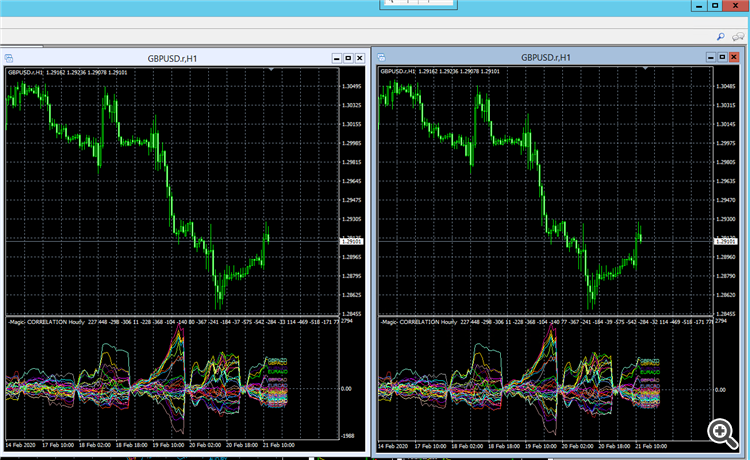
Thanks for the reply. I think I have found a bug in the indicator. Will try and explain -
It pertains to the "data reset interval" parameter. As of now it only works for " 1 day", "1 week" and the "1 month" options i.e. anything lower than 1 day - it does not show the correct 0-zero point. In other words the lowest 0-zero point option sems to be "1 day".....i.e. 4 hours and all the way down to 1 Minute does not seem to be working. I wanted to try it on the 15 min and 5 minute settings :)
Can you kindly please rectify this. Or if I have misunderstood something, please do let me know too.
I will attach a screen shot of 2 GBPUSD 1 hour charts . Each with the same settings except for the Data reset interval parameter.
The chart on the left
data reset interval parameter = 1 Day
The chart on the right
data reset interval parameter = 15 Minutes
I have tried changing the chart time frame etc..still the lowest the data reset interval parameter seems to be working is on the "1 Day" setting. Any option lower than that is chosen - it only displays the 0 point according to the "1 Day" setting.
I have an additional query too. I was thinking of trying/buying your "Magic Volumes" indicator. However, it does not seem to have a "rent" option and hence I am posting a question related to it here -
Does the "Magic Volumes" indicator work on the lower time frames such as 1 min, 5min, 15 min etc... or is it limited to only 1 Day and above ?
Thankyou
Hi Marco,
I have an additional query too. I was thinking of trying/buying your "Magic Volumes" indicator. However, it does not seem to have a "rent" option and hence I am posting a question related to it here -
Does the "Magic Volumes" indicator work on the lower time frames such as 1 min, 5min, 15 min etc... or is it limited to only 1 Day and above ?
Thankyou
I am going to modify the code and release an update.
Do realize that indicators become less efficient on the lower time frames.
I am going to modify the code and release an update.
Do realize that indicators become less efficient on the lower time frames.
Hi Marco,
I presume that the update will be for both the indicators.
Thankyou for looking into this. Will be looking forward to the updates.
Cheers
Hi Marco,
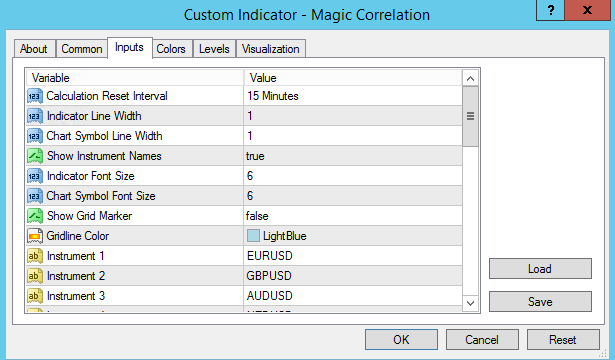
Thanks for making the update. However, there seems to be some new problems when they are run on the lower time frames. Namely - on a 1 minute chart with "Calculation Reset Interval = 15 minutes ".
I will attach screenshots to explain the problem. In a nutshell though - it seems to be that the indicator works with the aforementioned settings correctly every time is it reloaded, however after a new 15 min sequence starts(when a 15 min chart candle is formed) it starts to work as if the "Calculation Reset Interval = 1 or 2 minutes ", I do not know the exact value but it is definitely not 15 minutes. The chart screen shots will make it more clear -
Screenshot 1 -
Both the GBPUSD 1 min charts have the same settings, namely -
Screenshot 2 -
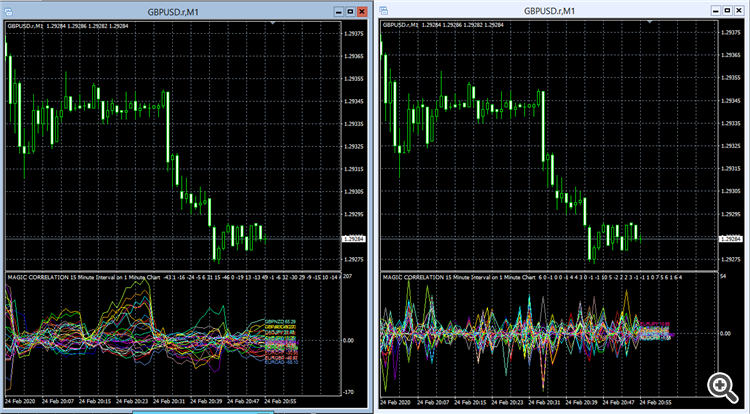
In screen shot 2 -
For the GBPUSD chart on the left hand side - the indicator has just been reloaded and hence it looks correct, i.e. the graph displays the correct line values of "Calculation Reset Interval = 15 minutes ".
For the GBPUSD chart on the right hand side - the indicator has been left running for several minutes and as can be seen; the graph displays are not that of the 15 minute Calculation Reset interval. The values looks more like as if the "Calculation Reset Interval = 1,2 or 3 minutes ". i.e. definitely not 15 minutes.
Can you please rectify this problem. Or if I have misunderstood something please do let me know.
Also - please do let me know if the (Magic Volumes) indicator (link - https://www.mql5.com/en/market/product/38494) works on the lower time frames i.e. 1 min , 5 min etc.
P.S. - I did notice than on after the latest update, 2 Input parameters were removed ,namely - the' lookback bars' and that of the 'timeframe' being displayed. Thought I did mention as it may probably help in troubleshooting .
Appreciate you looking into this.
Cheers
Hi Up
The fixed number of lookback bars was removed and it was replaced by calculation over the visible bars on the chart.
If the chart is scrolled the indicator will quickly redraw history on the fly.
Synchronization for bar times has been added in order to make sure that the calculation is only displayed when all instruments have received at least one new tick for a new bar to prevent overlap in values from previous and new bars, this means that there can be a small delay in the calculation when a new bar starts.
The Timeframe parameter was also removed because the indicator always relates to the current chart Timeframe.
For your question about the Magic Volumes indicator, yes it does draw all Timeframes in realtime so that it can be used to identify the most active trading times and also the most active instruments this is a powerful combination that tells you when to trade and what instruments to trade, the only thing it will not reveal is the direction of the trade but for that we use the Magic Correlation Indicator and these two indicators combined allow you to make better trading decisions.
If you have any more questions let me know.
Thanks.
Hi Up
The fixed number of lookback bars was removed and it was replaced by calculation over the visible bars on the chart.
If the chart is scrolled the indicator will quickly redraw history on the fly.
Synchronization for bar times has been added in order to make sure that the calculation is only displayed when all instruments have received at least one new tick for a new bar to prevent overlap in values from previous and new bars, this means that there can be a small delay in the calculation when a new bar starts.
The Timeframe parameter was also removed because the indicator always relates to the current chart Timeframe.
For your question about the Magic Volumes indicator, yes it does draw all Timeframes in realtime so that it can be used to identify the most active trading times and also the most active instruments this is a powerful combination that tells you when to trade and what instruments to trade, the only thing it will not reveal is the direction of the trade but for that we use the Magic Correlation Indicator and these two indicators combined allow you to make better trading decisions.
If you have any more questions let me know.
Thanks.
Hi Marco,
Thanks for the updates.
I see that version 1.4 has been released but I am not able to update it. Previously I could just update by an 'update' option being available from within the 'Market' tab within the terminal window of the MT4 platform.
On a related note - i presume that the update also fixes the issue with the Calculation Reset Interval showing the right values i.e. when it is set to 15minutes - it will show a new 0 point start for the line calculations once every new 15 min candle is formed. Presently on the previously screenshot-ed settings it displays as if the Calculation Reset Interval was set to 1 or 2 minutes i.e. the 0 point start seems to change every 1-2 minutes.
If I have misunderstood anything, please do let me know.
Cheers.
Hi Up
Everything should be fixed and this update should be available soon.
If there are any more bugs please let me know.
Thanks.
Hi Up
Everything should be fixed and this update should be available soon.
If there are any more bugs please let me know.
Thanks.
Hi Marco,
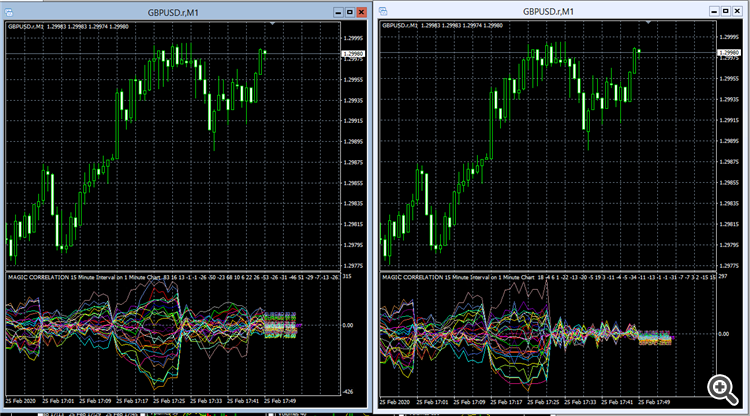
I just updated to the latest version i.e. version 1.4. My settings are exactly the same as that used in post #7. Hence, unfortunately the problem still persists. Will attach a screenshot below so that it can be viewed -
.
Please do let me know of your thoughts or if I have misunderstood something.
Cheers